
14 October 2026
Apple HomeView: Is It Worth It for Your Small Business Shopfront or Office?
Apple's $299 HomeView smart display starts shipping 13 November, Australia included. Before it goes on a shopfront counter or reception desk, here's what it actually does for a small business, where it falls short, and the privacy question most coverage is skipping.
Apple announced its first smart home display on 13 October — a 7-inch touchscreen called HomeView, built around Siri and a camera that recognises faces. It's priced at $299 USD, ships from 13 November, and Australia is on the initial launch list alongside the US, UK, Canada, India and New Zealand.
It was designed for a kitchen bench. The question worth asking before one ends up on a shopfront counter or a reception desk instead is whether it does anything useful there — and whether a device built to recognise six household members should be the thing recognising everyone who walks past your till.
What Actually Shipped
Strip out the home-automation framing and the hardware is straightforward: a 7-inch Liquid Retina display with True Tone, an A18 chip, and a camera that can identify up to six registered faces and show them personalised information when they approach. It comes in two forms — a tabletop model with a speaker base, in four colours, and a wall-mounted model in two colours that needs a separate mount sold on top of the device price. There's no App Store at launch, so the software is whatever Apple ships with it: Siri, Home controls, a shared photo display, intercom and video-calling features, and not much else.
Apple hasn't published Australian pricing at the time of writing — check the Australian Apple site once the device is listed before assuming the US figure converts directly.
Where It Could Earn Its Spot On A Counter
A handful of genuine small-business uses exist, mostly around convenience rather than anything mission-critical:
- Door and camera checks at the front desk. If you've already got HomeKit-compatible cameras or a smart lock on the premises, HomeView gives staff a way to glance at who's at the door without reaching for a phone.
- A shopfront intercom. Paired with a compatible video doorbell, it can work as a buzzer system for a shop that locks its door between customers.
- An ambient reception display. Timers, a shared calendar, the weather, a queue number — the kind of low-stakes information a waiting room or counter benefits from without anyone needing to operate it.
- Quick Siri tasks during a shift. Setting a timer, checking the next appointment, converting a measurement — things a staff member would otherwise pull out a personal phone to do.
None of that is a reason to buy one specifically for the business. It's a reason not to feel like it was wasted if you already wanted one.
Where It Falls Short For Business Use
The gap between a home device and a business device shows up fast once you think about who's actually standing in front of it:
- No App Store, so no business software. There's nowhere to run a booking app, a queue manager, or a POS front end. What ships in the box is what you get.
- No multi-user administration. HomeView is built around one Apple ID and one Home — a household of up to six recognised faces, not a staff directory. A shop with fifteen staff on a roster has no way to manage who the device knows and who it doesn't.
- Consumer-grade device management. There's no MDM profile, no remote wipe policy, no way to lock it down the way a business laptop or EFTPOS terminal is locked down. It's a general-purpose Apple device with a camera and a microphone, and it should be treated like one on your network.
- A new thing on the network. A Wi-Fi-connected display with a camera and a mic sitting on the same network as your POS and customer records is worth segmenting properly rather than plugging in next to everything else. That's a fifteen-minute conversation with whoever manages your network — worth having before the device goes live, not after.
The Privacy Catch Most Coverage Is Skipping
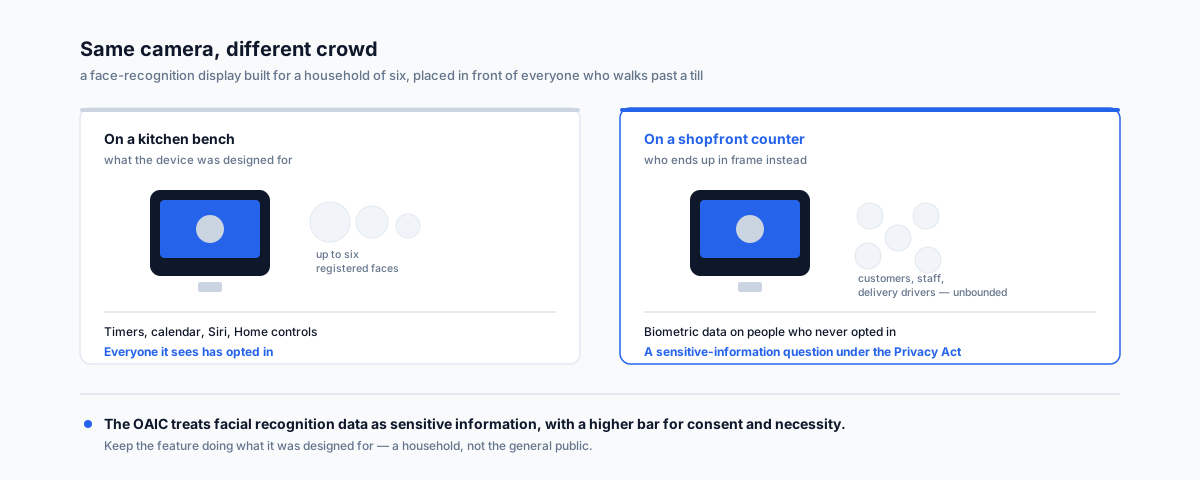
HomeView's headline feature is that it recognises a face and shows that person their own information. At home, that's four or five family members. On a shopfront counter, the faces in range are customers, delivery drivers, and staff — and collecting and matching biometric data about people who didn't sign up for a Home profile is a materially different activity under Australian privacy law than running the same feature for your own household.
The Office of the Australian Information Commissioner treats facial recognition data as sensitive information, which carries a higher bar than ordinary personal information — generally requiring consent to collect, and a clear, necessary, proportionate reason for collecting it at all. The OAIC's updated guidance followed a determination against a major retailer over in-store facial recognition technology, and it sets out what a business is expected to document before switching anything like this on in a space the public walks through.
If your business already sits under the $3 million turnover threshold, that might sound like someone else's problem. It's worth checking rather than assuming — our piece on the Privacy Act small business exemption covers which businesses lost that exemption this year and why "I'm too small for this to apply" is less reliable than it used to be. A device that quietly profiles everyone who approaches a counter is exactly the kind of feature that turns a theoretical obligation into a real one.
The practical answer for most small businesses: keep face recognition doing what it's designed for — a handful of named people who've opted in — and don't point it at the general public. That's the difference between a convenience feature and a compliance problem.
Verdict
HomeView is a reasonable $299 convenience device for a home. On a business counter it's a nice-to-have for checking a camera or running an intercom, and not much more — no App Store, no staff management, no device policy, and a headline feature that becomes a privacy question the moment it's facing customers instead of family. Treat it as a home gadget that happens to be sitting in a commercial space, not as infrastructure.
Getting Help
If you're weighing up consumer smart-home gear like this against what actually belongs on a business network — or you want a straight answer on whether a device like HomeView creates a privacy obligation for your specific setup — our Small Business IT Support service covers exactly that: what's safe to plug in, how to segment it from the systems that matter, and what to check before anything with a camera and a microphone goes live in a space customers walk through.
This is general information about a newly announced product, not legal advice. Where the privacy question is genuinely close for your business, that's worth a direct conversation with the OAIC's guidance in hand, or a lawyer.