
1 July 2026
The Best Automated Cloud Backup for Small Business (2026)
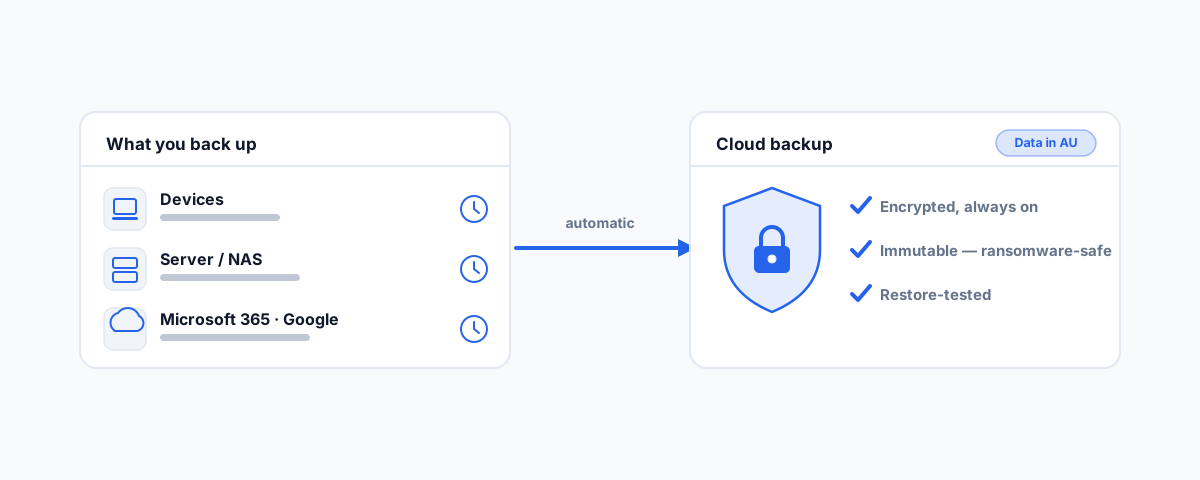
An Australian-first 2026 guide to automated cloud backup for small business — what to look for, the best device, server, and Microsoft 365 / Google Workspace options, data sovereignty, and the rules that matter more than the brand.
Every small business believes it has backups, right up to the afternoon it needs one and discovers it does not. The backup drive that stopped running months ago, the "cloud" that turned out to be file sync, the server nobody was actually protecting — these are not rare stories, they are the normal ones. The single word that separates a real safety net from a false sense of security is automated: a backup that depends on a person remembering to run it is a backup that will eventually be forgotten. This is a 2026 guide to getting automated cloud backup right for a small Australian business, including which tools suit which job — and the principles that matter more than any brand name.
What "Automated Cloud Backup" Should Actually Mean
Before comparing products, it helps to agree on what good looks like, because the label "cloud backup" gets stuck on things that are not backup at all. A proper automated cloud backup runs on a schedule without anyone thinking about it, sends a copy of your data off-site to the cloud, encrypts it in transit and at rest, alerts someone when a backup fails, and — the part almost everyone skips — can actually be restored when tested.
The most important distinction to internalise is that backup is not sync. OneDrive, Google Drive, and Dropbox are sync tools: they mirror your current files across devices, which means a file deleted or encrypted by ransomware on one device is dutifully deleted or encrypted everywhere else too. That is the opposite of what a backup does. A backup keeps historical versions you can roll back to, independent of what just happened to the live copy. If your entire "backup strategy" is a folder syncing to a cloud drive, you have convenience, not protection — a trap we cover among the common IT problems small businesses hit.
Everyday Device and Server Backup
This is the category most people mean by cloud backup: protecting the laptops, desktops, and servers your business runs on. There is no single winner, because the right tool depends on how many devices you have, whether you have a server, and how much you care about extras like ransomware protection. A few options worth knowing, and what each is good for:
IDrive Business is a strong all-rounder — it covers multiple computers and servers under one plan for a modest yearly cost, which makes it good value for a small team with a mix of devices. Backblaze Business is the simplicity champion: near-unlimited backup per computer with almost nothing to configure, ideal if you just want laptops protected and never want to think about it — though note its data centres are in the US and Europe, which matters for the Australian residency question below. Acronis Cyber Protect goes further than backup alone, bundling anti-ransomware and security into the same agent and offering full disk images as well as file backup, which suits businesses that want protection and recovery in one tool. MSP360 Managed Backup is the flexible choice: it lets you bring your own cloud storage — including Australian regions — so you control where data lives and what you pay for it. And endpoint-focused tools like CrashPlan or Carbonite remain solid set-and-forget options for protecting individual computers.
Pricing shifts year to year, so treat any figure as a starting point and check current plans — but as a rule these sit in the tens to low hundreds of dollars per year for a small business, which is trivial against the cost of losing your data.
Don't Forget Microsoft 365 and Google Workspace
Here is the gap that catches out more small businesses than any other: your email and documents in Microsoft 365 or Google Workspace are not backed up by Microsoft or Google in the way you think. Both run on a shared-responsibility model — the provider keeps the service running, but protecting your data against your own mistakes is your responsibility. Native retention typically only holds deleted items for around 30 to 90 days. If a departing employee's mailbox is purged, ransomware encrypts a shared drive, or someone empties a folder and nobody notices for a quarter, that data can be gone for good.
The fix is a dedicated third-party backup for your SaaS data — tools such as Datto SaaS Protection, Dropsuite, Afi, Backupify, MSP360, or Veeam back up mailboxes, OneDrive/Google Drive, SharePoint, and Teams on an automated schedule, with the ability to restore an individual email or an entire account. If your business lives in email and cloud documents — and most now do — this is not optional, it is the other half of your backup strategy. It pairs naturally with choosing the right platform in the first place, which we cover in our guide to the top business email providers in Australia.
Keeping Your Data in Australia
For many Australian businesses, where the backup physically lives is not a technicality — it is a compliance and peace-of-mind question. Data sovereignty means your information is subject to the laws of the country it sits in, so keeping backups on Australian soil keeps them under Australian jurisdiction, which matters for privacy obligations and for some industry and government requirements.
Not every provider offers this, so it is worth checking before you commit. Acronis is available with Australian data centres through local partners, keeping backups in Sydney. MSP360's bring-your-own-storage model lets you point backups at an Australian region such as AWS or Wasabi in Sydney. Backblaze, by contrast, stores data in the US and Europe with no Australian region — fine for many, but a dealbreaker if residency is a requirement for you. If Australian data residency matters to your business, make it a filter you apply before comparing anything else.
The Rules That Matter More Than the Brand
Whichever tool you choose, a few principles do more for your safety than the logo on the dashboard. The first is the 3-2-1 rule: keep three copies of your data, on two different types of storage, with one kept off-site — in practice, your live copy, a local backup, and a cloud backup. The second is immutability: backups that cannot be altered or deleted for a set period, so that ransomware (which increasingly tries to destroy the backups too) cannot take them with it. The third is automation with alerts, so a backup that silently stops running raises a flag instead of failing in the dark.
And the fourth matters most of all: test a restore. A backup you have never restored from is an assumption, not a safety net. Actually pull a file — or a whole machine — back from your backup and confirm it works, and do it on a schedule, not once at setup. The Australian Cyber Security Centre publishes practical backup and cyber guidance for small business at cyber.gov.au that is well worth reading alongside this.
How to Choose, Quickly
Cut through the options by starting with what you are protecting. If it is laptops and desktops, an endpoint tool like Backblaze, CrashPlan, or IDrive covers you. If you have a server or NAS holding shared data, you want image-level and server backup — Acronis, IDrive, or MSP360. If your business runs on Microsoft 365 or Google Workspace, you need a dedicated SaaS backup on top, because the device tools do not cover it. Layer in Australian data residency if that is a requirement, and a budget that reflects how much the data is worth. Most small businesses end up needing two layers — device and server backup plus Microsoft 365 or Google Workspace backup — and that combination, automated and tested, is what actually keeps you safe.
Getting Help
Choosing a backup tool is the easy part; the value is in setting it up so it genuinely runs unattended, keeps data where you need it, alerts you when something fails, and — the step almost everyone skips — is restore-tested so you know it works before you need it. If you would rather have that scoped, set up, and monitored so it is one less thing to worry about, our Small Business IT Support service handles backups end to end, from the right tool for your setup to a tested restore. Get it owned properly once, and the day you need a backup becomes a non-event instead of a disaster.