
30 July 2026
iOS 27 for Business: What Actually Matters Before the September Update
Most iOS 27 coverage is a consumer feature list. For a small business, only a few things actually matter — Siri's new Gemini backend, Apple's admin controls over Apple Intelligence, MDM changes, and compatibility. What to know before the September 2026 release.
Apple announced iOS 27 at WWDC on 8 June 2026, and most of what's been written about it since is a straightforward consumer features list — a redesigned Siri, better Photos editing, perimenopause tracking in Health, CarPlay video apps, a sharper Maps Flyover. None of that changes anything about how a small business runs. The handful of things in iOS 27 that are actually worth a business owner's attention are narrower, and mostly buried under the headline features rather than leading them. Worth flagging up front: public betas landed in July, general release is expected around 14 September 2026, and everything below is based on what Apple has confirmed so far — some specifics could still shift before the final release ships.
The One Everyone's Actually Talking About: Siri Runs on Gemini Now
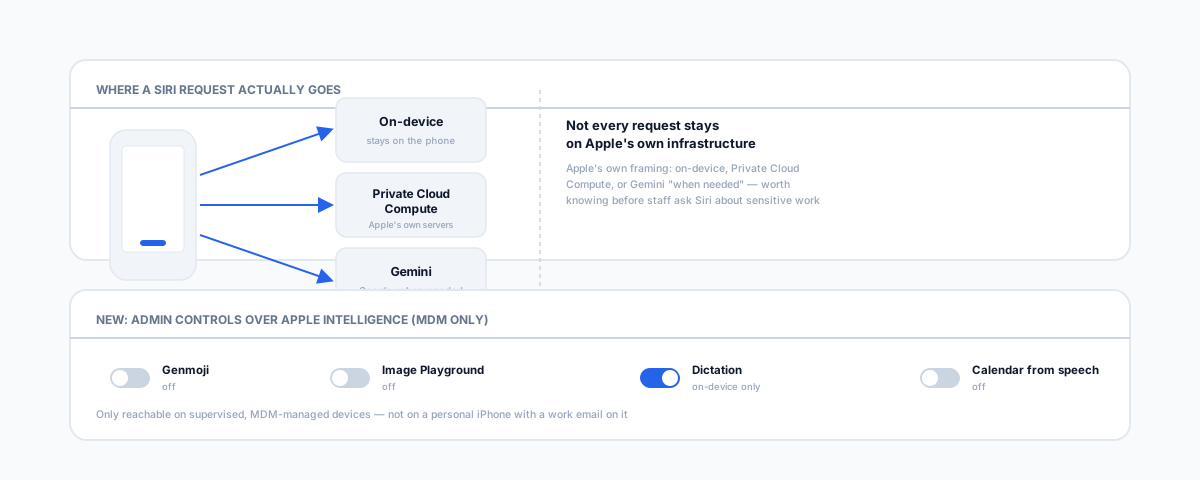
The redesigned Siri — Apple is calling it Siri AI — is the centrepiece of iOS 27, and the detail that matters is what's powering it. Apple and Google confirmed a multi-year deal in which Google's Gemini models help run the new Siri, alongside future Apple Intelligence features more broadly. Apple's own framing, from its official iOS 27 announcement, is that requests are handled on-device, through Apple's Private Cloud Compute, or via Gemini "when needed" — not that everything now routes through Google. For most small businesses this isn't a reason to panic, but it is worth knowing: a work phone asking Siri to summarise an email thread or draw on personal context from Messages and Notes may, for some requests, have that request handled by Gemini rather than entirely on Apple's own infrastructure. If your business handles anything genuinely sensitive on staff phones — client health information, legal matter details, financial records — that's worth a conversation about what Siri is and isn't asked to touch, rather than assuming "it's just Apple" the way it used to be a safe assumption.
If You Already Manage Devices: The MDM Changes
This section only matters if your business already uses mobile device management (Jamf, Intune, or similar) to configure staff iPhones centrally — most small businesses without a formal fleet can skip it. iOS 27 continues Apple's multi-year shift from old-style configuration profiles to Declarative Device Management (DDM), and this release moves several more configuration types over: VPN profiles (including Always-on VPN, IKEv2, and IPsec), DNS settings and DNS proxy, content caching, web content filtering, and — new this release — Apple Intelligence, Siri, and keyboard settings themselves. Apple's deployment documentation also notes that credentials are now declared separately from the configurations that use them, so updating one credential updates everything that depends on it automatically instead of requiring a profile-by-profile update. If your IT provider manages your fleet, this is their problem to handle, not yours — but it's a reasonable thing to ask about if you haven't heard from them about iOS 27 yet.
New: Admin Control Over Apple Intelligence
This is the one genuinely new lever worth knowing exists, and it answers a question a lot of businesses have already been asking informally: "can we turn this off on the shared iPad" or "can we stop staff generating Genmoji in client-facing apps." iOS 27 introduces a dedicated configuration (Apple's documentation calls it com.apple.configuration.intelligence.settings) that lets an administrator allow or deny Apple Intelligence features individually on supervised devices:
- Genmoji, Image Playground, Writing Tools, and Image Wand can each be switched off individually.
- Per-app intelligence features in Mail, Notes, and Safari can be controlled separately from the system-wide toggles.
- On-device-only processing can be forced for dictation and translation, so those never leave the device.
- Natural-language calendar event creation — a new control specifically blocks Siri from creating calendar events from spoken or typed requests.
The catch is that this only exists for supervised, MDM-managed devices — a personal iPhone with a business email account on it doesn't get this level of control, which is itself a reasonable prompt to check whether devices touching business data are actually enrolled in management or not.
Compatibility Reality Check
Not every iPhone gets the same iOS 27 experience, and the split matters for budgeting hardware refreshes:
- General iOS 27 update — supported back to iPhone 11, so most phones in active business use will update fine for security patches and the bulk of the interface changes.
- Advanced Apple Intelligence features — including the new Siri voices and some of the more capable Apple Intelligence functions, are limited to iPhone 17 Pro and newer. An older but still-supported phone will run iOS 27 without the flashier AI features, which is worth knowing before a staff member asks why their "updated" phone doesn't do what a colleague's does.
Should You Update the Day It Ships
For a personal phone, updating on day one is fine. For phones your business actually depends on — the one that takes calls from clients, the one running a point-of-sale companion app, the one with an MDM profile — the usual advice still holds for a .0 release: let it sit for a couple of weeks and update to the first point release once obvious bugs get patched, unless there's a specific security fix that can't wait. iOS 27 being built around a new AI backend and a wave of DDM migrations doesn't reduce that need for caution — if anything it's one more reason to test on a spare device before pushing it to every phone in the business.
Getting Help
If you're weighing whether to move to newer iPhones to get the full Apple Intelligence feature set, our guide to the Apple upgrade program for small business covers how that works in Australia. If you'd like a hand auditing which of your business's devices are actually under management before iOS 27 ships, or getting device management set up properly for the first time, our Small Business IT Support service can take that off your plate.