
23 July 2026
What Are the Real Hardware Trade-Offs on the $599 MacBook Neo (A18 Pro)?
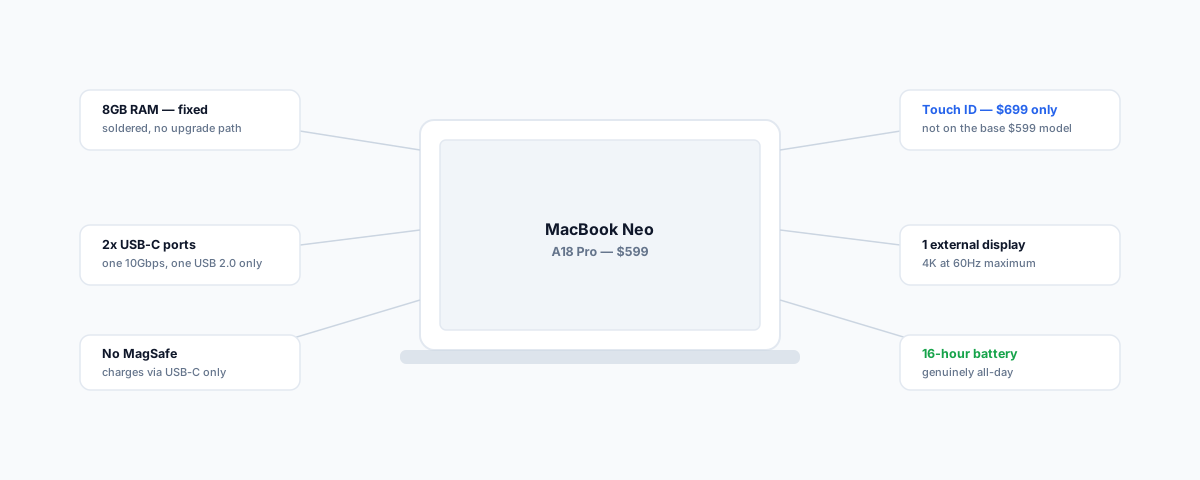
Apple's $599 MacBook Neo runs an iPhone chip, not a Mac one — and the trade-offs that make that price possible are specific and worth knowing before you buy. The 8GB RAM ceiling, the crippled second USB-C port, no MagSafe, and Touch ID locked behind the $699 tier.
Apple's MacBook Neo hits $599 by doing something the company has never done before in a laptop: putting a phone chip in it. The A18 Pro powering the Neo is the same chip that shipped in the iPhone 16 Pro back in 2024, not a member of the M-series family that powers every other current Mac. That's not a knock — it's the whole reason the price is possible — but it comes with a specific, well-defined set of trade-offs, and knowing exactly what they are matters more than the marketing headline of "a real Mac for $599."
The Chip: Strong Single-Core, Weak Multi-Core
The A18 Pro is a 6-core CPU (4 performance cores, 2 efficiency cores) with a 5-core GPU and a 16-core Neural Engine, per Apple's own MacBook Neo announcement — genuinely capable silicon, just built for a phone's workload pattern rather than a laptop's. Independent Geekbench 6 benchmarks put single-core performance at roughly 3,450 — about 30% faster than the older M2 chip — but multi-core performance lands around 8,500, noticeably below the M2's roughly 10,000. That split is the chip's whole story: it's excellent at snappy, bursty, single-threaded tasks (opening apps, scrolling, quick edits) and comparatively weaker once you're genuinely loading multiple cores at once, which is exactly the difference between "feels fast in daily use" and "handles serious multitasking."
The RAM Ceiling Is the Real Limit
If there's one trade-off that defines the whole machine, it's this: the MacBook Neo ships with 8GB of unified memory, soldered and non-upgradeable, on every configuration. In practice, that means the system leans on SSD swap memory once you're running more than a handful of apps and browser tabs at once — which is where a lot of the "it feels a bit sluggish under load" experience reported in early reviews actually comes from. For a single user doing email, browsing, and document editing, 8GB is workable. For anyone who keeps a dozen tabs, a video call, and a couple of apps open simultaneously, it's the ceiling you'll hit first, and there's no way to add more later.
The Ports Are Not What You'd Assume
Both charging ports on the Neo are USB-C, but they are not equal, and this is easy to miss until you plug something into the wrong one. One port runs at full 10Gbps USB-C speed; the second is limited to USB 2.0 speeds — 480Mbps — and is really there for charging or low-bandwidth peripherals rather than fast external storage or displays. Apple has also dropped MagSafe entirely on this model, so charging is USB-C only, which means a fast external drive or display plugged into the wrong port will quietly underperform and it won't be obvious why.
Touch ID Is a $699 Feature, Not a $599 One
The base $599 configuration — 256GB storage — does not include Touch ID at all. Stepping up to the $699 tier gets you 512GB of storage and Touch ID together, bundled as one upgrade rather than sold separately — confirmed directly by Apple's pricing structure. If biometric login and Apple Pay matter to how you or your team actually use a laptop day to day, that's a genuine $100 the headline price doesn't include.
Display and External Monitor Limits
The Neo's 13-inch Liquid Retina display (2408×1506, 500 nits) is a perfectly good everyday screen with full lamination and no notch, but it runs at a standard 60Hz — there's no ProMotion here, which is an entirely reasonable place to cut cost for this segment. The more relevant limit for a business context is external display support: the Neo can drive a single external 4K monitor at 60Hz and no more. A single-monitor setup at a desk is fine; a dual-monitor setup is not something this machine can do.
Battery Life Is Genuinely Good
Not every trade-off here is a downside. Real-world testing puts battery life around 16 hours, and Apple's own performance claims — up to 50% faster than a PC running an Intel Core Ultra 5 for everyday tasks, up to 3x faster for on-device AI workloads, and up to 2x faster for photo editing — are specifically about efficient, everyday computing rather than sustained heavy workloads, which lines up with what the chip is actually built for. At 2.7 lbs, it's not the lightest Mac ever made, but it's a genuinely portable machine that holds up through a full day away from a charger.
Who This Actually Suits
The honest read: the MacBook Neo is a strong choice for a single user doing writing, browsing, video calls, and light document work who wants macOS at the lowest price Apple has ever offered it — students, field staff, and anyone whose day doesn't involve heavy multitasking or multiple displays. It's a poor fit for anyone who needs to run several demanding apps at once, connect more than one external display, or rely on fast external storage from both ports interchangeably. For a small business speccing devices for a team rather than buying one machine for yourself, the 8GB RAM ceiling in particular is worth budgeting around — it's the spec that decides whether this is the right device for a given role, not the chip name on the box. Our full look at the launch is in our MacBook Neo entry-level Mac coverage, covering the rest of the launch details.
Getting Help
Choosing the right device tier for each role on your team — rather than buying the same laptop for everyone regardless of what they actually do with it — is exactly the kind of decision that's cheap to get right and expensive to get wrong once you're provisioning for a whole staff. Our Small Business IT Support service covers device selection and procurement alongside the rest of your IT setup, so the $599 machine goes to the person it actually suits.