
21 October 2026
6 Mailchimp Integrations Worth Setting Up (and What Each One Actually Fixes)
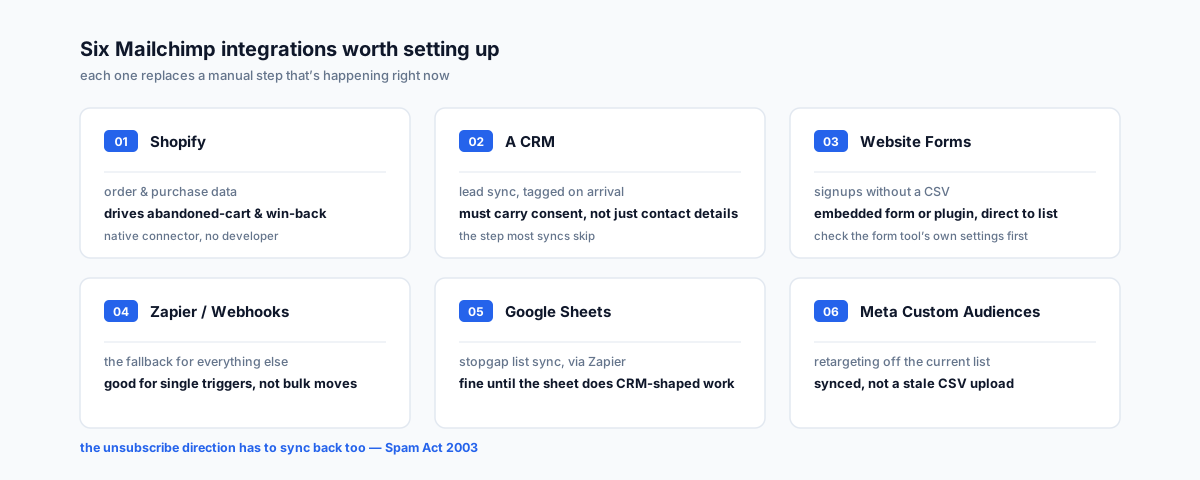
Mailchimp does what it's told — the gap is usually which connections are actually wired up. Six integrations worth the setup time, what each one replaces, and the one thing that breaks if the sync only runs one way.
The Mailchimp account most small businesses run has one real connection — the signup form on the website — and everything else happens by hand. New Shopify customers get added to the list in a CSV export, if someone remembers to run it. The CRM and the email list are two separate records of the same contact, and nobody's sure which one is current. The Facebook ad audience was built off a list pulled six months ago, before half the current subscribers signed up and a chunk of the old ones unsubscribed.
None of that is a Mailchimp problem — it does what it's told. It's a question of which of its native and third-party connections are actually worth setting up, because "integration" covers everything from a five-minute toggle to a small developer project, and not every one of them pays for itself.
What Makes An Integration Worth The Setup Time
The six below earn a place on this list for the same reason: each one replaces a manual step that's actually happening somewhere in the business right now — weekly, monthly, or every time a campaign goes out — not a step that might matter someday. If a connection doesn't remove a real, recurring task, it's not worth the time to wire up yet.
1. Shopify — So Purchase Data Drives The List, Not Just Signups
Mailchimp's native Shopify integration pulls order history, products viewed, and products bought into the account, which is what makes abandoned-cart emails, win-back flows for lapsed buyers, and post-purchase cross-sell sequences possible without a developer. Without it, segmentation can only run off "subscribed or not" — every send goes to the whole list regardless of what anyone's actually bought. If the store needs more sophisticated behaviour triggers than Mailchimp's native connector supports, our Klaviyo vs Mailchimp comparison for Shopify covers where that ceiling sits.
2. A CRM — So New Leads Land In The Right Audience Automatically
Whether it's a general CRM or an industry-specific one, syncing it to Mailchimp means a new lead gets tagged and added to the right audience the moment it's created, instead of waiting for someone to notice and add them manually. The part that's easy to get wrong is treating the sync as "copy every contact across" — a contact record needs to carry whether, when, and how that person actually agreed to marketing email, not just their name and address. Our piece on connecting a real estate CRM to email marketing goes into what that consent field needs to look like in practice.
3. Website Forms — So Signups Don't Depend On A CSV
A signup form that isn't wired directly into Mailchimp — a contact form plugin, a landing page builder, a booking tool — means someone is exporting entries and pasting them in by hand, usually on a delay long enough that a welcome email arrives a week late or not at all. Mailchimp's embedded forms and its WordPress plugin cover the common case; most other form tools have a native Mailchimp connector in their own settings, which is worth checking before reaching for Zapier.
4. Zapier Or Webhooks — The Fallback For Everything Else
Not every tool in the stack has a native Mailchimp connector, and that's what Zapier (or a direct webhook, for anything Zapier doesn't cover well) is for — a booking system, a support desk, an internal tool that nobody built with email marketing in mind. It's the right answer for "trigger a tag when X happens," and the wrong one for bulk-moving a whole database at once; a one-off migration is better done through Mailchimp's own import tools or a direct API call.
5. Google Sheets — For Teams Not Ready For A Full CRM
For a team running contacts out of a spreadsheet rather than a CRM, a Sheets-to-Mailchimp sync (typically through Zapier, since there's no first-party connector) keeps the list current without a rebuild of how the team tracks its contacts. It's a stopgap rather than a long-term setup — once the spreadsheet is doing CRM-shaped work, it's worth moving to an actual CRM and syncing that instead.
6. Meta Custom Audiences — So Retargeting Uses The Current List
Mailchimp's Facebook and Instagram integration pushes the subscriber list to Meta as a custom audience and keeps it updated, which means ads can target current subscribers or build lookalike audiences off them without a manual CSV upload that's stale the day after it's created. Without the sync, the ad audience is a snapshot from whenever someone last remembered to export it.
The Part That Breaks If The Sync Only Runs One Way
Every integration on this list moves data into Mailchimp. The one direction that actually matters just as much is the reverse: an unsubscribe inside Mailchimp has to flow back to the CRM or source system, or the next scheduled sync just re-adds that contact. Marketing email in Australia sits under the Spam Act 2003, and the ACMA's guidance on avoiding spam is specific that an unsubscribe request has to be honoured within five business days, free of charge, without demanding a login — a one-way sync that keeps re-subscribing someone who's opted out isn't a technical glitch, it's the kind of thing ACMA has issued formal warnings to real estate agencies over. Mailchimp's own integrations directory is worth checking first for any tool on this list — a maintained native connector is usually a safer bet than a Zapier workaround for anything handling consent data specifically.
Getting Help
Six integrations is a reasonable target, not a checklist to complete in one afternoon — the ones worth building first are whichever ones replace a manual step that's happening this week. Our email marketing team can scope which of these actually apply, confirm each platform's real access path, and make sure the unsubscribe direction is wired up before the rest goes live.