
26 June 2026
How to Sync Shopify Inventory Across Amazon, eBay, and Etsy Without Overselling
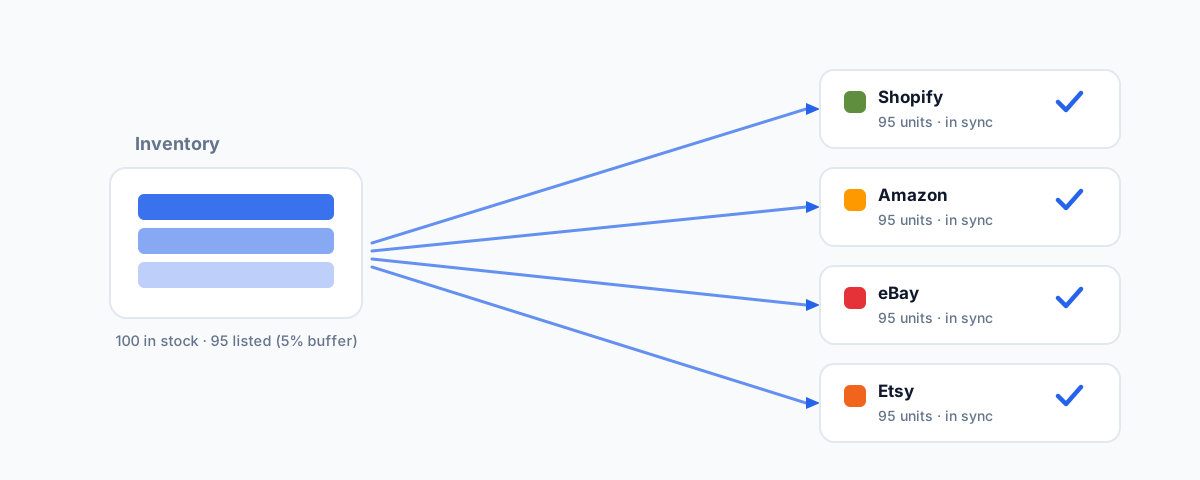
A practical guide to keeping one stock pool accurate across Shopify, Amazon, eBay, and Etsy — why overselling happens, choosing a source of truth, matching SKUs, picking a sync tool, and using buffer stock.
Selling on more than one channel is one of the best growth moves a Shopify store can make — and one of the fastest ways to create a mess if your inventory is not under control. The moment the same stock is listed on Shopify, Amazon, eBay, and Etsy, you are no longer managing four storefronts; you are managing one pool of stock that four storefronts are all trying to sell at once. Get the syncing right and it is invisible. Get it wrong and you oversell: you take an order you cannot fulfil, cancel on the customer, eat a refund, and on marketplaces like Amazon you damage the account metrics that decide whether you keep selling at all. This guide is about getting it right.
Why Overselling Actually Happens
It helps to understand the root cause, because it is not laziness or a bad app — it is timing. Every channel holds its own view of how much stock is available, and those views are only as current as the last sync. When a unit sells on Amazon, there is a window — sometimes seconds, sometimes many minutes — before eBay, Etsy, and your Shopify storefront are told that the number went down. If a second customer buys on eBay inside that window, both orders are accepted and you are now one unit short. Shopify has no built-in mechanism to close that timing gap across external marketplaces, which is exactly why overselling tends to strike during your busiest, fastest-selling moments — the worst possible time for it.
So the whole game is making that window as small as possible and building in a margin that absorbs it. Everything below serves one of those two goals.
Pick One Source of Truth
The single most important decision is choosing where the real stock number lives. One system must be the master, and every channel must take its number from that master rather than keeping its own. For most stores selling primarily through Shopify, Shopify itself is the natural source of truth: stock is counted there, and the marketplaces are fed from it. Larger or more complex operations often promote a dedicated inventory management system (IMS) to that role and let Shopify and the marketplaces all sync to the IMS instead.
Either choice works. What does not work is letting each channel manage its own count independently and hoping they stay aligned — that is not a system, it is a coincidence waiting to end. Decide on the master first; every tool decision follows from it.
Match Your SKUs Exactly — the Silent Killer
Syncing tools keep channels aligned by matching products on their SKU (and sometimes barcode). If the SKU for a product is not identical on every channel, the tool cannot connect the listings, and the stock for that item silently stops syncing. The failures are maddeningly small: a trailing space, a capital letter on one channel and lowercase on another, a variant that exists on Shopify but was never created on eBay. Each one leaves an item that looks fine until it oversells.
Before you connect anything, get your catalogue clean and consistent — one SKU per variant, identical across channels, with no stray formatting. If your product data is already inconsistent (and most large catalogues are), it is worth fixing that first; our guide to automating Shopify product data cleanup covers how to standardise titles, variants, and SKUs at scale. Clean SKUs are the foundation the entire sync sits on.
Choose Your Sync Approach
With a source of truth and clean SKUs in place, you choose how the syncing actually happens. There are two broad routes.
The native route is Shopify Marketplace Connect, Shopify's own free app, which lets you list and sync to Amazon, eBay, Walmart, and Target Plus directly from your Shopify admin. Because it is built by Shopify and lives in your store, it is the simplest starting point for those channels, and it keeps inventory, orders, and listings in step without a second subscription. Its trade-offs are worth knowing up front: there can be order caps and the sync is not always instant, so it suits steady volumes more than high-velocity flash selling.
The dedicated route is a third-party multichannel app or full IMS — tools like Sumtracker, Veeqo, LitCommerce, or CedCommerce (which is commonly used for Etsy), and at the larger end Sellbrite, Linnworks, or Cin7. These add faster or more configurable syncing, support for bundles and multiple warehouses, and broader channel coverage, in exchange for a subscription and more setup. The right pick depends on your channel mix and order volume: if you only sell on Shopify plus one or two marketplaces at modest volume, the native app may be all you need; if you are running Etsy, several marketplaces, and hundreds of orders a day, a dedicated platform earns its keep.
Keep a Buffer of Safety Stock
No sync is truly instantaneous, so the professionals never list every last unit. Holding back a small buffer — commonly 5 to 10 percent — gives the system room to breathe. If you have 100 units, you list 95 across your channels and keep 5 in reserve. That holdback quietly absorbs sync lag, the unit that comes back as a return, and the occasional demand spike, so a brief timing gap costs you nothing instead of costing you an oversold order. It feels counterintuitive to advertise less stock than you have, but a buffer is the cheapest insurance against the most expensive problem.
Sync Speed and Order Caps Matter
Not all syncing is equal, and the difference shows up exactly when it counts. Near-real-time syncing — updates within seconds or a couple of minutes — is the goal for serious multichannel sellers, because it shrinks the overselling window to almost nothing. Slower, periodic polling that runs every fifteen or thirty minutes can be perfectly fine for low volumes but becomes risky as you speed up. When you evaluate a tool, ask two concrete questions: how quickly does it propagate a stock change, and are there caps on the number of orders or syncs it will handle on your plan. Matching those limits to your real order velocity is what keeps the system honest under pressure.
Bundles, Kits, and Multiple Locations
Two situations break naive syncing and deserve a specific check. The first is bundles and kits: if you sell a three-item set, a sale of that set has to decrement each component's stock, or the components will oversell elsewhere. Not every tool handles this, so if you sell bundles, confirm it explicitly. The second is multiple locations or warehouses: you need to decide which location's stock feeds which channel, so a marketplace is not promising units that live in a warehouse it cannot ship from. Both are solvable, but only if the tool you choose supports them — verify before you commit, not after you oversell.
A Reliable Setup Checklist
Put together, a multichannel inventory setup that does not oversell rests on five things. One source of truth that owns the real number. SKUs that match exactly across every channel. A sync tool whose speed and order caps fit your volume. A buffer of safety stock to absorb the gaps. And monitoring, so a failed or paused sync raises an alert instead of quietly drifting until customers find it for you. Miss any one of these and the others cannot fully cover for it — the buffer hides sync lag, but it will not save you from a mismatched SKU.
Getting Help
Multichannel inventory is straightforward in principle and full of edge cases in practice — the SKU that does not match, the bundle that does not decrement, the connector whose order cap you only discover at peak. If you would rather have it scoped, set up against your real channels, and tested so it holds under load, our Shopify Integrations service handles the source-of-truth design, SKU alignment, connector choice, and the monitoring that keeps it honest. The same discipline applies whether you are syncing marketplaces or syncing a point of sale, as in our WooCommerce and Square POS integration guide. Get the foundation right once, and selling on every channel stops being a risk and goes back to being growth.