
29 June 2026
Building a Course Booking Calendar in WordPress and Divi with the RTOdata API
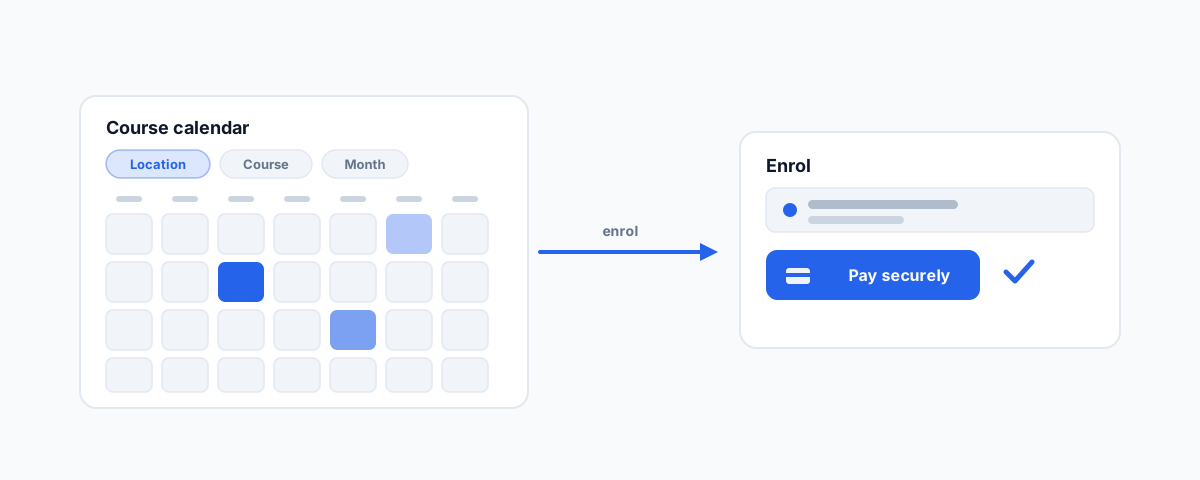
A solution walkthrough for training providers — building a filterable course booking calendar in WordPress and Divi on the RTOdata Cloud API, with FullCalendar, Location/Course/Month filters, a clean layout, deep-linked registration, and Stripe payment.
Most registered training organisations already have a student management system that knows everything about their courses — the schedule, the locations, the training plans, the enrolment process. What they often do not have is a website that shows that information in a way students actually enjoy using. The default is a long, unfiltered table of course dates dumped onto a page, and it works about as well as it sounds. This is a walkthrough of how we approach a better version: a clean, filterable course booking calendar built in WordPress and Divi, powered by the RTOdata Cloud API, that takes a student from browsing to a paid enrolment without friction.
The Brief and the Stack
The goal is a booking experience that looks like it belongs on a modern website while still being driven entirely by the data the RTO already maintains. That last part matters: the training organisation's system is the source of truth for courses and schedules, and the website's job is to present that data beautifully and hand the student back to the official enrolment process at the right moment. We are not rebuilding the RTO system; we are giving it a better front door.
The stack reflects that. WordPress with the Divi builder provides the site and the page layout the marketing team can maintain. The RTOdata Cloud API supplies live course, schedule, and enrolment data so nothing is duplicated or kept in sync by hand. FullCalendar renders the calendar itself, because it is a mature, well-supported JavaScript calendar that takes a simple feed of events and handles all the hard parts of displaying them. And Stripe takes the payment securely at the end. Each tool does the one job it is best at.
Pulling the Schedule: the RTOdata API and a FullCalendar Feed
The heart of the build is the connection between RTOdata and FullCalendar. RTOdata's API library exposes the course calendar and schedule data — the upcoming intakes, their dates, locations, and the courses they belong to. FullCalendar, in turn, expects a feed of events: each event is essentially a title, a start, an end, and whatever extra data you want to attach. So the integration is a translation layer that takes the schedule from RTOdata and reshapes each scheduled course intake into the event format FullCalendar understands, ideally served through a single endpoint the calendar can call.
Doing this server-side in WordPress — via a small custom endpoint rather than calling RTOdata directly from the browser — is the better pattern for two reasons. It keeps your API credentials on the server where they belong, and it gives you a natural place to cache the response so you are not hitting the RTO system on every page load. The calendar then simply requests your endpoint, receives a tidy list of course events, and draws them. The moment that feed is wired up, you have already beaten the long table: students see intakes laid out on a month they can actually navigate.
Filters: Location, Course, and Month
A calendar of every intake across every campus is still too much. The filters are what make it usable, and the three that matter for an RTO are Location, Course, and Month. A student in Perth looking for a first aid course next March should be able to get to exactly that in three clicks.
The clean way to handle this is to let the filters drive the feed. When a student selects a location and a course, those choices become parameters on the request to your endpoint, and the endpoint returns only the matching intakes — so the calendar and any list view update together and stay in agreement. Month is partly handled by the calendar's own navigation, but exposing it as a filter as well helps students who think in "when" before "what." Keeping the filter state in the page URL is a nice touch: it means a filtered view can be bookmarked or shared, and the marketing team can link straight to "diploma courses in Brisbane" from a campaign.
A Clean, User-Friendly Layout
With live data and working filters, the layout is where the experience is won. The calendar view is the hero, but a calendar alone is not always the fastest way to scan options, so pairing it with a card or list view of the same filtered results gives students both a "show me the month" and a "show me the next available" way in. Each course card carries the essentials — course name, location, start date, and a clear call to enrol — and nothing else competing for attention.
Inside Divi, this lives as a dedicated section that the rest of the page is built around, so the booking experience feels native to the site rather than bolted on. The details that separate a good build from a rough one are the unglamorous ones: it has to be genuinely responsive so the calendar collapses sensibly on a phone, and it has to be accessible, with filters and dates that work with a keyboard and a screen reader. Those are exactly the things a raw table gets wrong and a considered build gets right.
Deep-Linking into the RTOdata Registration Page
When a student picks an intake, the smartest move is not to rebuild the entire enrolment form on the website — it is to hand them to the RTO's existing registration page with their choice already made for them. RTOdata owns the enrolment process, including the compliance fields that make an RTO an RTO, so the website's job is to deliver the student there with the course, training plan, and schedule pre-selected.
In practice this means constructing the registration link so those selections travel with it, using the identifiers RTOdata's integration documentation specifies for the course, the training plan, and the chosen schedule. The student clicks "Enrol" on a specific intake and lands on a registration page that already knows what they are enrolling in, rather than being dropped at a generic form and asked to find their course again. That single handover — done correctly, with the right parameters — is what keeps the journey feeling like one smooth flow instead of two disconnected systems stapled together.
Taking Payment with Stripe
Payment is the step where trust is either earned or lost, so it has to be secure and it has to feel effortless. Stripe Checkout is the right tool here because the student is redirected to a Stripe-hosted payment page, enters their card details there, and returns — which means card data never touches your WordPress server and your PCI scope stays minimal. You are getting bank-grade payment handling without taking on the liability of processing cards yourself.
The integration creates a Checkout session for the selected course and its price, sends the student to Stripe to pay, and then relies on Stripe's webhooks to confirm the payment succeeded before treating the enrolment as paid. That webhook confirmation is important: you never want to mark someone as paid based on them simply landing back on a "thank you" page, because that page can be reached without a completed payment. Tying the confirmed payment back to the right student and the right intake is what lets the booking and the money stay reconciled.
The End-to-End Flow and the Gotchas
Put together, the flow reads simply: a student filters by location and course, sees the matching intakes on a clean calendar, picks one, lands on the RTOdata registration page with everything pre-selected, pays securely through Stripe, and is enrolled — with the payment reconciled behind the scenes. When it works, it feels obvious. Making it reliably work is where the experience comes in.
A few gotchas decide whether the build holds up. Caching the RTOdata feed keeps the site fast and protects the RTO system, but the cache window has to be short enough that a newly added or filled intake shows up promptly. Dates and timezones need deliberate handling so a course never displays on the wrong day for a student in another state. The schedule has to stay genuinely in sync, so a course that fills or is cancelled in RTOdata disappears from the calendar rather than selling a seat that no longer exists. API keys, rate limits, and error states all need graceful handling, because the one time the feed is slow or down, the page should degrade politely rather than break. None of these are exotic — they are simply the difference between a demo and something you can trust with real enrolments and real money.
Getting Help
A booking calendar like this is a handful of well-understood pieces — an API feed, a calendar, some filters, a smart handover, and a payment step — assembled with care so the whole journey is smooth and the data stays honest. It is also the kind of project where the details quietly decide whether it works in production. If you would like it scoped, built into your WordPress or Divi site, connected to RTOdata and Stripe, and tested end to end before it goes live, our WordPress Integrations service handles exactly this kind of build. The same approach applies whenever a site needs to talk to an external platform, as in our guide to connecting a Wix site to external tools with Velo — get the integration right once, and the website finally does the work for you.