
22 October 2026
WordPress's New PHP Security Risk: The Easy Fix Most Sites Still Haven't Made
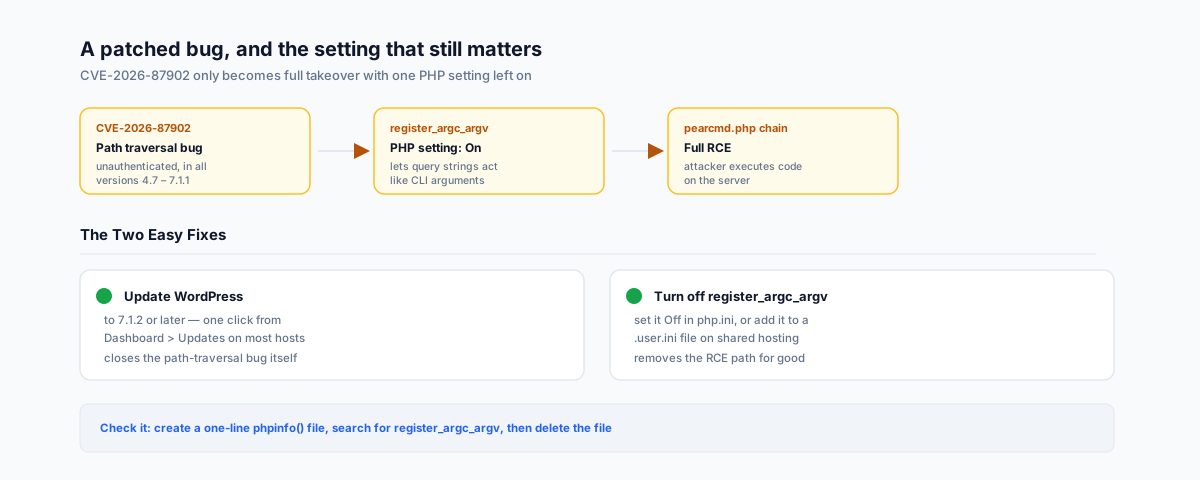
WordPress 7.1.2 patched a critical, unauthenticated path-traversal flaw — but the chain that turns it into full remote code execution depends on a forgotten PHP setting most hosting accounts still have switched on. What CVE-2026-87902 actually needs, and the two changes that close it off.
WordPress 7.1.2 shipped on 22 September 2026 to patch a critical, unauthenticated flaw — WordPress's own version documentation confirms it's a security release, recommended immediately, addressing a single critical-severity issue tracked as CVE-2026-87902. On its own, that's a straightforward "update your site" story. What most coverage of it skips is that the bug's path to actual site takeover runs through a PHP setting that has nothing to do with WordPress at all, has been switched on by default for most of PHP's history, and most hosting accounts have never touched.
What CVE-2026-87902 Actually Is
The flaw is an unauthenticated path traversal in how WordPress resolves page templates, rated CVSS 9.2 (Critical), and it affects every WordPress version from 4.7 through 7.1.1 — which is to say, almost every WordPress site that existed before the patch. An attacker doesn't need to log in. In the right conditions, the bug lets a request make the site load a PHP file from outside its active theme directory — a file it was never meant to execute.
That last part matters: on its own, this is a file-inclusion bug, not automatically a takeover. Turning it into full remote code execution needs a specific, already-known technique — getting WordPress to load pearcmd.php, a script bundled with PHP's PEAR package manager — and that technique only works at all if one PHP setting is switched on.
The PHP Setting That Turns It Into Full Takeover
That setting is register_argc_argv. Its job, per the PHP manual, is to make PHP populate the $argv and $argc variables — normally used to read command-line arguments — on every script run, including a plain web request. With it switched on, PHP will treat parts of a URL's query string as if they were command-line arguments, which is exactly what the pearcmd.php chain needs to turn a readable file into an executed command. It's been the default "On" setting for most of PHP's life, and only changed to default "Off" starting with PHP 8.5 — which means any WordPress host still running an older PHP version, which is most shared hosting in Australia right now, likely has it on without anyone having made that decision deliberately.
The Two Easy Fixes
Neither of these needs a developer:
- Update WordPress to 7.1.2 or later. Most hosts auto-apply security releases within a day or two; if yours doesn't, it's a single click from Dashboard > Updates. This closes the path-traversal bug itself.
- Turn off
register_argc_argv. If you manage your ownphp.ini, setregister_argc_argv = Offand restart PHP-FPM. On shared hosting withoutphp.iniaccess, add the same line to a.user.inifile in your site's root directory — most hosts pick this up automatically within a few minutes, no restart needed. This one setting removes thepearcmd.phppath regardless of what else gets found in WordPress core later, which is the real value of fixing it rather than just patching and moving on.
How to Check Your Setting
You don't need terminal access to check which way it's currently set. Create a temporary file in your site's root containing <?php phpinfo(); ?>, open it in a browser, and search the page for register_argc_argv — it'll show "On" or "Off" under the Core section. Delete the file again once you've checked; leaving a phpinfo() page live is its own, smaller information-disclosure risk.
Why This Matters for a Small Business Site
The honest caveat is that exploitation still needs specific conditions — a theme whose top-level directory name starts with "page-", and a readable .php file on the server to target — so not every unpatched site is instantly exploitable. But "needs specific conditions" has never been a reason to leave a critical, unauthenticated, no-login-required bug unpatched on a site that takes customer orders, stores contact forms, or runs a store's checkout. Update first; turn off the PHP setting second; don't wait to find out which theme folder names you're running.
Getting Help
Checking a PHP setting and confirming an update applied cleanly takes minutes once you know what to look for — the harder part is knowing it's there to check in the first place. Our WordPress Integrations service can audit your site's PHP configuration and update process as part of getting your WordPress setup properly looked after.