
1 August 2026
Apple Upgrade Program vs Carrier Trade-Ins: What Actually Differs
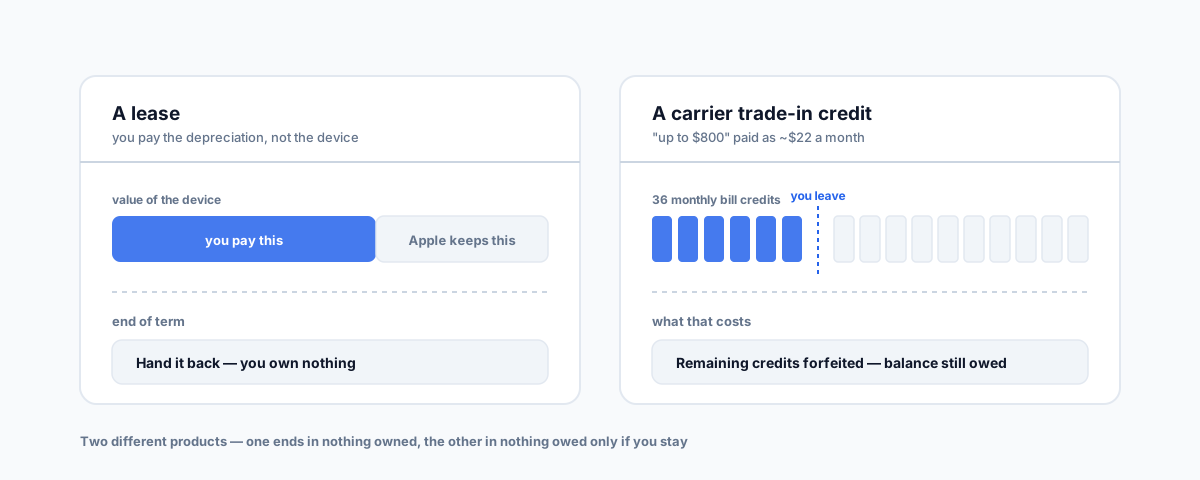
Apple Upgrade and a carrier trade-in get compared as competing offers, but they are different financial products — one is a lease, the other is a discount drip-fed as bill credits over 24 to 36 months. What each actually costs, what you own at the end, and which one an Australian business can genuinely use.
Since Apple launched its Klarna-backed Apple Upgrade program at the end of July, the question that keeps coming up is a reasonable one: is this a better deal than what my telco offers me at upgrade time? It's the natural comparison — both are ways to get a new device without paying the full price on day one, both spread the cost monthly, and both involve handing over your old phone. But they're not two versions of the same offer. They're two genuinely different financial products, and the difference determines what you end up owning, who you're tied to, and how the whole thing lands on your tax return.
If you haven't read it, our earlier post on Apple Upgrade covers what the program is and why it doesn't reach Australian businesses. This post is about the comparison itself.
Two Different Products, Not Two Offers
Strip away the marketing and the structural difference is simple:
- Apple Upgrade is a lease. You pay for the device's depreciation over a fixed term — 24 months for iPhone and Apple Watch, 36 for Mac and iPad — and at the end you hand it back, buy it out, or roll into a new lease. If you hand it back, you own nothing. That isn't a flaw; it's the entire design. You're paying to use current hardware, not to accumulate it.
- A carrier trade-in is a discount on a purchase. You're buying the device, usually on an interest-free device payment plan over 12, 24 or 36 months, and the trade-in value is applied as a credit that reduces what you pay. At the end you own the phone outright.
So "which is cheaper" is close to a meaningless question until you decide whether you want to own the hardware at the end. Comparing a lease payment to a device-plan payment without accounting for the residual value is comparing two different things.
Where the Money Actually Comes From
Under a lease, the maths is transparent: you pay roughly the difference between what the device is worth new and what it's worth at the end of the term, spread monthly. Apple keeps the residual. That's why lease payments look low — and why they buy you nothing at the end.
Carrier trade-in headlines work differently, and this is where people get caught. An "up to $X trade-in credit" is rarely a lump sum knocked off the price. It's typically $X divided across the term of the plan and applied as monthly bill credits — which means the value only fully materialises if you stay for every month of it. An $800 credit over 36 months is about $22 a month, and you have to still be there in month 36 to have received all of it.
Two other things compress that headline in practice. The advertised maximum almost always assumes near-perfect device condition, and it often assumes a higher plan tier than the one you'd otherwise pick. The number you actually get is usually somewhere below the number on the poster.
The Lock-In Is Different, Not Absent
Both options tie you to something. It's worth being precise about what:
- Apple Upgrade ties you to the financing and the term — a Klarna agreement with a soft credit check, for 24 or 36 months. What it doesn't do is tie you to a network. The device isn't carrier-locked, so you can move mobile providers without touching the lease.
- A carrier trade-in ties you to the carrier and the plan. Remaining credits are contingent on keeping qualifying service. Leave at month 18 of a 36-month deal and you typically forfeit the credits you haven't yet received and owe the outstanding balance on the device plan. Downgrading to a cheaper plan before the term is up can void the remaining credits on some deals too.
That second one is the real cost of a carrier trade-in, and it never appears in the advertised price. It's not that the deal is bad — it's that the discount is effectively pre-payment for your continued custom, and you only keep it if you deliver.
What Happens to Your Old Device
Worth noting because the three main paths produce genuinely different things:
- Apple Trade In — available in Australia, gives you credit toward a new Apple purchase or an Apple Gift Card. Applied at the time of purchase, not spread out.
- Telstra trade-in — gives bill credit, usable against a new device, accessories, or your ordinary monthly bill.
- Optus trade-in — pays out via a digital prepaid Mastercard with a 36-month expiry, redeemable anywhere Mastercard is accepted.
The Optus route is the most liquid of the three — it isn't locked to the telco at all — but it does come with an expiry to keep track of. If you're trading in several devices at once, that difference in form matters more than a small difference in headline value.
The Australian Reframe
Here's the part that resolves the comparison for anyone reading this from Australia: you can't actually take the Apple Upgrade side of it. The program launched in the United States only, and Apple explicitly excluded business and education purchases from it — so an ABN takes you out of eligibility regardless of geography.
Which means the practical three-way choice for an Australian business is:
- Carrier trade-in plus a device payment plan — lowest friction if you're already committed to your telco for the next few years, and the only one of the three that bundles the device into a bill you're already paying.
- Business device leasing — Apple Device Leasing through Telstra Enterprise is the genuine business-account equivalent of what Apple Upgrade offers US consumers, on 24- or 36-month terms.
- Outright purchase plus Apple Trade In — you own the hardware, you're not locked to anyone, and the trade-in reduces the cost up front rather than over three years.
Tax Treatment Is the Tiebreaker Nobody Mentions
For a business, the deciding factor often isn't the sticker price at all — it's how each option is treated. Broadly:
- Buying the device makes it a depreciating asset. Under the $20,000 instant asset write-off, eligible small businesses with aggregated turnover under $10 million can claim an immediate deduction for eligible assets costing less than $20,000, GST-exclusive, applied per asset rather than in total. Phones and laptops sit comfortably under that ceiling, so a fleet refresh can often be deducted in the year it's bought and installed ready for use rather than depreciated over years.
- Leasing the device makes the payments an operating expense, deducted as incurred. No asset on the books, no depreciation schedule, and the deduction is spread across the term rather than landed in one year.
- Trade-in credits reduce the cost base or the deductible expense — you can't claim a deduction for money you were credited rather than spent.
Which of those is better depends entirely on your position — whether you want the deduction this year or spread out, and what your cash flow looks like. That's a question for your accountant, not a blog post, and the write-off thresholds and eligibility rules do change between years, so check the current ATO guidance rather than relying on last year's numbers.
How To Actually Choose
- If you want the newest hardware on a predictable monthly cost and don't care about owning it, leasing is the honest fit — just use a business leasing product rather than waiting for a consumer program that excludes you.
- If you're staying with your telco anyway for the next three years, a carrier trade-in is close to free money, provided you go in knowing the credits are conditional on staying.
- If you value flexibility — to change carriers, to keep devices longer than a term, to sell them yourself — outright purchase with Apple Trade In is usually the cheapest over a full refresh cycle, and it's the only one that leaves nothing hanging over you.
- If your telco decision is unresolved, sort that before the device decision. Our guide to what Telstra business plans actually give you is the better starting point, because committing to a trade-in deal effectively commits you to the plan.
Getting Help
The mistake isn't picking the wrong option — it's comparing a lease payment to a discounted purchase payment as if they're the same number, and then finding out at month 18 that changing carriers costs more than expected. Our Small Business IT Support service works through what your team's actual refresh cycle looks like and which financing shape suits it, then handles getting the fleet configured and managed once the hardware question is settled.