
12 July 2026
Best Shopify Apps to Extract Product Specifications from Text (2026)
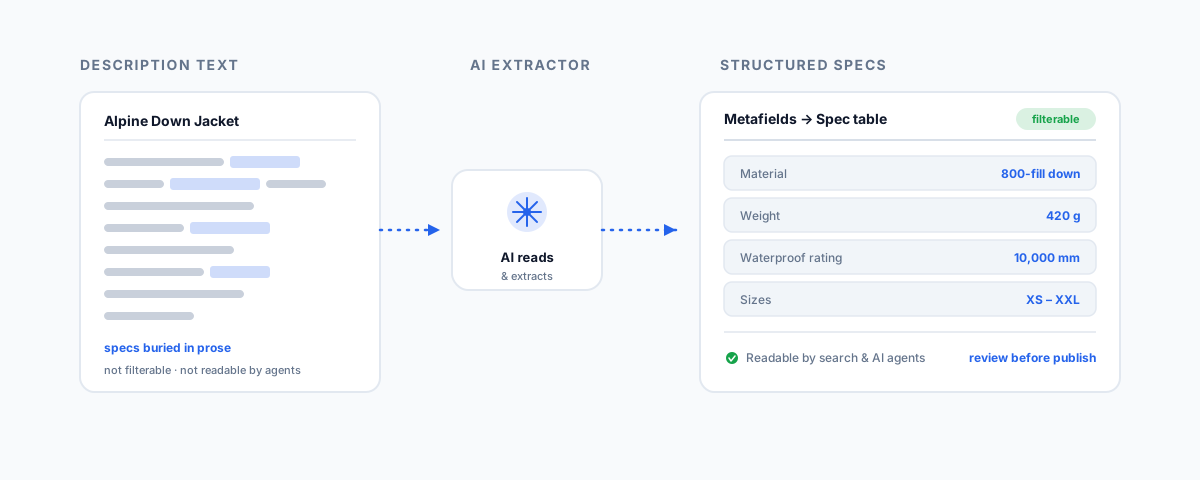
The best Shopify apps for turning freeform product description text into structured specifications — AI extractors like ChatGPT-AI Metafield Generator and AI Metafield Autopilot, metafield managers like Metafields Guru, and spec-table apps like TableFlow — and how to combine them.
Most Shopify catalogues already contain their product specifications — they are just trapped inside paragraphs. The material, the dimensions, the compatibility, the capacity: all sitting in freeform description text where a shopper has to read for them and, crucially, where filters, search, and increasingly AI shopping agents cannot see them at all. Extracting those buried facts into structured fields is one of the higher-leverage jobs you can do to a store, and you do not have to do it by hand. This is a rundown of the Shopify apps that pull specifications out of text and turn them into structured data, grouped by the part of the job each one does.
Why Extract Specs from Text
Before the apps, it is worth being clear on why this matters, because it is more than tidiness. A specification sitting in a sentence cannot be filtered on, so shoppers cannot narrow by size or material. It does not populate structured data, so your product pages miss the rich results that lift search click-through. It forces customers to email "does it fit / what is it made of," generating support load you could avoid. And there is a newer reason: AI shopping agents read structured fields — metafields — not marketing prose. As buyers increasingly shop through AI, stores whose specifications live in queryable fields are far more discoverable than those whose specs are locked in paragraphs. Extracting specs from text is what makes your catalogue legible to filters, search, and agents alike.
The Apps at a Glance
The work splits into three jobs — extract the specs from the text, store them as structured metafields, and display them — and the apps tend to specialise in one. Here is the field.
| App | What it does | Best for |
|---|---|---|
| ChatGPT-AI Metafield Generator | AI reads existing title and description and extracts attributes (colour, material, size) into metafields in bulk | Pulling specs out of prose you already have |
| AI Metafield Autopilot | AI suggests metafields from product info, with safe bulk apply and undo | Reviewable, low-risk bulk extraction |
| AutoMeta: AI custom fields | Creates custom fields and generates AI content contextual to each product | Building and populating fields together |
| Metafields Guru | Bulk metafield management, CSV import/export, Excel-like editor, Flow and ERP integration | Storing and editing specs at scale |
| Fieldify / Native Metafields | Flexible metafield creation and editing, including variant-level fields | Setting up the field structure to extract into |
| TableFlow Specification Table | Renders specifications as a spec or comparison table from metafield data | Displaying the extracted specs on the page |
AI Extractors: Pulling Specs Out of Prose
These are the apps that do the actual extraction, and they are the stars of this job because they read your existing text and turn it into structured attributes.
- ChatGPT-AI Metafield Generator is the most direct fit. It looks at existing product data — the title and description you already have — and uses AI to extract the metafield values you specify, like colour or material, then bulk-populates them across products. This is exactly "specs from text": point it at your catalogue and it reads the prose and fills the fields.
- AI Metafield Autopilot takes a review-first approach, generating suggested metafields from existing product information and letting you apply them across many products at once, with a safe bulk apply and undo. That undo matters when you are running AI over a whole catalogue and want a safety net.
- AutoMeta: AI custom fields blends creation and generation, letting you build rich custom fields and populate them with AI-generated content contextual to the product. It leans slightly more toward generating content than extracting existing facts, but it is useful where you want to define and fill fields in one flow.
The common caveat with all AI extraction is accuracy: the AI can misread or invent a value, so a human review pass — especially on anything a customer buys on, like dimensions or compatibility — is not optional. The apps that make review and undo easy are the safer choice for a large run.
Storing and Managing the Specs
Extraction needs somewhere structured to put the results, which on Shopify means metafields, and a good metafield manager makes the whole job easier to run and maintain.
- Metafields Guru is the workhorse: comprehensive metafield management with bulk editing, CSV import and export, an Excel-like editor, a browser extension, and integration with Shopify Flow and ERP systems. If you are moving specs in and out in volume, this is the control panel.
- Fieldify and Native Metafields focus on defining and editing the fields themselves across products, variants, and collections, with support for the full range of metafield types. They are the tools for setting up the structure you extract into — including variant-level specifications, which many stores need and many tools handle poorly.
Displaying Them: Spec Tables
Extracted, stored specifications are only half the payoff if customers never see them cleanly, which is where a display app earns its place. TableFlow Specification Table maps your metafields into a clear specification table on the product page, with comparison and conditional display so the right specs show for the right products. It turns the structured data you have built into the scannable spec table shoppers actually want, closing the loop from buried sentence to visible, filterable fact.
How to Combine Them, and When to Go Custom
For most stores the pipeline is three apps working together: an AI extractor to read the text and fill metafields, a metafield manager like Metafields Guru to store and tidy them, and a table app like TableFlow to display them. Set up your metafield structure first, extract into it, review, then display.
There is a point, though, where stitching apps together stops being the best answer. If your catalogue is very large, your source text is messy or inconsistent, or you need specs extracted from supplier PDFs and feeds rather than just your own descriptions, a custom pipeline — an LLM reading your data through the Shopify Admin API, with your own validation rules — will be more accurate and far less fiddly than chaining plugins, and it will not charge you per app forever. This is the same machinery behind broader catalogue work, which we cover in our guides to product data enrichment and automating product data cleanup. Richer structured data also travels better across sales channels, which helps if you list beyond Shopify, as we cover in multichannel inventory sync.
Getting Help
Extracting specifications from text is high-value and very doable with the right apps — but the details decide whether it works: choosing where the AI reads from, structuring metafields properly, reviewing for accuracy, and displaying the result cleanly. If you would like your catalogue's specifications pulled out of description text and turned into structured, filterable, agent-readable data — whether with the right apps or a custom pipeline for a large or messy catalogue — our Shopify Integrations service designs and runs exactly that. Get the specs out of your paragraphs and into fields, and your store becomes easier to search, filter, and buy from.