
26 July 2026
"Fix a Shopify Checkout Redirect Loop: The Real Causes and How to Diagnose Each One"
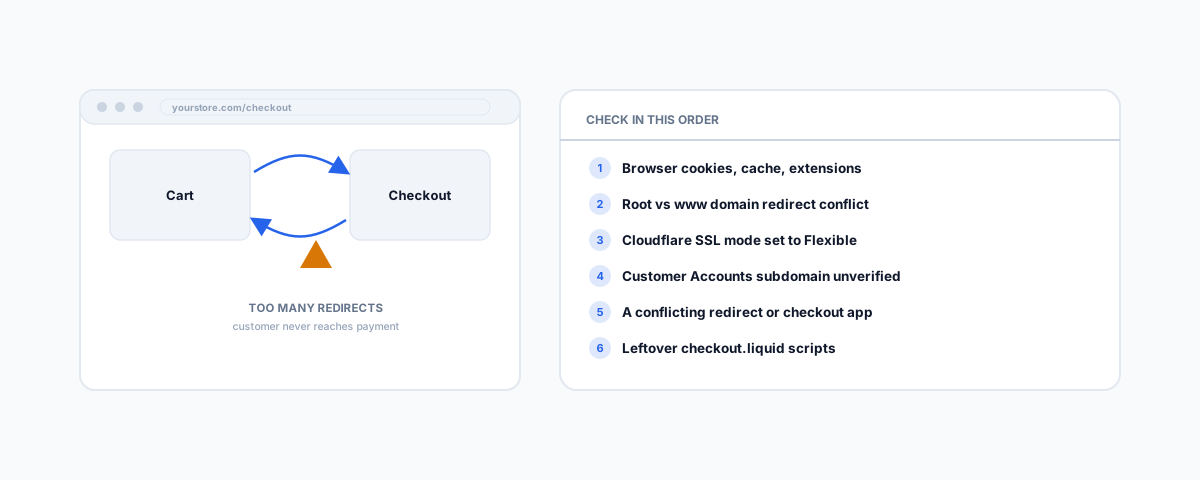
A Shopify checkout that loops, throws "too many redirects," or just refreshes when a customer clicks Checkout has a short list of actual causes — browser state, domain and Cloudflare SSL misconfiguration, a Customer Accounts subdomain requirement most guides miss, conflicting apps, and leftover checkout.liquid scripts.
A Shopify checkout redirect loop shows up one of two ways: the browser throws an explicit "too many redirects" or ERR_TOO_MANY_REDIRECTS error, or — less obviously — the customer clicks Checkout and the page just refreshes, or spins and dumps them back on the cart with nothing changed. Both are the same underlying category of problem: something is sending the browser back and forth between two states instead of through to checkout, and it has a short, checkable list of actual causes rather than the vague "clear your cache and try again" most search results lead with. Work through these in order — they're roughly fastest-to-check first.
Rule Out the Browser First
Before touching any store settings, confirm it isn't the browser doing this to one customer or one device. Clear cookies and cache for your store's domain, then try again in a private/incognito window with extensions disabled — ad blockers and privacy extensions are common culprits because Shopify's checkout relies on first- and third-party cookies and scripts that some blockers strip by default. If the loop disappears in incognito, you're chasing a browser-state or extension problem, not a store configuration one, and you can stop here.
Check for a Duplicate or Conflicting Domain Redirect
If the loop reproduces everywhere, the next place to look is your domain setup. A common cause is the root domain and the www subdomain each set to redirect to the other — check Settings > Domains in your Shopify admin and confirm only one is set as primary with traffic redirected to it, not both pointing at each other. A duplicate or leftover A record from a previous host is another frequent cause. Shopify's own domain-connection documentation covers the exact records your specific domain needs — worth copying the values shown in your own admin rather than a generic value from a forum post, since Shopify's infrastructure IPs can change.
If You're Using Cloudflare, Check Your SSL Mode
This is the single most common cause for stores that proxy their domain through Cloudflare, and it's easy to miss because the setting is one dropdown. If Cloudflare's SSL/TLS encryption mode is set to Flexible, Cloudflare terminates HTTPS at its own edge and connects to Shopify over plain HTTP — but Shopify's checkout forces HTTPS and redirects any HTTP request to HTTPS. Cloudflare then re-requests over HTTPS but still presents HTTP to Shopify on the next hop, and the two systems redirect each other indefinitely. Cloudflare's own documentation confirms this exact mechanism and the fix: change the SSL/TLS mode from Flexible to Full or Full (strict), so both hops — visitor to Cloudflare, and Cloudflare to Shopify — are actually encrypted.
Customer Accounts and the Subdomain Verification Requirement
This is the cause most troubleshooting guides skip entirely, and it's worth checking if you've recently upgraded to Shopify's newer Customer Accounts. The login flow for the new system runs an authentication handshake that, on a custom domain, requires a verified custom subdomain configured specifically for customer accounts — without it, the browser treats the authentication request as cross-origin and blocks it, which can abort or loop the checkout redirect for signed-in customers specifically (guest checkout may work fine while this is broken, which is a useful diagnostic clue). Shopify's own guide to connecting a custom subdomain for customer account pages covers the setup — a CNAME record added at your domain provider and then verified in Shopify admin, which can take up to 48 hours to propagate.
Isolate a Conflicting App
Apps that redirect based on location, language, or age gates, and apps that customize the checkout flow, are a common source of loops when their logic conflicts with Shopify's own redirect rules or with each other. Disable third-party apps one at a time, starting with anything that touches redirects, geolocation, or checkout customization, retesting after each one — this is slow but it's the reliable way to isolate which app is responsible rather than guessing.
Legacy checkout.liquid Scripts
If your store has custom scripts that were added to the old checkout.liquid template before Shopify moved to Checkout Extensibility, and those scripts haven't been migrated, they can behave unpredictably on the current checkout — including redirect logic that assumed the old checkout structure and no longer matches. If none of the causes above resolve it and your store has any checkout customization history, this is worth checking with whoever set it up originally, or reviewing your checkout customizations directly in Shopify admin.
Getting Help
A checkout that loops even occasionally is lost revenue every time it happens, on top of the abandoned carts a broken checkout naturally creates — our guide to abandoned cart recovery for Shopify and WooCommerce covers what to do about the carts this leaves behind while you're fixing the underlying cause. Our Shopify Integrations service diagnoses and fixes checkout and domain issues like this properly, so it's resolved once rather than patched and left to resurface next time an app updates or a DNS record changes.