
4 July 2026
Why Apps Slow Down Your Shopify Store — and How to Fix Slow Loading Speed
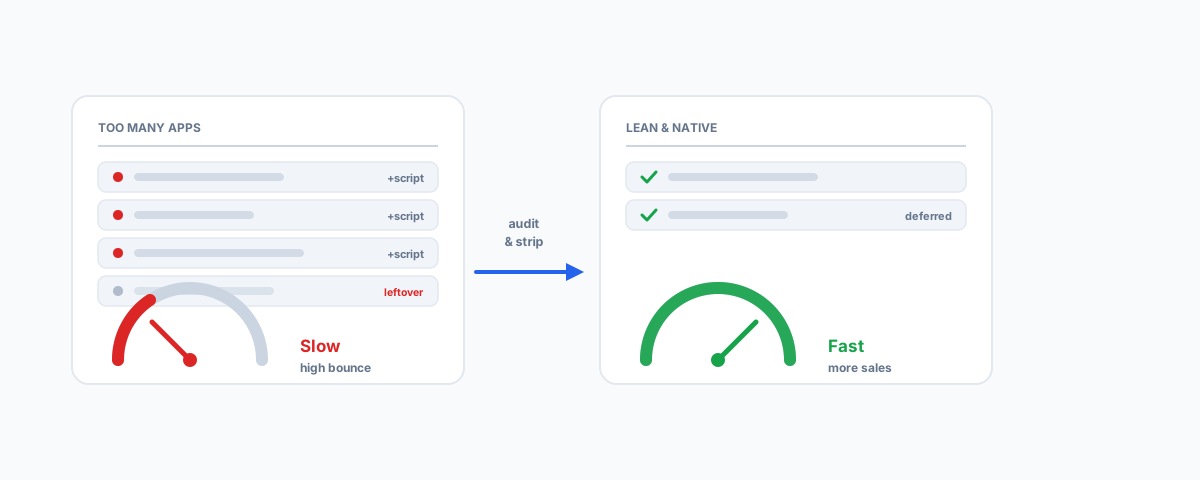
How third-party apps quietly become the biggest cause of a slow Shopify store — the app types that hurt speed most, how to find what is dragging you down, and a practical fix list from removing leftover code to optimising images and your theme.
A slow Shopify store costs you money before you ever see it happen — visitors leave before the page loads, and Google quietly ranks you lower for being sluggish. When owners go looking for the cause, they often blame Shopify itself. It is almost never Shopify. The far more common culprit is the pile of apps installed over the years, each one adding its own code to every page. The good news is that app-driven slowness is very fixable once you understand where it comes from. Here is how apps slow a store down, how to find the ones hurting you, and what to actually do about it.
Why Store Speed Actually Matters
Speed is not a vanity metric. Every extra second of load time pushes your bounce rate up and your conversion rate down — shoppers on phones and patchy connections simply give up. Google also uses page experience, including load speed and Core Web Vitals, as a ranking signal, so a slow store is a double loss: fewer of the people who arrive convert, and fewer people arrive in the first place. On mobile, where most Shopify traffic now lives, the effect is sharpest. Getting speed right is one of the highest-return, least-glamorous things you can do for a store.
How Apps Slow Your Store Down
Most Shopify apps work by injecting their own JavaScript and CSS into your storefront. That is how a review widget shows stars, or a pop-up appears — but each of those scripts has to be downloaded and run by the shopper's browser, often before the page can finish rendering. Install a dozen apps and you have a dozen sets of scripts, many loading from third-party servers you do not control, all competing to run on every page. Two things make it worse than it sounds. First, some scripts are render-blocking — the page waits on them before showing anything. Second, and most insidious, is leftover code from apps you have already uninstalled: many apps embed snippets in your theme that are not removed when you delete the app, so you can be carrying the weight of apps you no longer even use.
The App Types That Usually Hurt Most
Any app can be well or badly built, so this is about categories to scrutinise, not brands to avoid. The types that most often add weight:
- Review and rating widgets — pull in scripts and sometimes external fonts and images on every product page.
- Pop-ups, upsell, and cross-sell apps — inject scripts that watch behaviour and render overlays.
- Live chat and messaging widgets — load a persistent third-party script sitewide.
- Page builders — flexible, but can generate heavy, script-laden markup.
- Sliders, carousels, and animation apps — add JavaScript and often large images.
- Currency converters and geolocation — run on every page to detect and swap values.
- Wishlist, countdown timers, and social-proof apps — small individually, heavy in aggregate.
- Stacked tracking pixels — multiple analytics and ad pixels each add their own requests.
None of these is inherently bad; the problem is having many at once, or keeping ones you no longer need.
How to Find What's Slowing You Down
You do not have to guess. A few tools will show you exactly where the time goes:
- Shopify's Online Store Speed report (Analytics → Reports) gives you a Shopify-calculated speed score and tracks it over time.
- Google PageSpeed Insights and Lighthouse (built into Chrome DevTools) grade a specific page and, crucially, list the individual scripts and resources costing you the most — often naming the app files directly.
- Reviewing the theme code or a waterfall view shows render-blocking resources and leftover snippets from removed apps.
Run these on your homepage and a product page, on mobile, and you will usually see the offenders within minutes.
How to Fix It
With the diagnosis in hand, the fixes are mostly about discipline:
- Audit and remove unused apps. Uninstall anything you are not actively using — the fastest win available.
- Strip leftover code. After uninstalling, check the theme for snippets the app left behind and remove them, so you stop paying for apps that are gone.
- De-duplicate. If two apps do the same job, keep the lighter one. Consolidate wherever you can.
- Prefer native features. Shopify does more out of the box than it used to; a built-in feature almost always beats an app for speed.
- Defer and lazy-load. Non-critical scripts and below-the-fold images should load after the main content, not block it.
- Question every new app. Before installing, ask whether the value justifies the weight it adds to every page.
Images and Theme
Apps are the usual headline, but two other things quietly matter. Images are often the single largest thing a page downloads — compress them, size them correctly for where they display, and use modern formats so a hero image is not shipping megabytes to a phone. And the theme itself sets your baseline: a bloated or heavily customised theme starts you in a hole before any app is added, while a lightweight, well-built theme leaves room to breathe. If you are choosing a developer or theme, speed should be part of the brief from the start — something we cover in what to look for in Shopify development services. Keeping the catalogue itself tidy helps too, as we describe in automating Shopify product data cleanup.
Getting Help
A slow Shopify store is rarely one big problem — it is usually a dozen small ones stacked up over time, and the same discipline that let them accumulate is what clears them out. If you would like it done properly — an audit of every app and its real cost, leftover code stripped, images and theme optimised, and the speed scores to prove it — our Shopify Integrations service can get your store fast and keep it that way. Speed is one of the few improvements that pays back on every single visit, so it is well worth getting right.