
22 October 2026
Free Invoice Generators for Australia: What's Actually Free, What's ATO-Compliant, and Why Wave Isn't an Option
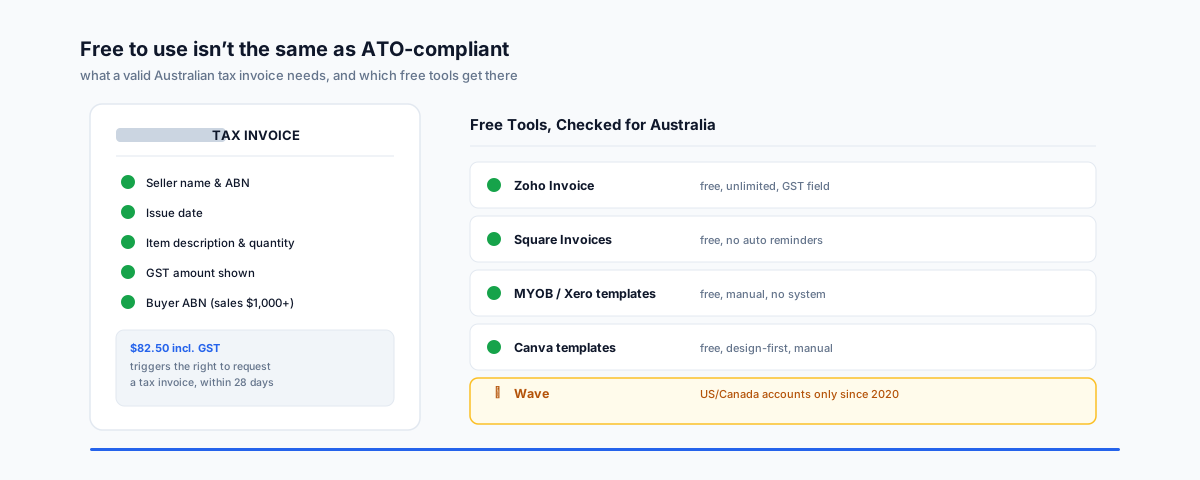
"Free invoice generator" searches usually turn up US tools that either aren't available here or won't produce a document the ATO recognises as a tax invoice. What Australian GST rules actually require, which free tools work, and why Wave — a name that still shows up in most roundups — no longer does.
"Free invoice generator" is a search that quietly bundles two different requirements together, and most roundups only answer one of them. The first is whether the tool is actually free and actually available to an Australian business — not every US-built invoicing app still takes new Australian sign-ups. The second is whether the document it produces counts as a valid tax invoice if you're registered for GST — a nicely formatted PDF that's missing the right details isn't one, no matter how professional it looks.
What Makes It a "Tax Invoice" in Australia
If you're registered for GST, the ATO's tax invoices guidance sets out exactly what has to be on the document, and the rules change depending on the sale amount:
- A customer can ask for a tax invoice for any taxable sale of $82.50 or more (including GST), and you must provide one within 28 days of the request.
- For sales under $1,000, the invoice needs to clearly show it's intended as a tax invoice, your identity and ABN, the issue date, a description of each item (including quantity or volume), the GST amount — shown separately or stated as included in the price — and which items on the invoice are taxable, if it's a mix.
- For sales of $1,000 or more, the buyer's identity or ABN has to appear on the invoice as well.
- The words "tax invoice" should only appear if you're actually registered for GST. If you're not registered, issue a plain invoice with no GST component — adding GST to a sale you're not registered to charge it on is its own problem.
None of this is complicated once you know it, but it's exactly the kind of detail a generic template or a US-built tool won't get right by default, because the rules themselves are Australian.
Skip Wave
Wave Accounting still turns up near the top of almost every "free invoice generator" roundup, and for a long time that was fair — it was free, full-featured, and happy to take international sign-ups. That changed in November 2020: Wave stopped accepting new sign-ups from outside the US and Canada, and Wave's own support documentation confirms the restriction has since gone further than just blocking new accounts — users outside the US and Canada can no longer send invoices or payment reminders through Wave at all, and all product and customer support for that group has been discontinued. If you've got an old Wave account from before 2020, it may still technically exist, but it's not a tool to recommend to anyone starting fresh in Australia today, and it was never going to produce an ATO-compliant tax invoice anyway — Wave's invoicing adds tax on top of a pre-tax price, which doesn't match the GST-inclusive pricing Australian law requires you to display.
The Free Tools That Actually Work Here
- Zoho Invoice — genuinely free, not a trial, with no seat or time limit. It covers unlimited invoices on most current plans, client management, expense tracking, and online payment links, and it lets you configure GST as a tax rate and set your ABN on the invoice template, which gets you most of the way to ATO-compliant output without manual fiddling.
- Square Invoices — free to send, with the appeal being that it sits next to Square POS and Square payment links if you already take card payments that way. The gap worth knowing about before you commit: it doesn't support automatic payment reminders, so chasing a late invoice is a manual job.
- MYOB and Xero invoice templates — both publish free, downloadable invoice templates (Word, Excel, or PDF) with the ATO-required fields already laid out. These aren't software — there's no client list, no payment tracking, no automation — but they're a legitimate, genuinely free option if you're sending a handful of invoices a month and don't need a system behind them.
- Canva — free, well-designed invoice templates if branding and layout matter more to you than functionality. Same trade-off as the MYOB/Xero templates: you're filling in a document by hand each time, with no record-keeping built in.
Templates vs Software
The real decision isn't which logo looks best — it's whether you want a document or a system. A template is free forever, has zero lock-in, and takes thirty seconds to fill in, but every invoice is a fresh manual job and nothing reminds a customer they're late. Software like Zoho Invoice or Square keeps a client list, tracks what's paid and overdue, and can email a reminder automatically — but free tiers usually cap out on invoice volume, multiple users, or reporting depth sooner or later.
When Free Stops Being Enough
The trigger is rarely the invoice itself — it's what happens after. Once you're issuing enough invoices that reconciling them against your bank feed by hand becomes a weekly chore, or once an accountant needs your invoicing data to actually talk to your accounting software rather than living in a separate app, a free standalone invoice tool starts costing more in admin time than a paid one would in subscription fees. At that point the question changes from "which free tool" to "does this need to be the same system as my books" — which is really a Xero, MYOB, or QuickBooks decision rather than an invoicing one.
If you're selling through Shopify specifically rather than invoicing directly, the free invoicing apps worth knowing about are different again — see our guide to the best free invoice generator for Shopify B2B for that side of things.
Getting Help
Free invoicing tools are the right call for a lot of small businesses — the mistake is picking one based on a US roundup that never checked whether it works here, or whether its output actually satisfies the ATO. If you've outgrown a standalone invoice tool and need it properly wired into your accounting system instead, our Workflow Automation service can help connect invoicing, payments, and bookkeeping so nothing needs re-entering by hand.