
5 July 2026
How to Integrate WhatsApp and SMS into Your Business Phone System
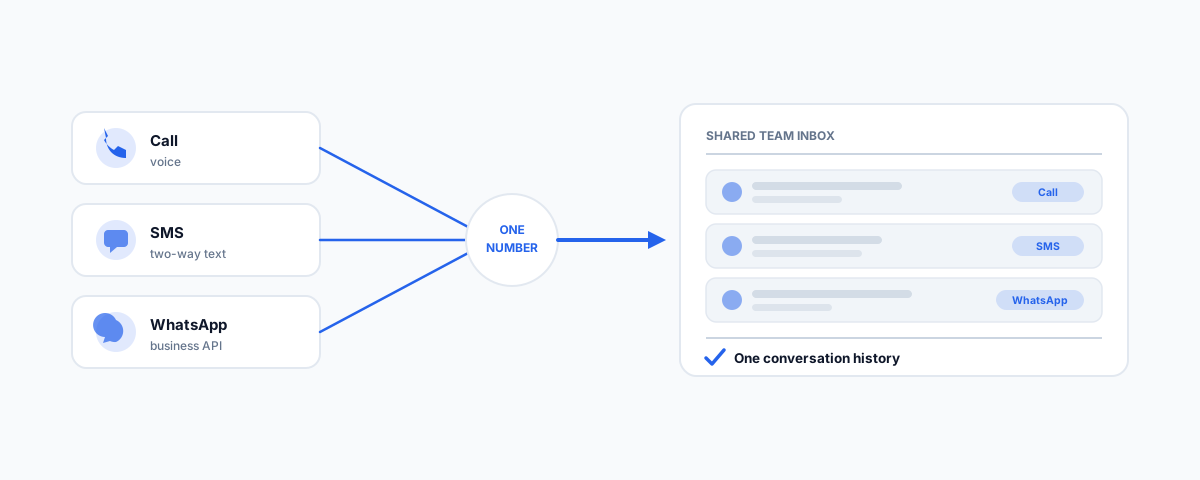
How a modern cloud phone system can fold WhatsApp and SMS into the same place your team handles calls — why it is worth doing, how SMS and WhatsApp Business integration each work, bringing it all into one inbox, and getting consent and compliance right.
More and more customers would rather message a business than call it — a quick text or WhatsApp fits their day better than sitting in a phone queue. The problem is that most businesses handle those messages badly: SMS goes to whoever's mobile happens to be nearby, WhatsApp lands on a staff member's personal phone, and none of it is tied to the calls the same customer made last week. A modern cloud phone system fixes this by treating messaging as part of the phone system, not a side channel — WhatsApp and SMS flowing into the same place your team already handles calls, from your business number. Here is how that works and what it takes.
Why Bring Messaging Into the Phone System
The case is mostly about meeting customers where they are and keeping your team sane. Customers increasingly prefer messaging, so offering it wins conversations you would otherwise lose. Pulling it into the phone system means every message sits in a shared team inbox with the full history — so anyone can pick up a thread and see that this customer also called on Tuesday, rather than that context living on one person's phone. It gets business conversations off personal devices and onto your business number, which matters for professionalism, staff privacy, and not losing the thread when someone leaves. And because messaging is asynchronous, it handles the after-hours and "just a quick question" contacts that a phone line cannot.
How SMS Integration Works
SMS is the simpler of the two. A modern business phone system can send and receive two-way text messages from your main business number — the same number people call — so a customer can text you and your team replies from the shared inbox, not a personal handset. Depending on your provider, this is either a built-in texting feature of the phone system or an add-on powered by a messaging platform such as Twilio behind the scenes. The everyday uses are obvious once you have it: appointment reminders, order and booking notifications, delivery updates, and quick back-and-forth that would be clumsy on a call. The key shift is that texting becomes a team function tied to your business identity, rather than something done ad hoc from whoever's phone.
How WhatsApp Business Integration Works
WhatsApp needs a bit more understanding because there are two versions and they are not the same. The free WhatsApp Business app is designed for a single phone and a small operation. To integrate WhatsApp into a phone system so a whole team can use it, you need the WhatsApp Business Platform (the API), usually connected through your phone-system provider or a WhatsApp business solution provider. Two rules are worth knowing up front. First, WhatsApp uses a 24-hour window: once a customer messages you, you can reply freely for 24 hours, but to start or continue a conversation outside that window you must use pre-approved template messages. Second, you set up a verified business profile so customers see your business name, not a mystery number. It is more involved than SMS, but it brings the world's most-used messaging app into your team inbox properly.
Bringing It Together in One Inbox
The real payoff is not SMS or WhatsApp individually — it is having calls, SMS, and WhatsApp all land in one place. A good unified or omnichannel phone system routes every channel to the same team inbox, so a customer can call, then text, then send a WhatsApp, and your staff see one continuous conversation rather than three disconnected ones. That means messages can be routed to the right person or team, handled by whoever is free, and logged against the customer in your CRM. This is where a platform like GoTo Connect earns its place: it is built to be the single hub for voice and messaging rather than a phone line with bolt-ons.
Consent and Compliance
Messaging customers is powerful, which is exactly why it is regulated — get this right from the start:
- SMS consent (Australian Spam Act). You need consent to send marketing texts, every message needs a clear way to opt out, and you must honour opt-outs. Transactional messages a customer asked for (like a booking reminder) are treated differently from marketing, but consent and records still matter.
- WhatsApp opt-in. WhatsApp requires customers to opt in to being contacted, and business-initiated messages must use approved templates — you cannot cold-message people.
- Keep records. Store how and when consent was given, so you can show it if asked.
The same consent discipline underpins marketing messaging too, which we cover in combining Klaviyo email and SMS into a single flow.
Getting Help
Folding WhatsApp and SMS into your business phone system is one of those upgrades that quietly changes how customers experience you — reachable the way they prefer, answered by a team that has the full picture, all from one business number. If you would like it set up properly — messaging and voice in one inbox, on your business number, with consent and compliance handled — our GoTo Connect service designs and deploys exactly that kind of unified phone-and-messaging system. Give customers one place to reach you, and give your team one place to answer.