
21 October 2026
iOS 27's Impersonation Risk Detection: What It Actually Protects You From (and Why It's Off by Default)
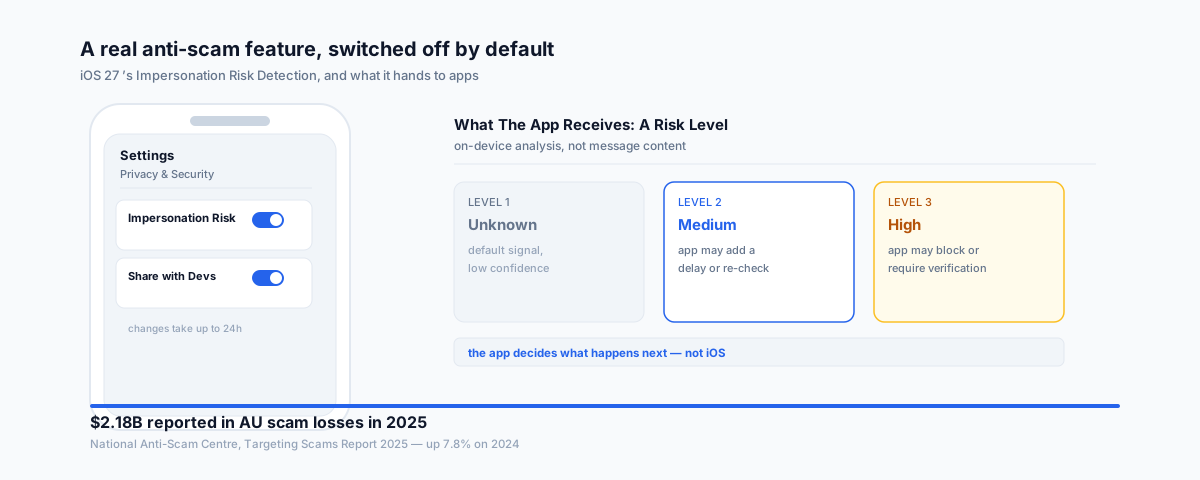
iOS 27 shipped with a real anti-scam feature called Impersonation Risk Detection — and it's switched off by default, buried in a settings menu most people will never open. What it actually does, what it doesn't, and how to turn it on.
Australians reported just over $2.18 billion in scam losses in 2025, according to the National Anti-Scam Centre's Targeting Scams Report — up 7.8% on 2024, even as the median individual loss actually fell to $400. iOS 27 quietly shipped a feature aimed squarely at the kind of scam those numbers describe: someone impersonating a bank, a government agency, or a trusted contact to talk you into a payment or an account change yourself. It's called Impersonation Risk Detection, and it's turned off by default, sitting in a settings menu most people will never think to open.
What Impersonation Risk Detection Actually Is
Two-factor authentication doesn't stop this category of fraud, because the victim performs the action themselves — approving a transfer, changing a password, confirming a code — after being talked into it. Apple's answer, built on a framework it calls Trust Insights, works differently: when you attempt a sensitive action in a supported app, iOS runs an on-device analysis of interaction timing, behavioural patterns, and context, and hands that app a risk level — Unknown, Medium, or High. The app itself decides what to do with that signal: show a warning, add a delay, or ask for extra verification. Apple says the analysis doesn't read the content of your Messages, Mail, or Photos — it works from behaviour and context, not from what you've actually typed or received.
How to Turn It On
The feature exists on any iPhone running iOS 27, but it does nothing until you switch it on:
- Open Settings, then go to Privacy & Security, then Impersonation Risk Detection.
- Turn on "Share with App Developers."
- You may be asked to sign in to the App Store with your Apple Account first.
- Changes can take up to 24 hours to take effect — this isn't instant, so don't expect it to start working the moment you flip the switch.
What It Doesn't Do
The honest limitation is that Impersonation Risk Detection only works inside apps that have actually adopted it, and Apple hasn't published a full list of which ones have. Turning the setting on doesn't mean your bank's app, your super fund's app, or a payment app you use will suddenly show scam warnings — it means those apps can now ask iOS for a risk signal, if their developers have built the support in. It's also not a replacement for the call and message screening iOS already has; those tools can flag an unknown number, but they can't stop you acting on a scam once you've decided to.
The Giveaway Worth Remembering
Apple's own advice is blunt: if someone contacts you and tells you to turn this feature off, that itself is a sign you're being scammed. It's a useful thing to know even if you never touch the setting yourself, because it's exactly the kind of "quick, disable your security settings" instruction a scammer walking someone through a fake bank call would give.
Why This Is Worth Doing on Every Phone in the Business
A staff phone that handles supplier payments, approves invoices, or has access to the business bank app is exactly the device this protects — and exactly the kind of device nobody thinks to audit until something's gone wrong. If you're already reviewing what iOS 27 changes for your business, our piece on iOS 27 for business covers the device-management and Apple Intelligence side of the same release; this setting is worth adding to that same rollout checklist rather than treating as a separate, optional step.
Getting Help
Turning this on takes thirty seconds per phone — the harder part is making sure it actually happens across every device that touches business money, and that staff know what the "someone told me to turn off my phone's security feature" red flag looks like. Our Small Business IT Support service can build device security checks like this into a standard rollout for your whole team.