
2 July 2026
The Small Business IT Onboarding and Offboarding Checklist
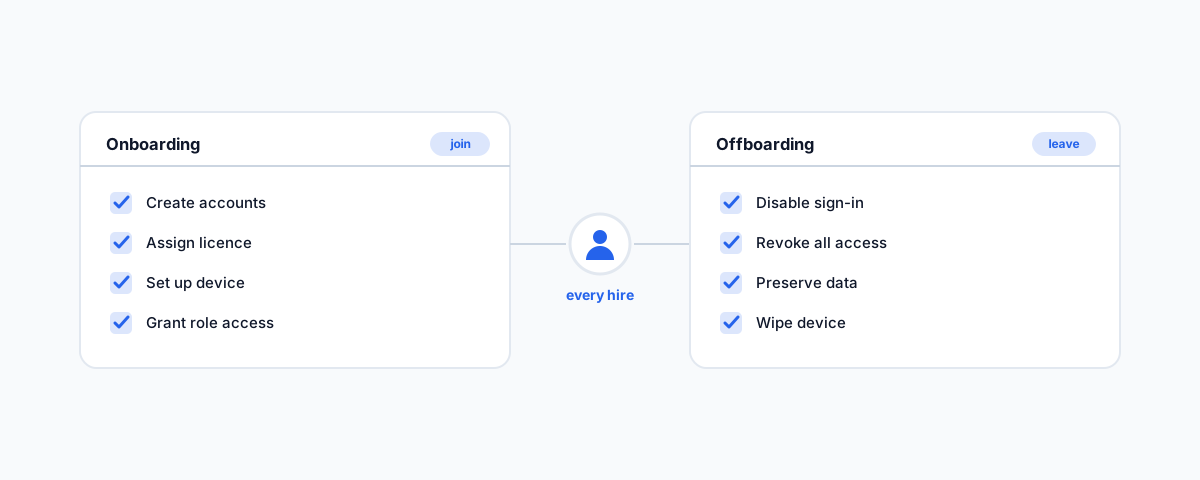
A practical IT checklist for small businesses — getting new staff working on day one, setting up and standardising devices, and removing access cleanly when someone leaves so nothing lingers.
Two moments in every staff member's time with you carry more IT risk than any other: the day they start and the day they leave. Done well, a new hire is productive from their first coffee, and a departing one's access vanishes the moment they walk out. Done ad hoc — which is how most small businesses do it — new starters sit idle waiting for logins, and former staff keep working accounts for months because nobody remembered to switch them off. Neither is hard to fix; both just need a written process instead of relying on memory. Here is what that process looks like.
New Starter, Day One
The goal on a new hire's first day is simple: they can sit down and work, with everything they need and nothing they do not. That means their accounts are created ahead of time (not scrambled together while they wait), the right software licence is assigned, their device is set up and ready, and they have access to exactly the systems their role requires. The last part matters as much as the first — access should match the role, not "the same as everyone else," because over-granting access on day one is how businesses end up with everyone able to see everything.
Getting this right ahead of time turns a new starter's first day into a good first impression instead of a frustrating wait. It also means the person setting them up is working from a list, so nothing is forgotten and the tenth hire is as smooth as the first. Because so much of this lives in Microsoft 365 — accounts, email, licensing, access — it pairs closely with getting your Microsoft 365 administration right.
Device Setup and Standards
The devices themselves are where consistency pays off. A business runs far more smoothly when laptops and desktops are set up to a standard build rather than each one being a snowflake: the same core software, disk encryption switched on, automatic updates enabled, and the machine enrolled in whatever management tool you use so it can be configured and, if needed, wiped remotely. That standardisation is what makes support fast — when every device is set up the same way, fixing one is fixing all of them.
Encryption deserves a specific mention because it is the cheapest insurance there is: a lost or stolen laptop with encryption on is an inconvenience, while the same laptop without it is a data breach. It is built into modern Windows and Mac, and switching it on at setup takes minutes. Peripherals — monitors, printers, headsets — are less dramatic but worth having a known-good setup for, so a new desk comes together quickly.
Mobile Devices and BYOD
Phones are the device most often forgotten in all this, even though they hold email and business data. If staff use their own phones for work — which most do — you want a way to keep business data separate from their personal life, so that access can be removed when they leave without wiping their holiday photos. Mobile management tools let you protect and, if necessary, remove just the work data on a personal device. At minimum, business email on a phone should sit behind the phone's passcode and your multi-factor authentication, so a misplaced phone is not an open door.
The Offboarding Checklist
Offboarding is the mirror image, and the one businesses most often fumble — usually because the focus is on the person leaving, not their digital access. The moment someone departs, their ability to sign in should be disabled, their access to every system revoked (not just email — the CRM, the file storage, the booking system, the finance tools, anything they touched), their data preserved or handed over so nothing important leaves with them, and their devices collected and wiped or reset for the next person. That word "every" is where it goes wrong: it is easy to disable the email and forget the half-dozen other services they had logins to.
Lingering access is a genuine risk, not a tidiness issue — a former staff member (or anyone who gets hold of their still-live credentials) with a working login is exactly how data walks out or systems get tampered with. A written offboarding list, run every single time, is what closes that gap. And preserving their mailbox and files before removing the account — rather than deleting everything to stop the licence cost — means you keep what the business needs.
Why a Written Process Beats Memory
None of this is complicated; the difficulty is purely that it is easy to forget a step under time pressure, and the forgotten step is the one that bites. A simple, written checklist for onboarding and its reverse for offboarding turns both into a repeatable routine that anyone can run, consistently, every time. It is the same principle behind not relying on one person's memory for backups or security — the recurring, boring stuff is exactly what should be systematised, a theme we return to across the common IT problems small businesses face.
Getting Help
Onboarding and offboarding are where good IT habits quietly protect a business — and where the lack of them quietly exposes it. If you would rather have a proper process set up, with standard device builds, clean day-one setups, and offboarding that actually closes every door, our Small Business IT Support service handles staff onboarding, offboarding, and device management so nothing slips through. Get the checklist built once, and every hire and departure after that just follows it.