
3 August 2026
Why Your Listings Aren't Syncing to realestate.com.au and Domain
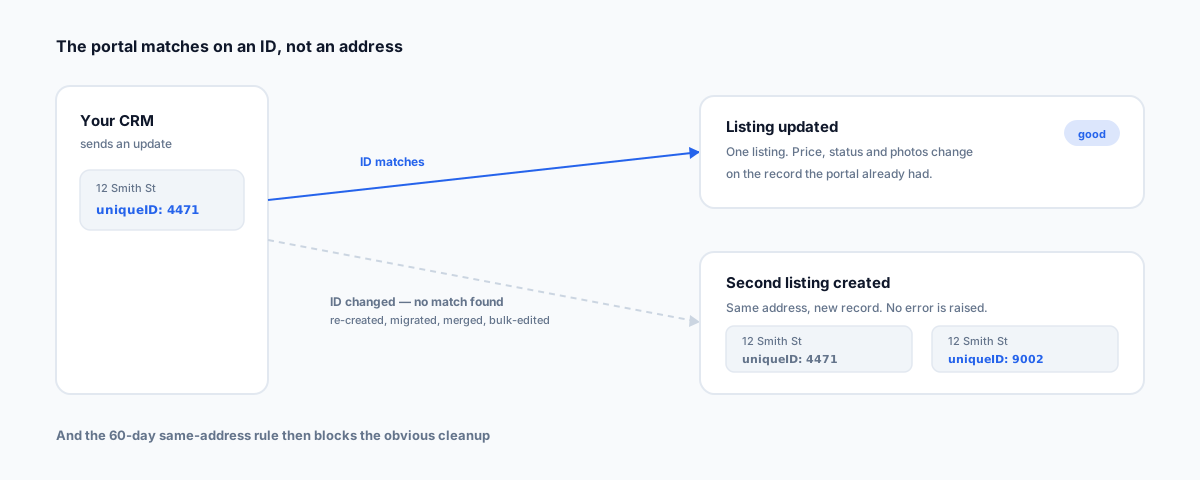
A listing that never appeared, a price change that didn't propagate, a duplicate you can't remove, a withdrawn property that won't die — four symptoms with mostly one cause. How the REAXML feed actually works, why the portal matches on an ID rather than an address, and the 60-day rule that punishes the obvious fix.
Four things go wrong with portal feeds, and every agency has hit at least two of them. A new listing never appears. A price change sits in the CRM and never reaches the portal. A duplicate turns up and you can't work out where it came from. A withdrawn property refuses to disappear.
They look like four separate problems. They mostly aren't. Nearly all of it comes back to one thing: the portal isn't tracking your property, it's tracking an ID. Once that clicks, all four symptoms have the same shape and the fixes stop being guesswork.
Our guide to the real estate agent software stack covers where portal feeds sit among the rest of your tools. This post is about what happens inside the feed itself.
How the Feed Actually Works
Listings reach realestate.com.au through REAXML, the XML format REA publishes for bulk uploads, which most Australian CRMs also use as the basis for feeding other portals. Two properties of that system explain most of what confuses people.
It's incremental, not a snapshot. After the initial load, each file your CRM sends contains only changes. You are not publishing the current state of your listing book; you're sending a stream of instructions. If an instruction never gets sent, or gets sent and rejected, nothing on the portal changes and nothing obviously breaks — the old data just sits there looking fine.
Listings are keyed by ID, not by address. Every listing carries an agentID identifying the office and a uniqueID identifying the property. When a file arrives, the processor looks for an existing listing matching that agency and that ID. Found it, and the listing is updated. Didn't find it, and a new listing is created. Notice what doesn't happen: it doesn't error, and it doesn't check whether the address already exists on the portal under a different ID.
Every listing also carries a required modTime — a modification timestamp on the record. That matters later when you're trying to work out whether an update was actually sent.
The uniqueID Is Permanent
This is the single most consequential fact about the whole system, and it's the one least likely to be explained to whoever is actually operating the CRM.
The uniqueID is set when a listing is created and cannot be changed afterwards. If a property predates your current CRM, it already has a uniqueID from wherever it came from, and every future update has to carry that original value. The ID is the property's identity as far as the portal is concerned. Lose it, change it, or regenerate it, and you have — from the portal's point of view — a different property.
Why Duplicates Happen
Now the duplicate makes sense. A duplicate is almost never a portal glitch. It's the predictable result of the ID changing, because the processor found no match and did exactly what it's designed to do: created a new listing.
The things that rewrite an ID are all ordinary, sensible-looking operations:
- Deleting a listing in the CRM and re-creating it. The single most common cause. Someone fixes a bad record the intuitive way and the new record gets a new ID.
- Migrating to a new CRM, where listings are recreated in the destination system with fresh IDs.
- Merging duplicate records inside the CRM, where the surviving record may not keep the ID that the portal knows about.
- Some bulk imports and bulk edits, depending on how the CRM implements them.
None of those look like "changing the listing's identity" from inside the CRM. All of them are.
The 60-Day Rule That Punishes the Obvious Fix
Here's where it gets genuinely nasty. Having found a duplicate, the intuitive fix is to remove the bad one and re-upload the property fresh. That's when you meet REA's rule preventing the same property being listed twice within 60 days, and an error along the lines of you already have an active listing with the same address.
So the naive cleanup is blocked precisely when you need it. The correct fix is to restore the original ID relationship rather than create another new listing — which usually means going through your CRM's portal support or REA directly rather than solving it yourself in the CRM. The important part is knowing not to make it worse: uploading a third version with yet another new ID digs the hole deeper.
Why a Change Didn't Appear At All
Different symptom, different cause. When a price change or a description edit never lands, there are three candidates and they're worth checking in this order:
- It was never sent. Feeds batch and run on a schedule, so a change made at 4pm may genuinely not be out yet. Give it the interval before assuming failure.
- It was sent and rejected. This is the common one, and it's also the one people skip. Your CRM has a portal error log — Box+Dice, Rex, Agentbox, VaultRE and the rest all expose upload errors somewhere in the listing's portal settings. The answer is usually sitting in it, written plainly. Open it before you ring anyone.
- It failed upstream at the CRM. Occasionally the problem is at the CRM provider's end and nothing was generated at all. If the error log is empty and the listing shows no recent activity, this is where you're heading.
The habit worth building is simply: check the error log first, every time. It converts most of these from a mystery into a two-minute fix.
Withdrawn and Sold Listings That Won't Disappear
Status isn't a free-text field — the REAXML specification declares it as a fixed set of values, and a listing must carry one. Per the published DTD, a residential sale listing must be current, withdrawn, offmarket, or sold. A rental listing must be current, withdrawn, offmarket, or leased.
Two practical consequences. First, taking a property down isn't a deletion — it's an update carrying a changed status against the same uniqueID. If that update doesn't send, or sends against a broken ID, the listing stays live regardless of what your CRM shows internally. Second, the sale and rental vocabularies differ (sold versus leased), which is a real source of confusion in agencies running both sides of the business through one system.
So a listing that won't come down is usually the same ID problem wearing a different hat: the update is being written against an identity the portal no longer associates with that listing.
The Migration Trap
Everything above is a nuisance one listing at a time. During a CRM migration it happens to your entire listing book at once.
If the destination CRM creates listings with new IDs rather than carrying across the originals, every active property can fork into a duplicate, and the 60-day rule then blocks the tidy cleanup across the whole book simultaneously. This is the question to ask a vendor before you sign anything — not can you import our listings, but do you preserve the existing portal uniqueIDs, and what happens to properties that predate our current system. Ask it in writing, and ask what the remediation looks like if the answer turns out to be no.
Triage Order
- Open the portal error log in your CRM. Before anything else. Most answers are here.
- Check the batch interval — has enough time actually passed for the update to have gone out.
- If it's a duplicate, don't re-upload. Confirm whether the ID changed and why, and get the original ID relationship restored rather than creating a third listing.
- If it won't come down, check that the status update sent against the correct ID, and that you're using the right vocabulary for sale versus rental.
- If the log is empty and nothing has moved, escalate to your CRM provider — the file may never have been generated.
- If you're mid-migration, stop and confirm ID handling before pushing more listings.
Getting Help
Portal feeds are the kind of infrastructure nobody owns until it breaks, and then it's urgent because listings are the product. Most of the recurring cases we see trace back to an ID that changed during ordinary CRM housekeeping, which is fixable but much cheaper to prevent. Our Workflow Automation service covers the plumbing between your CRM and the portals — including getting a migration sequenced so your listing book doesn't fork on the way across.