
5 July 2026
How to Manage Product Variations in Lightspeed and WooCommerce
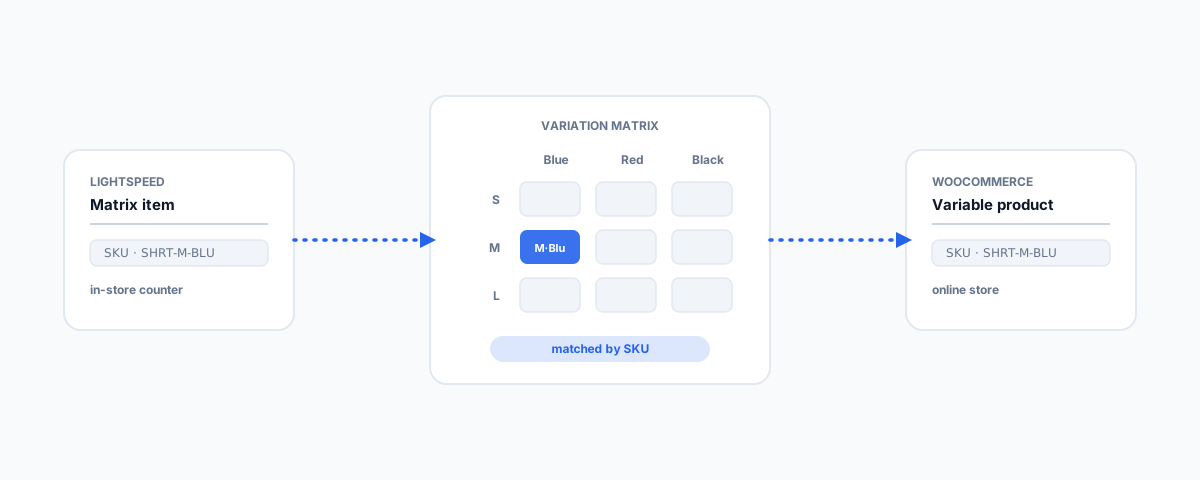
How product variations work in Lightspeed and WooCommerce, why SKUs are the key to keeping them straight, and how to manage size and colour variants across both systems without overselling — plus practical tips for a catalogue that stays tidy.
Variations — the same product in different sizes, colours, or materials — are where product management quietly gets complicated, and doubly so when you run both a point-of-sale system like Lightspeed and an online store on WooCommerce. Each platform models variations in its own way, and if they do not agree, you get mismatched stock, overselling, and a catalogue nobody trusts. The concepts are the same underneath, though, and once you see how each system thinks and what ties them together, keeping variations straight across both is very manageable. Here is how.
How Each Platform Models Variations
Both platforms express the same idea — one product, several buyable versions — with different names and structures:
- WooCommerce uses a variable product: a parent product with attributes (like Size and Colour) whose combinations generate variations, each with its own SKU, price, and stock level.
- Lightspeed uses matrix items: a parent item with attributes that generate individual variants, each again carrying its own SKU and stock.
The terminology differs — attributes and variations here, matrix items and variants there — but the shape is identical: a parent, a set of options, and a specific sellable unit for each combination. Recognising that they are the same model makes the rest straightforward.
The Matching Problem: SKUs Are the Key
The thing that lets the two systems agree on a variation is the SKU. Each specific version — the medium blue shirt — needs the same SKU in Lightspeed and in WooCommerce, because the SKU is the shared identity that stock levels, sales, and syncing all hang off. This is why SKU discipline matters so much with variations: a small store might have a handful of products but hundreds of variant SKUs, and if the codes drift between systems, nothing lines up. Keep your attribute and option names consistent too (do not have "Colour" in one and "Color" in the other, or "M" versus "Medium"), so the variants map cleanly.
Keeping Them in Sync
If you sell the same stock through Lightspeed in-store and WooCommerce online, the real risk is selling the same item twice — once at the counter, once on the site — because the two did not update each other. Avoiding that means syncing stock at the variation level, matched by SKU, so a sale in either place decrements the shared pool. That is done with an integration or middleware connecting the two, and it is exactly the discipline behind not overselling across channels, which we cover in multichannel inventory sync. The parallel challenge of connecting a POS to an online store is one we walk through for another stack in WooCommerce and Square POS integration.
Practical Tips for a Tidy Variant Catalogue
A few habits keep variation management from becoming a mess:
- Be strict with SKUs. Every variant gets a unique, consistent SKU used identically in both systems.
- Standardise option names across platforms so they map without ambiguity.
- Do not over-create variants. Only make variations customers actually choose between; needless options multiply the SKUs you have to manage.
- Add images per variation where colour or finish matters, so shoppers see what they are buying.
- Decide a source of truth for stock — one system leads, the other follows — rather than editing both by hand.
Getting Help
Managing product variations across Lightspeed and WooCommerce is mostly about discipline — consistent SKUs, matching option names, and a reliable sync so stock stays honest across the counter and the website. If you would like the two connected properly, with variation-level stock sync that prevents overselling and a catalogue that stays tidy, our WordPress Integrations service builds exactly that connection. Get your variants agreeing across both systems, and product management stops being a daily guessing game.