
10 July 2026
How to Reconcile Shopify Payouts and Fees in MYOB
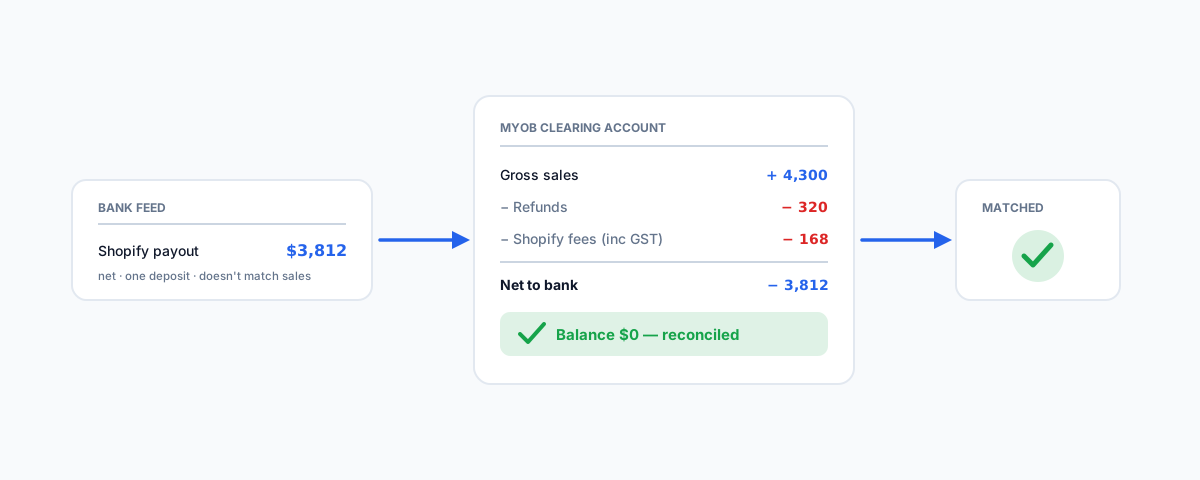
Why a Shopify Payments payout never matches your sales in MYOB, and how to reconcile it properly — splitting gross sales, refunds, shipping, and Shopify fees through a clearing account so every payout zeroes out against your bank feed.
Connecting Shopify to MYOB gets your sales into the books, but there is a second problem that trips up almost every store owner the first time: the money that actually lands in your bank account never matches your sales figures. A Shopify Payments payout is a single netted deposit, and reconciling it against what you sold is where ecommerce bookkeeping genuinely gets hard. Here is why it does not match, and the clearing-account method that makes every payout reconcile cleanly. (For choosing an integration in the first place, start with our overview of Shopify and MYOB.)
Why the Payout Doesn't Match Your Sales
When a customer pays through Shopify Payments, Shopify does not pass you that exact amount. It bundles a period of activity together and deposits the net a few days later. That single deposit is really:
- Gross sales — what customers paid, including product and shipping.
- Minus refunds — any money returned to customers in the period.
- Minus Shopify fees — the transaction and processing fees Shopify takes out before paying you.
- Sometimes minus chargebacks or adjustments.
So your sales records show the gross figure, your bank feed shows the net figure, and the difference is fees, refunds, and timing. If you simply match the bank deposit to an invoice, you will be wrong by exactly the fees and refunds — and your books will drift a little further out with every payout.
The Fix: A Shopify Clearing Account
The standard solution — and the one the integration apps automate — is a clearing account (also called a holding or suspense account). You set up a dedicated account in MYOB, and it works like a temporary holding tank for each payout:
- Record gross sales into the clearing account, not straight to the bank. This is the full amount customers paid.
- Record Shopify fees and refunds against the clearing account, reducing its balance.
- When the payout hits your bank feed, transfer the net amount from the clearing account to your bank account.
Done right, the clearing account should return to zero after each payout — everything that came in as sales has gone out as either fees, refunds, or the net deposit. A non-zero balance is your signal that something is unaccounted for, which makes the clearing account a running accuracy check, not just a bookkeeping step.
Booking the Shopify Fees
The fees are the part people forget, and the part that makes reconciliation fail. Every payout has Shopify's processing fees taken out, so those fees must be recorded as an expense — typically a "Merchant fees" or "Transaction fees" account — against the clearing account. Do not skip them or net them silently, or the clearing account will never balance. On GST: Shopify generally charges GST on its fees to Australian merchants and issues a tax invoice, so check your Shopify tax invoice and book the fee with the correct GST code rather than assuming it is GST-free.
Refunds and Chargebacks
Refunds reduce what Shopify pays you, so they have to be booked against the clearing account too — otherwise the deposit will come up short against your recorded sales. Chargebacks and other adjustments work the same way: each one is a reduction in the payout, and each needs a matching entry so the clearing account still zeroes out. These are exactly the events that make manual reconciliation painful, and exactly what an automated integration handles for you.
Match by Payout, Not by Day
One practical habit saves a lot of confusion: reconcile by payout period, not by calendar day. Because Shopify bundles several days of transactions into one delayed deposit, trying to match a single day's sales to a single bank line will never work. Treat each payout as the unit — its gross sales, its fees, its refunds, and its net deposit — and reconcile the whole bundle together.
Automating the Whole Thing
Doing this by hand is fine for a low-volume store, but it becomes a real chore quickly, which is why the Shopify–MYOB integrations exist. Apps like Amaka post the clearing-account entries — sales, fees, and refunds — for each payout automatically, so your only job is to confirm the net matches the bank. That is the payoff of a proper integration, and it is the same discipline whether you are on MYOB or, as we cover separately, handling Shopify shipping fees in Xero.
Getting Help
Payout reconciliation is where a lot of Shopify stores quietly lose confidence in their numbers — the bank never quite matches the sales, and nobody is sure why. If you would like it set up properly — a clearing account, correct fee and GST mapping, and an integration that posts it all automatically so every payout reconciles to zero — our Shopify Integrations service configures and tests exactly this against your live data. Get the reconciliation right once, and your MYOB file finally agrees with your bank.