
3 July 2026
"Selling Installed Products on Shopify: Supplier Pricing, Add-ons, and Installation Booking in One Cart"
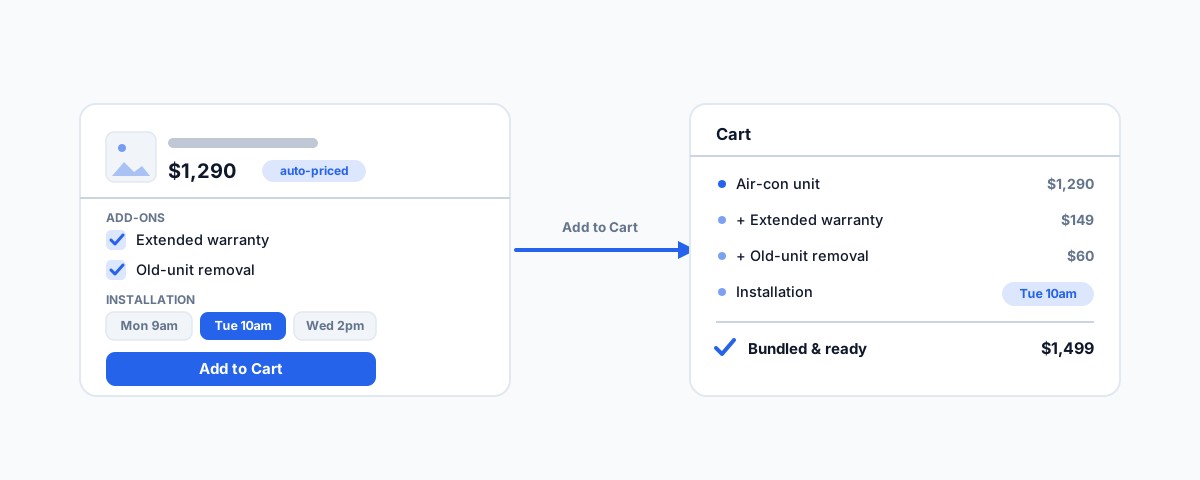
How to sell products that need installation on Shopify — automatically updating prices from your supplier with a markup, adding options on every product page, letting customers book an installation slot, and bundling it all into one Add to Cart.
Some products are not "add to cart and ship it." Think blinds, air-conditioning, solar, security systems, appliances, or flooring — the customer is not just buying a box, they are buying a thing that needs to be installed. Selling those online is where a standard Shopify store quietly falls short. It cannot keep its prices in step with a supplier who changes them constantly, it has nowhere to sell the extras that go with an install, and it certainly cannot let a customer choose their installation time as part of buying. So businesses end up doing it all by hand — re-pricing manually, taking add-on requests by phone, and booking installs in a separate back-and-forth — or they lose the sale to the friction. Here is what a proper setup looks like, and what each piece takes.
Keeping Prices Right, Automatically
If you resell products from a supplier, your prices depend on theirs — and their prices move. Updating your Shopify catalogue by hand every time the supplier changes a cost is slow, always out of date, and a reliable way to accidentally sell at a loss. The fix is to have your prices continually update themselves: pull the supplier's current prices, apply your fixed markup, and push the result into Shopify on a schedule, without anyone touching a spreadsheet.
How you do that depends on your supplier. If they publish a price feed or offer an API, apps like Stock Sync or Syncee can read it, apply a markup rule, and keep your prices current automatically. If your supplier only has a website and no feed — which is common — you need a custom scheduled integration that fetches their prices and applies your markup, which is more involved and needs to be built to respect the supplier's terms and to cope with their site changing. Either way, the payoff is the same and worth a lot: your margins are protected and your prices are never stale, without the manual grind. It is the same discipline behind keeping stock accurate, which we cover in our guide to multichannel inventory sync.
Add-ons on Every Product Page
An installed product usually comes with choices the customer should be making at the point of purchase, not in a follow-up call: an extended warranty, extra parts or accessories, a premium installation option, or removal and disposal of the old unit. If your store cannot offer those on the product page, you are leaving money on the table and creating admin for yourself later.
A product-options or add-on app puts these choices right on every product page — checkboxes and selections for the extras relevant to that product — so the customer builds the package they actually want. Simple, no-cost add-ons can even be captured natively through Shopify's line item properties. The payoff is twofold: a higher average order value because customers add the extras themselves, and fewer follow-up conversations because the choices were made up front.
Letting Customers Book Their Installation
This is the piece that genuinely sets an installed-product store apart. Instead of "we'll call you to arrange installation," the customer sees available installation time slots right on the product page and picks one as part of buying. A booking app — such as Appointo, Sesami, or BookThatApp — adds that scheduling widget to the product page and captures the chosen slot, carrying it through as a line item property so it travels with the order.
The benefit is immediate on both sides. The customer gets certainty — they have bought the product and locked in when it will be installed, in one go. And you get the job booked into your calendar at the moment of sale, instead of chasing the customer afterwards to find a time. The sale and the schedule happen together, which removes a whole stage of admin and a common point where deals stall.
One "Add to Cart" That Bundles It All
Individually, those three capabilities are useful. What makes the experience feel seamless — and what the brief specifically calls for — is that when the customer taps "Add to Cart," the product, the add-ons they chose, and the installation slot they picked all go into the cart together as one package. No adding items separately, no forgetting the booking, no mismatched orders.
Under the hood, Shopify's line item properties are what carry the add-on and slot choices along with the item, and the cart's AJAX interface is what lets priced add-ons be added as their own lines in the same action — so the cart, the checkout, the order confirmation, and your fulfilment all reflect the complete job. For the customer it is one clean step; for you it is an order that arrives with everything attached — the product, the extras, and exactly when it needs to be installed. That completeness is what keeps orders clean and stops things falling through the cracks between sale and install.
Making the Pieces Work Together
Here is the honest part: each of these is a separate capability — a pricing sync, an options app, a booking app, and Shopify's cart mechanics — and the value only appears when they cooperate on one product page and inside one cart. That coordination is the real work. Apps can conflict, the product page has to stay clean and fast on mobile, the booking widget has to show genuinely available slots, and the price sync has to keep running reliably in the background. The difference between a setup that delights customers and one that frustrates them is almost always in how well these parts are integrated and tested together — from the price on the page, through the add-ons and the slot, into the cart, through checkout, and out the other side as an order your team can fulfil.
Getting Help
Selling installed products online is a genuine competitive edge when it works, and a source of daily friction when it half-works. If you would like this built properly — automated supplier pricing with your markup, add-ons and installation booking on every product page, and a single Add to Cart that bundles the lot — and tested end to end so the whole journey holds together, our Shopify Integrations service designs and builds exactly this kind of store. Get the pieces working as one, and selling a product that needs installing becomes as easy for the customer as buying anything else.