
7 August 2026
Syncing Shopify Inventory Across Multiple Stores: What Shopify Won't Do For You
Shopify does not sync inventory between stores — not even between expansion stores inside the same Plus organisation. What that means in practice, the three sync architectures, why SKU matching decides everything, and the question worth asking before you build any of it.
The discovery usually happens the same way. You've had a second Shopify store running for a few months — a New Zealand storefront, a wholesale site, a second brand — and someone notices that the same jacket is showing five in stock on both. Not five in total. Five each. It sold three times last week and both stores still think they have plenty.
Then comes the search that brought you here, and the answer nobody wants: Shopify does not sync inventory between stores. Not by default, not with a setting, and not — this is the part that surprises people who have paid for it — between expansion stores inside the same Shopify Plus organisation.
Shopify is direct about this in its own documentation. Store settings, products, collections and inventory aren't synced between stores in an organisation, and they don't share data by default. The recommended fix is third-party apps or an ERP. That's it. That's the native support.
So the real question isn't "how do I turn it on". It's which of several architectures you're going to build, and — first — whether you should be running multiple stores at all.
The Question Before The Question
A large share of multi-store Shopify setups exist because of a decision made before Shopify Markets was any good. That's worth revisiting before you spend money solving a problem you may have inherited rather than chosen.
Markets lets one store sell into multiple countries with different currencies, languages, domains, catalogues, pricing and storefront content — and, on supported setups, different business entities. If your second store exists because you needed a .co.nz domain showing NZD prices, that is now a configuration inside one store rather than a second store to keep in step.
The appeal is straightforward: one store has no sync problem. There's one inventory record per location, and it's simply correct. Every hour and dollar spent on sync tooling is overhead created by the decision to split.
Shopify's own guidance on consolidating puts it well — merging is worth exploring when your stores mostly sell the same brand, similar products and a similar customer experience, and your team is tired of maintaining separate systems.
When Separate Stores Are Genuinely Right
Sometimes the split is correct and consolidation would be the mistake. Keep separate stores when:
- Different legal entities are selling. An Australian Pty Ltd and a New Zealand company are different sellers with different tax registrations, bank accounts and obligations. This is the most common legitimate reason in this part of the world.
- The catalogues genuinely differ. Not "mostly the same with a few exclusions" — actually different product lines with different suppliers.
- Fulfilment rules can't be shared. Different 3PLs, different carrier logic, different compliance requirements per market.
- The brands are separate. Two brands that shouldn't share a customer-facing identity, often post-acquisition.
- Customer service and teams operate independently, with regional teams owning their own store.
- Wholesale or franchise partners run their own storefronts and you supply them. This is the classic source-and-destination pattern, and it's a real business model rather than a workaround.
If you're on Plus, you get one main store plus nine expansion stores on the contract at no additional cost — so the store is free. The sync between them is what costs.
Why "The Same SKU" Isn't The Same Record
To reason about sync properly, it helps to know what Shopify is actually tracking.
Inventory in Shopify isn't a number attached to a product. It's an inventory level: a quantity held against an inventory item at a specific location. A variant points at an inventory item, and that item has a quantity at each location you've enabled.
Two stores mean two entirely separate sets of these records. The jacket in Store A and the jacket in Store B are different inventory items with different internal IDs, sitting at different locations, even when the SKU, barcode and title are identical. Nothing links them. Any sync tool — bought or built — is doing the same job: matching records across stores by some shared key, then pushing quantity changes from one to the other.
That's why the following section matters more than the tool you pick.
SKU Matching Is The Whole Game
Every sync system links products by SKU, or occasionally barcode. Which means every sync system inherits your SKU discipline, and most sync failures are actually data failures wearing a costume.
The things that break it:
- SKUs that differ by whitespace or case —
TSH-BLK-Mandtsh-blk-mlook identical in a spreadsheet and don't match. - Blank SKUs. A variant with no SKU can't be linked to anything. These accumulate quietly through manual product creation.
- Duplicate SKUs within one store — the same SKU on two variants. Tools handle this inconsistently: some link one and silently leave the rest unlinked, which is worse than failing loudly.
- SKUs that drift. Someone edits a SKU in one store to fix a typo, and the link breaks with no error, because "no matching SKU" isn't an error condition — it just means nothing to sync.
Fix the SKUs before you connect anything. The same discipline underpins syncing to external marketplaces — we covered it in the context of Shopify, Amazon, eBay and Etsy, which is a different problem with an identical failure mode.
The Three Sync Architectures
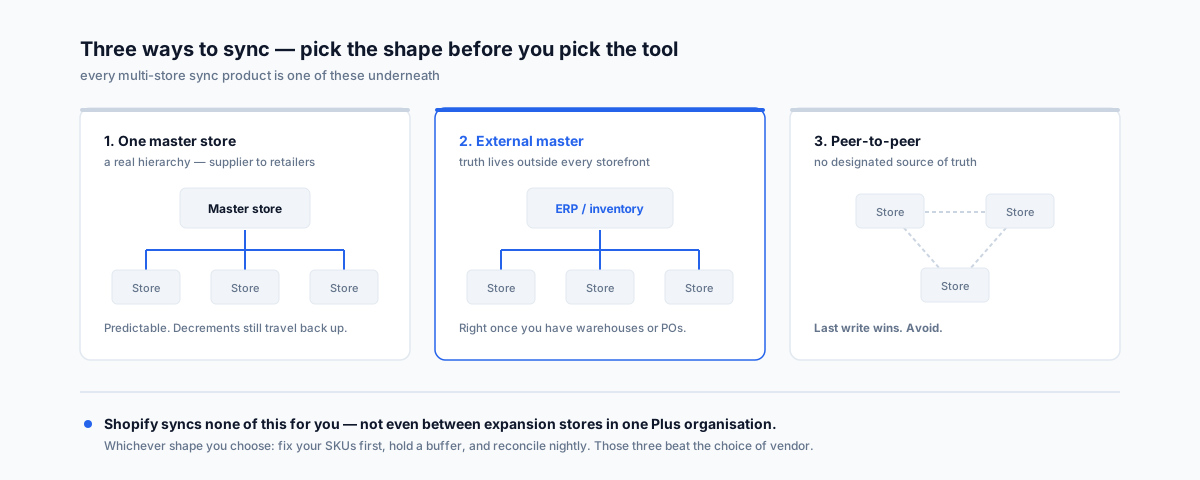
Everything on the market is one of these three, and picking the wrong shape is more expensive than picking the wrong vendor.
1. One master store. One store owns the truth; the others receive. Simple, predictable, and correct when there's a genuine hierarchy — a supplier feeding retailer storefronts, or a head-office store feeding regional ones. The limitation is that stock decrements originating in a receiving store have to travel back to the master, so it isn't purely one-directional in practice.
2. An external master. Inventory truth lives outside Shopify entirely, in an inventory or ERP system, and every store is a receiver. This is the right answer once you have warehouses, purchase orders, manufacturing or wholesale channels, because those things need a home that isn't a storefront. It's also the most work to set up and the most expensive to run.
3. Peer-to-peer. Every store syncs to every other, with no designated truth. This is the one to avoid. With no authoritative source, conflicting updates resolve by whichever arrived last, and a failed message leaves stores permanently disagreeing with nothing to reconcile against.
Choose the architecture before you shortlist tools. Most disappointment with sync apps traces back to using a peer-to-peer setup for a business that needed an external master.
The Apps Worth Knowing
Syncio is built specifically around the source-and-destination model, which makes it the natural fit for supplier-to-retailer and multi-brand setups. Its pricing reflects that asymmetry: source stores are priced on orders containing synced products — free up to 10 a month, then $19, $49 and $99 tiers as volume grows — while destination stores are priced on product count, from free up to 25 products through to $129/month at 10,000. Add-ons for order sync, payouts, product settings and metafields sit on top. It also connects Shopify to WooCommerce, which matters if your second storefront isn't Shopify.
Trunk takes the opposite pricing approach: Essential from $35/month and Pro from $39/month, scaling by orders per month rather than by SKU or channel, with unlimited sales channels and listings on every plan. Pro adds bundling, kitting and duplicate-SKU syncing. Several comparison articles describe Trunk as per-SKU pricing — that isn't what its own documentation says, and the distinction matters a lot if you carry a deep catalogue with modest order volume.
Note the shapes rather than the numbers. A large catalogue with low order volume is punished by product-count pricing and rewarded by order-based pricing. A small catalogue turning over fast is the reverse. Work out which describes you before comparing headline prices, because the cheapest-looking plan flips depending on that answer.
If You Build It Yourself
Custom sync via the Admin API is entirely reasonable for a technical team, and three things bite everyone who does it.
The echo loop. Store A's inventory changes, your webhook fires, you write to Store B. Store B's inventory changes, which fires its webhook, which writes back to Store A. Without an explicit guard, you have an infinite loop burning API calls. The fix is to tag writes your own system made and ignore the resulting webhooks, or to enforce a strict one-way flow per record.
The race window. Between the sale in Store A and the write landing in Store B there is a window — usually seconds, occasionally much longer under load or retry. Two customers can buy the last unit inside it. No amount of engineering closes this window; it can only be made small. Which is why the next section isn't optional.
Partial failure and reconciliation. Webhooks get missed. Requests fail. Rate limits throttle you at exactly the moment a flash sale generates the most updates. A sync system without a periodic full reconciliation will drift, and the drift is invisible until someone counts stock by hand. Schedule a nightly full comparison and log the corrections — if that log is never empty, you've learnt something important about your event pipeline.
Buffer Stock Is Not Optional
Every multi-store setup needs safety stock, because the race window can't be eliminated.
Hold back a quantity on fast-moving lines so the last unit is never simultaneously purchasable everywhere. The right buffer is a function of how fast a line sells and how bad an oversell is: on a $30 t-shirt with deep stock, one or two units is plenty; on a one-off or a high-value item, list it in one store only and don't sync it at all.
That last option is underrated. Not everything has to be synced. Unique items, clearance lines and anything where an oversell is genuinely damaging are better assigned to a single store than spread across several with a safety margin protecting them.
The Australian Angles
Two things worth flagging for local merchants.
The AU/NZ split is the most common local multi-store setup, and it's now often unnecessary. If both storefronts are the same entity selling the same catalogue, Markets handles the domain, currency and pricing without a second store to keep in sync. If they're genuinely different companies, keep them separate — and note Shopify's own advice that finance and legal should confirm which entity is selling in each market before any consolidation.
Watch what the split does to your GST position. Where a second store exists to serve overseas customers, the tax treatment follows the transaction, not the storefront. Exports of goods can be GST-free, but only where the conditions are met — including that the goods are exported within 60 days of the earlier of payment or invoice, with documentary evidence to support it. The ATO's guidance on exports and GST sets out the requirements. If goods aren't exported in time, GST becomes payable on that sale — so a store configured to treat everything it sells as GST-free is an assumption worth checking rather than a setting worth trusting.
How To Choose
- Two storefronts, same entity, same catalogue, different country — don't sync. Consolidate into one store with Markets.
- You supply retailers or franchisees who run their own stores — source-and-destination model. Syncio is built for exactly this shape.
- Several own-brand stores, one warehouse, deep catalogue, moderate order volume — order-based pricing suits you better than product-count pricing.
- You have warehouses, purchase orders or manufacturing — external master. The truth belongs in an inventory system, not in a storefront, and every store becomes a receiver.
- Any setup at all — fix SKUs first, set a buffer, and schedule nightly reconciliation. These three do more than the choice of vendor.
- High-value or one-off items — don't sync them. Assign them to one store.
Getting Help
The expensive version of this problem isn't the sync tool subscription. It's the six months of quiet drift before anyone notices, and the cancelled orders and refunds that surface it — usually during the busiest week of the year, because that's when the race window is widest and the reconciliation nobody scheduled would have mattered most.
Our Shopify Integrations service works through which architecture your setup actually needs, cleans up the SKU data that every sync depends on, and builds the reconciliation that tells you when something has quietly stopped working.