
28 July 2026
Single Touch Payroll Phase 2: What's Still Catching Australian Small Businesses Out
STP Phase 2 is now the permanent payroll reporting standard, with no further deferrals — but small businesses are still tripping on the same handful of mistakes. What changed from Phase 1, the setup errors that duplicate an employee's income, and a checklist for getting it right.
Single Touch Payroll Phase 2 stopped being a "coming change" a while ago — the ATO is explicit that it's now the permanent reporting standard for every Australian employer, with no further transition deferrals on the table. So the interesting question for a small business in 2026 isn't "when do I need to comply" — it's already assumed you do — it's why the ATO's own list of common STP2 mistakes still fills up with the same handful of errors, most of which trace back to how a business set payroll up in the first place rather than anything happening pay-run to pay-run.
What Actually Changed From Phase 1
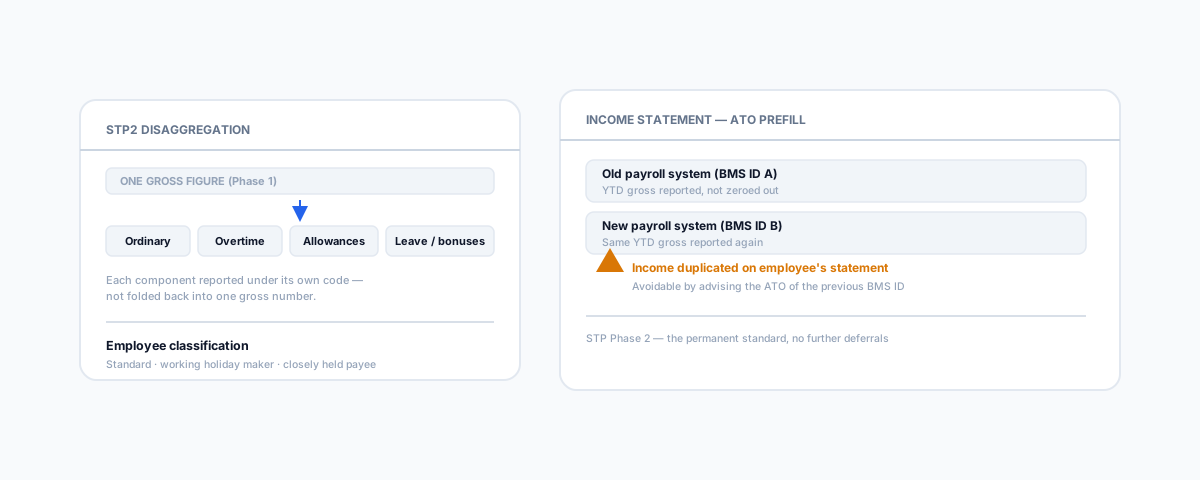
Phase 1 let most businesses report a single gross wage figure per employee, per pay run, and call it done. Phase 2 requires that gross figure broken apart — disaggregated — into its actual components: overtime, bonuses and commissions, director fees, paid leave, and a growing list of allowance types, each reported under its own specific code rather than folded into one number. On top of that, every employee now needs a correctly reported income type (individual non-business, working holiday maker, closely held payee, and others) and employment basis, and when someone leaves, a structured cessation reason code has replaced the old free-text field. None of this changes what you're paying anyone — it changes how precisely that payment has to be classified on its way to the ATO.
Where the Mistakes Actually Happen
The pattern across small businesses is remarkably consistent, and it's rarely about getting a pay run wrong in the moment — it's about setup decisions made once, early, that then repeat every single pay cycle. Pay items and wage categories carried over from an old system get mapped into STP2 without being reviewed, so an allowance that should be itemised separately ends up bundled back into ordinary gross, or incorrectly flagged as "not reportable" entirely. Employee classification is the second recurring trap — working holiday makers and closely held payees don't report the same way as standard employees, and a business that's never had one before doesn't always know the category exists until it's set up wrong.
The mistake that causes the most visible damage, though, is switching payroll software mid-financial-year without handling year-to-date continuity properly. Every STP-enabled payroll system has its own Business Management Software ID (BMS ID) — think of it as the system's identifier to the ATO for that employee's running totals. Move to a new payroll platform without either zeroing out YTD amounts in the old system or correctly advising the ATO of the previous BMS ID, and an employee can end up with duplicated income showing on their ATO-prefilled income statement — the old system's figures and the new system's figures both counted. It's an entirely avoidable error, but it only surfaces at tax time, well after the payroll switch that caused it.
Why Precision Here Actually Matters
It's tempting to treat this as reporting bureaucracy that doesn't affect anyone's actual pay — but the classification is the mechanism, not paperwork sitting alongside it. Correct income type and allowance disaggregation is what determines correct PAYG withholding and what counts toward an employee's reportable earnings for super purposes. Get the classification wrong consistently enough, and it isn't just an untidy report sitting with the ATO — it can misstate what an employee was actually owed, which is a considerably harder thing to unwind after the fact than a reporting field.
A Practical Setup Checklist
- Review pay item mapping whenever you touch payroll software — don't assume old wage categories translated correctly into STP2 codes; check each one, particularly allowances.
- Confirm employee classification explicitly — working holiday makers and closely held payees need their own review, not the default "standard employee" assumption.
- Handle BMS ID continuity deliberately if you switch systems — either zero out YTD figures in the old platform or provide the ATO the previous BMS ID, never neither.
- Don't default anything to "not reportable" — that setting should be a deliberate choice for a specific pay item, not a shortcut during setup.
Getting Help
STP2 mistakes are almost always setup mistakes, not pay-run mistakes — which means the fix is a one-time review, not an ongoing burden, if it's done properly. If your business runs payroll through Xero and Deputy, the classification settings sit inside that same system and are worth checking as part of any rostering or payroll setup review. Our Small Business IT Support service can review payroll and systems setup end to end, so an STP2 misconfiguration doesn't surface as an unpleasant surprise on someone's tax return.