
22 July 2026
Rostering and Timesheets on Autopilot: Deputy, Xero Payroll, and What Actually Needs Human Sign-Off
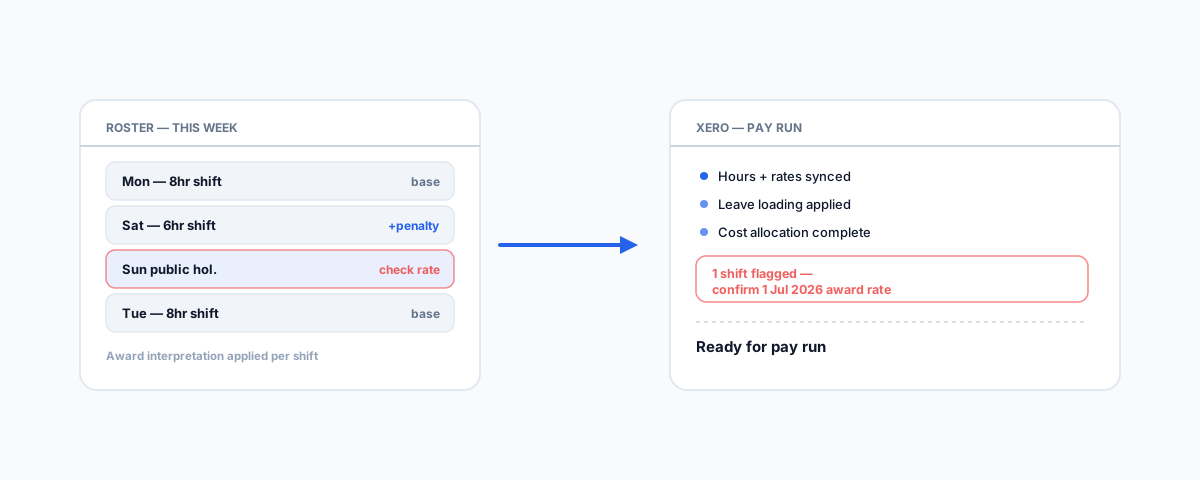
Deputy calculates overtime, penalty rates, and leave loading against your award, then pushes the numbers straight into Xero for payroll — a genuine time-saver. But the 2026 Annual Wage Review is a live test of whether that automation actually stayed current, and Fair Work holds the employer liable either way.
Rostering and payroll used to be one of the most manual jobs in running a business with shift workers — a spreadsheet roster, a paper or app timesheet, someone manually working out overtime and penalty rates, and then re-typing the totals into payroll software. Deputy and Xero together largely remove that manual step: Deputy handles the roster and timesheets, calculates what each shift is actually worth against the award you've configured, and pushes that straight into Xero for pay runs. It's a genuine time-saver, not a marketing claim. The part worth being deliberate about is where that automation still needs a human to check its work — and the 2026 Annual Wage Review, which landed three weeks before this was written, is a good live test of exactly that.
What Deputy and Xero Actually Automate
Deputy's Award Interpretation engine sits over your rostering and timesheet data: as staff clock on and off, or a roster is built, Deputy calculates overtime, penalty rates, leave loading, and cost allocation against whichever award or enterprise agreement you've configured for each employee. Once a timesheet is approved, that calculated cost — not just raw hours — flows into Xero, which runs the actual pay run on the numbers Deputy has already worked out. Deputy's own documentation on award interpretation with Xero covers the mechanics. The integration also syncs the other direction — new employees and their details flow from Xero into Deputy — so a new hire is set up once, not twice.
Where This Genuinely Saves Time
The value is real and worth naming plainly: nobody is manually calculating Saturday penalty rates or public holiday loading against a modern award by hand, which is exactly the kind of calculation that's tedious to do correctly and easy to get subtly wrong under time pressure. Timesheet approval becomes a review step rather than a data-entry step, since the numbers are already calculated when a manager looks at them. And because Deputy and Xero are talking to each other directly, there's no manual re-keying between the roster and the pay run, which is where transcription errors used to creep in.
Why the 2026 Wage Review Is a Good Test of the Automation
The Fair Work Commission's 2026 Annual Wage Review lifted modern award minimum rates by 4.75% and the National Minimum Wage by 6%, to $26.44 an hour, effective from the first full pay period on or after 1 July 2026. That's not a hypothetical example — it happened three weeks before this was written, and it's a genuinely useful test case: has anyone actually confirmed the new rates loaded correctly into your Deputy award templates, or is the assumption simply that the software handled it? Automated award interpretation is only as current as the template behind it, and a rate change of this size, applied to every shift since 1 July, compounds quickly if it was missed.
Why Getting This Wrong Matters More Than It Used To
The stakes here are higher than a simple accounting correction. From 1 January 2025, intentional underpayment of wages became a criminal offence under the Closing Loopholes workplace reforms — the Fair Work Ombudsman is the primary source on minimum wage and underpayment obligations. Fair Work has also been explicit that responsibility sits with the employer, not the software: a business cannot point to Deputy or Xero as the reason an underpayment happened. That combination — a genuine criminal offence for intentional underpayment, and no software-fault defence for the honest mistakes — is exactly why an automated, well-configured system still needs a human periodically checking that it's actually current.
The Edge Cases That Still Need a Human
Automated award interpretation handles the routine case well. These are the situations that regularly slip through and are worth a specific, deliberate check rather than trust by default:
- Annual wage review updates — as above, the new financial-year rates need to be confirmed in your award templates every 1 July, not assumed.
- Junior and apprentice rate changes on a birthday — many awards step junior and apprentice pay rates up at specific ages, and a system won't always catch this without the employee's date of birth correctly configured and the template built to act on it.
- Public holiday and penalty rate stacking — some shifts combine multiple penalty conditions (a Sunday that's also a public holiday, for instance), and the interaction between rules is exactly where interpretation software is most likely to need a manual sanity check.
- Higher duties and allowances — a staff member temporarily covering a more senior role, or entitled to a tool or travel allowance, needs that reflected in the specific shift, which depends on someone actively flagging it rather than the system inferring it.
- New hires and reclassifications — a new employee not yet mapped to the correct award classification, or an existing employee whose role or hours changed, is a common source of quiet, ongoing underpayment until someone checks the setup.
A Practical Habit, Not Constant Second-Guessing
None of this means distrusting the automation — it means treating it the way you'd treat any financial system with real legal consequences: reviewed on a schedule, not just set up once and left alone. A short quarterly check against the current award rates, and a specific check every 1 July when the Annual Wage Review lands, catches the majority of what actually goes wrong. If you're running Deputy alongside other field-service systems — SimPRO for jobs, Xero for the books — our guide to unifying SimPRO, Xero, and Deputy into one AI-assisted dashboard covers the broader systems picture this sits inside. For the wider software landscape trades businesses run on, our guide to software for tradies in Australia is a useful starting point.
Getting Help
Setting up Deputy's award templates correctly in the first place, and building a habit of checking them against Fair Work's annual updates, is a small, well-defined piece of work compared to the cost of getting it wrong. Our Workflow Automation service sets up and audits exactly this kind of rostering-to-payroll integration, so the automation is doing what you think it's doing rather than quietly drifting out of date. The software does the calculation — confirming it's calculating against the right numbers is still, and will likely remain, a human's job.