
27 June 2026
Tradify + Xero: Connecting Job Management to Your Accounting
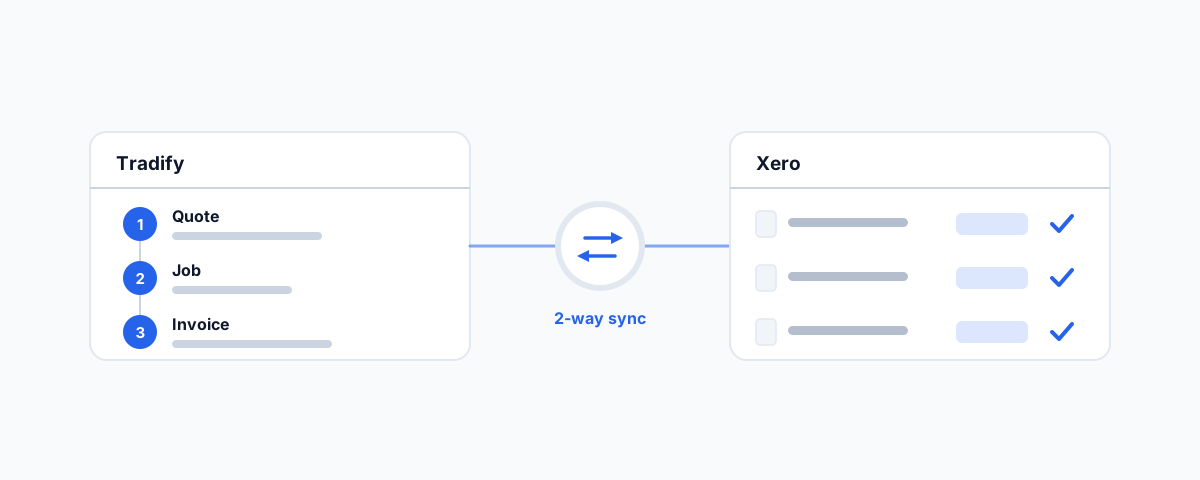
How Tradify's job management connects to Xero for trades businesses — the quote-to-invoice workflow, exactly what the two-way Xero sync does, how to set it up, and who it suits.
For most trades businesses, the work is the easy part. The hard part is everything around it: the quote that was scribbled on a job, the timesheet that lives in a glovebox, the invoice that does not get raised until Sunday night, and then the data entry that copies all of it into Xero a second time. Every one of those handovers is a chance to lose money — a job that never gets invoiced, a number typed wrong, an hour that should have been spent quoting the next job instead of doing paperwork. Tradify exists to collapse that admin into one flow, and its Xero connection is what stops the same information being entered twice.
What Tradify Is
Tradify is job management software built for trades — electricians, plumbers, gas and HVAC, builders, and the like. Rather than juggling a quoting tool, a calendar, a notebook, and a separate invoicing app, you run the whole job lifecycle in one place: capture an enquiry, send a quote, schedule and dispatch the work, track the job with photos and notes, log time and materials, and invoice when it is done. It works on a phone or tablet in the field as well as on a desktop in the office, so the person on the tools and the person doing the books are looking at the same job.
The point of a single system is not the feature list; it is that nothing falls through the gaps between separate tools. When the quote, the job, the time, and the materials all live together, the invoice is something the system can assemble for you rather than a task you start from scratch.
The Quote-to-Invoice Workflow
This is where Tradify earns its place. A job flows end to end without being re-entered at each step. You build a quote from your price list, and when the customer accepts it, that quote becomes a job rather than something you re-type. As the job runs, staff log their hours and add the materials used. When the work is finished, those timesheets and costs turn into an invoice with the line items already populated — you are reviewing and sending, not building from zero.
The result is that invoicing stops being the dreaded end-of-week chore and becomes a by-product of doing the job properly. Jobs get invoiced sooner, fewer billable hours and parts slip through, and the number on the invoice actually reflects what happened on site.
What the Xero Integration Actually Does
The invoice is also exactly where Tradify hands off to your accounting, and the integration is a genuine two-way sync rather than a one-direction export. Invoices you raise in Tradify appear in Xero, and crucially, payments and credit notes reconcile back the other way — so when a customer pays an invoice and you reconcile it in Xero, Tradify knows it is paid too. You are not maintaining two separate pictures of who owes you what.
It goes beyond invoices. Your customer contacts stay aligned between the two systems, so a detail updated in one is not stale in the other. Suppliers and bills can flow through to Xero, and you can bring your price lists and customer information across from Xero when you set up. The governing idea is "enter it once": the job system and the accounting system share data instead of each demanding their own copy. If you have read our guide to Shopify Xero integration, the principle is the same one that makes any Xero connection worth having — a single source of truth, kept in step automatically, so your books are not a re-typing exercise.
Setting It Up
Connecting the two is straightforward, but a little care up front saves cleanup later. You authorise Tradify to connect to your Xero organisation, then map the important settings: which Xero accounts your invoices and bills should post to, and which tax rates apply so GST lands correctly. Tradify offers integration presets that handle common configurations, but it is worth confirming the account and tax mapping matches how your bookkeeper wants things coded.
Before you switch everything over, run one real invoice end to end — raise it in Tradify, check it appears correctly in Xero, record a payment, and confirm it reconciles back. Getting that single round trip right tells you the mapping is sound before you rely on it for every job. Tradify offers a free trial and, for existing Xero customers, a sign-up discount, so you can test the workflow against your own data before committing.
Who It's For
Tradify suits small-to-mid trades businesses that quote and invoice regularly and want to stop running their admin across disconnected tools. The payoff is largest when you have staff in the field whose time and materials need capturing, recurring or maintenance work to schedule, and a steady flow of quotes and invoices where double entry into Xero is quietly eating hours each week. A sole trader doing a handful of invoices a month may find a simpler setup is enough; but once jobs, staff, and invoices start to pile up, a single system that feeds Xero automatically usually pays for itself in recovered billable time alone.
Getting the Accounting Side Right
One caution worth stating plainly: an integration is only as good as its configuration. If the account and tax mapping between Tradify and Xero is wrong, you will faithfully sync incorrect data, and untangling miscoded invoices after months of trading is far more painful than getting it right on day one. Decide your account structure and GST treatment, map them deliberately, and verify with that first test invoice. Done properly, the sync then quietly keeps your job system and your books in agreement without you thinking about it.
Getting Help
Connecting job management to accounting is the kind of setup that is simple in principle and full of small decisions in practice — the account mappings, the tax rates, the test before go-live, and migrating your existing customers and price lists cleanly. If you would rather have it scoped, connected, tested against a live invoice, and documented so your team and bookkeeper can follow it, our Workflow Automation service handles exactly this kind of integration. Get the connection right once, and the paperwork stops being the part of the job you dread.