
31 July 2026
Windows 11, Version 26H2: What Actually Matters for Small Business This Fall
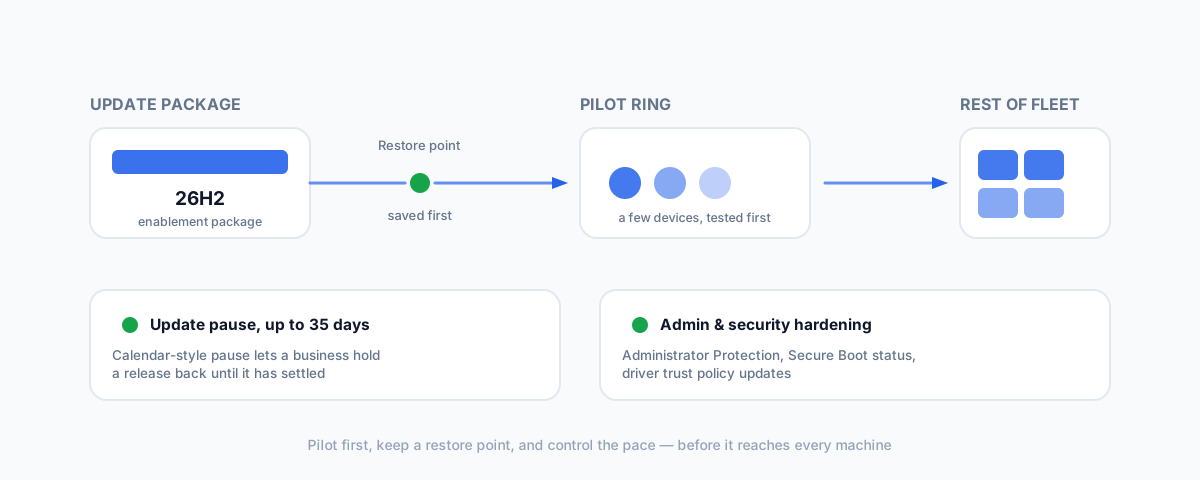
Windows 11 version 26H2 is rolling out this fall as a lightweight enablement package. Most of the coverage is consumer feature spotting — for a small business, the handful of things worth knowing are Copilot's deeper reach into the OS, Point-in-Time Restore, update controls, and admin hardening.
Windows 11, version 26H2 is Microsoft's annual feature update, expected to roll out this fall as a lightweight enablement package rather than a full reinstall — the same low-friction delivery method as the last couple of annual updates. Most of what's been written about it so far is a straightforward tour of visible changes: a refreshed taskbar, File Explorer polish, a Copilot box replacing the search bar. None of that tells a small business owner what to actually pay attention to. A few things in this release are worth a proper look before it lands on every machine in the business, and — worth flagging up front — some specifics below are still based on Windows Insider preview and release-preview builds as of writing, so details could shift before the final release ships.
Copilot Is Moving Further Into the OS
The most visible change in 26H2 is how much further Copilot reaches into everyday use. The taskbar search box is being replaced or augmented with a Copilot-driven search experience, and File Explorer is gaining a dockable Copilot side panel along with quick "Ask Copilot" actions when you hover over a file. For a personal machine this is a convenience. For a business machine, it's the same conversation the iOS 27 release forced with Siri: a feature that reaches further into what's on the screen and in the file system is a feature you should know the data-handling boundaries of before staff start using it on anything sensitive — client files, financial records, anything covered by a confidentiality agreement. If your business manages devices centrally, this is worth confirming with whoever administers your fleet rather than assuming the defaults are fine for every machine.
Point-in-Time Restore — a Genuine Safety Net
The feature most worth knowing about isn't AI at all. Point-in-Time Restore creates automated, granular restore points and lets a device be rolled back to a specific earlier state in minutes — a real modernisation of the classic System Restore, which had barely changed since Windows XP. For a business, this matters most in exactly the moment you'd expect: right after a driver update, an app install, or a Windows update goes wrong on a machine someone actually needs working that day. It's rolling out to 24H2 and 25H2 as well as 26H2, so you may see it before the wider update even lands.
More Control Over When Updates Land
Windows Update's pause options are getting more flexible — a calendar-style control lets you choose a specific pause end date, with updates able to be held off for up to 35 days. That's a meaningful window for a small business without a formal IT update-ring process: it gives you room to let a .0 release settle before it reaches machines that run your point-of-sale, your booking system, or anything else you can't afford to have misbehave mid-shift.
Admin and Security Hardening
A cluster of changes in 26H2 tighten the security baseline rather than add a feature you'll notice day to day: improvements to Administrator Protection, built-in Sysmon functionality for better endpoint visibility, clearer Secure Boot status reporting, and updated driver trust policies. None of these require you to do anything active, but they're the kind of platform-level hardening that quietly makes patching, application control, and restricting admin privileges easier to actually enforce — which is to say, they line up with the same fundamentals covered in our Essential Eight checklist for small business. If you already treat MFA, patching, and restricting admin privileges as non-negotiable, 26H2 is giving you slightly better tools to enforce them, not a new obligation.
Fleet Management Gets a Cleanup Option
For businesses running Enterprise or Education editions with centrally managed devices, 26H2 adds policy-based removal of preinstalled Microsoft Store apps — a way to strip default bloat from every managed machine at once instead of uninstalling it by hand or living with it. If you manage more than a handful of devices through Intune or similar, this is a small but genuine time-saver; if you're a sole trader on Windows 11 Home or Pro without fleet management, it doesn't apply to you.
How the Rollout Actually Works
Microsoft has been telling IT admins to treat 26H2 the way you'd treat any annual update: pilot it on a small ring of devices across different roles in the business first, confirm backups and recovery options are working, review your update rings, and have a rollback plan documented before it reaches everyone. Because it ships as an enablement package rather than a full reinstall, the actual update process itself is quick — the risk isn't the install, it's finding out a line-of-business app doesn't like the new version after it's already on every machine. Microsoft's own Windows IT Pro Blog guidance on getting ready for 26H2 is worth a read if you or your IT provider manage more than a couple of machines.
Should You Update the Day It Ships
For a personal laptop, day-one is fine. For anything the business actually depends on — the machine running your POS companion software, the one with line-of-business software that's fussy about Windows versions, anything with a formal MDM profile — the usual caution for a .0-style annual update applies: let it sit for a couple of weeks, watch for early bug reports, and update once the first patches land unless there's a security fix that can't wait. A Copilot expansion and a wave of security-baseline changes are, if anything, more reason to test on a spare device first rather than less.
Getting Help
If you'd like a hand deciding whether Copilot's expanded reach in 26H2 is appropriate for the devices your business actually uses, or getting a proper pilot-and-rollout plan in place before this update reaches every machine, our Small Business IT Support service can take that off your plate.