
4 August 2026
How to Create Digital Loyalty Cards for Apple Wallet
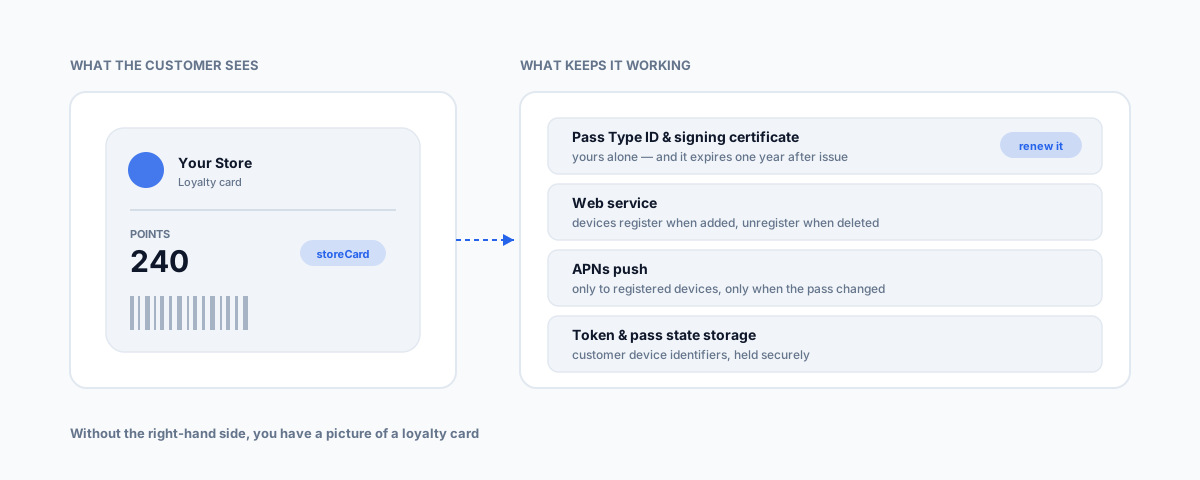
Designing the card is the easy part. A points balance that updates and a card that appears on the lock screen outside your shop both need a web service, push infrastructure, and a certificate that expires every year. What the work actually involves, and when to rent it instead.
Search for how to make an Apple Wallet loyalty card and you'll find plenty of guides that treat it as a design exercise — pick your colours, add your logo, drop in a barcode, done. That part genuinely is easy. It's also the part that doesn't matter much, because a card you can't update is a picture of a loyalty card.
Everything that makes a wallet pass better than the plastic one in someone's glovebox — a points balance that changes when they buy something, a card that appears on the lock screen as they walk past your shop — runs on infrastructure sitting behind the pass. So the real question isn't how to design one. It's whether you build that infrastructure or rent it, and for most small businesses the honest answer is rent.
What an Apple Wallet Pass Actually Is
A pass is a .pkpass file: a small bundle containing a JSON file that defines the pass and its data fields, plus your images, cryptographically signed and zipped. When someone taps "Add to Apple Wallet", that bundle is what lands on their phone.
Passes come in styles, and loyalty cards use storeCard — the same style Apple intends for points cards, discount cards and gift cards. Choosing the right style matters because it determines the layout and how the pass behaves, not just how it looks.
What Apple Requires Before You Create Anything
Two things, and both are gates rather than options.
An Apple Developer Program membership. Apple lists this at $99 annually on its program page; pricing is set by Apple and worth confirming at enrolment for your region and entity type.
Your own Pass Type ID and signing certificate. Apple requires each issuer to have their own — you can't borrow someone else's, and the certificate is what proves a pass came from you and hasn't been altered in transit. Apple's Wallet Passes documentation is the canonical reference for the mechanics.
Then the operational detail that catches people out, which is worth putting in your calendar the day you set this up: the pass signing certificate expires one year after you create it, at the same time of day it was issued. When it lapses you cannot issue new passes and you cannot update existing ones. It's a silent failure — nothing breaks loudly, your loyalty program just quietly stops working. Renewing it is routine; discovering it during a promotion is not.
Static Passes vs Live Passes
This is the dividing line that determines how much work you're actually signing up for.
A static pass is a barcode, a logo and some text. It never changes. You can generate one and hand it out, and it will work as an identifier at the counter — but the customer's points balance lives in your POS, not on the card, and the pass will never notify them of anything.
A live pass updates. To get that, you need:
- A web service endpoint that Apple's Wallet talks to. When a customer adds your pass, their device registers with your server; when they delete it, it unregisters. You have to handle both.
- APNs integration — Apple's Push Notification Service — to tell registered devices that a pass has changed.
- Secure storage for device tokens and pass state, because you're now holding identifiers tied to individual customers' devices.
- Discipline about when you push. Send only to devices actually registered for that pass, and only when the pass has genuinely changed. Pushing on a schedule, or to everyone, is how you get throttled and how you annoy people.
That's a real backend service with real maintenance, not a weekend project — which is the fact most "how to create a loyalty card" guides skip entirely.
The Features That Earn the Install
Worth knowing what you're buying with that effort, because these are the things a plastic card and an unopened app can't do:
- Location relevance. A pass can surface on the lock screen when the customer is near coordinates you specify — up to ten locations per pass. For a business with a few sites, this is the single most valuable feature in the whole system: your card appears when they're standing outside, without them opening anything.
- Time relevance. A
relevantDatelets the pass surface at a moment that matters, which suits bookings, events and expiring offers. - Change messages. When you update a field configured with a change message, Wallet shows the customer a notification. Points added, reward unlocked, offer about to expire — delivered without an app install and without an email.
That combination is why wallet passes work. It's also why a static pass is barely worth doing.
Build or Rent
Unless you have engineers and a reason, rent. Pass platforms — PassKit, Passcreator, PassNinja, Loopy Loyalty and others — exist precisely because certificate management, the registration web service and APNs plumbing are the same problem for everyone, and they'll handle certificate renewal so the annual expiry isn't your problem.
Build it yourself when you have a genuine reason: passes that must reflect data living in a system a platform can't reach, volume that makes per-pass pricing painful, or a compliance position that rules out a third party holding customer data. Those are real reasons. "It looks simple" is not one — the pass looks simple, the update service isn't.
Don't Forget the Android Half of Your Customers
Apple Wallet only exists on iPhone. Google Wallet passes are a separate implementation with their own accounts, formats and approval process — not a checkbox on the same build.
A loyalty program that only works for iPhone users is half a loyalty program, and which half you're excluding depends on your customer base rather than anything you control. When you evaluate a pass platform, whether it issues both Apple and Google passes from one system is a selection criterion, not a nice-to-have. It's also the strongest practical argument for renting rather than building — you'd otherwise be building the whole thing twice.
The Australian Compliance Layer
The moment you launch a loyalty program you start collecting customer data, and that brings obligations under the Privacy Act and the Australian Privacy Principles.
Beyond that baseline, the ACCC has looked hard at this category. Its customer loyalty schemes review found that scheme terms and privacy policies were frequently vague, that consumers had limited control over how their personal information was used, shared or monetised, and recommended schemes stop automatically linking members' payment cards to their loyalty profiles. It was aimed at large schemes, but the findings translate directly into three things a small operator should just do:
- Write terms a customer can actually read, particularly around how points are earned, expire, and what happens if you change the rules.
- Say plainly what data you collect and who you share it with. If you're using a third-party pass platform, that platform is holding customer data and your privacy policy needs to reflect it.
- Don't auto-link payment cards to loyalty profiles without explicit, informed consent.
None of that is onerous at small scale. It's much easier to do at launch than to retrofit once you have a few thousand members.
If You Already Sell Through Shopify or Square
Check what you've got before building anything. Several loyalty platforms that plug into Shopify and Square issue wallet passes as part of the product, which means the certificate, the update service and the Google Wallet equivalent are all somebody else's problem. Our comparison of Shopify loyalty apps covers that layer — and if the answer there is yes, the entire contents of this post become someone else's maintenance burden.
Worth knowing too: when a customer says the card won't load or won't add, that's usually a Wallet problem rather than a loyalty problem. Our guide to Apple Wallet connection errors covers triaging that.
Getting Help
The pass is the visible part; the value is in what it's connected to. A loyalty card that doesn't know what someone bought this morning is a barcode with a nicer background. Our Workflow Automation service covers the join — getting passes talking to your POS and customer records so balances update on their own, and picking a platform that covers both Apple and Google rather than leaving half your customers out.