
1 August 2026
"Unable to Connect to Apple Wallet Services": What That Error Actually Means
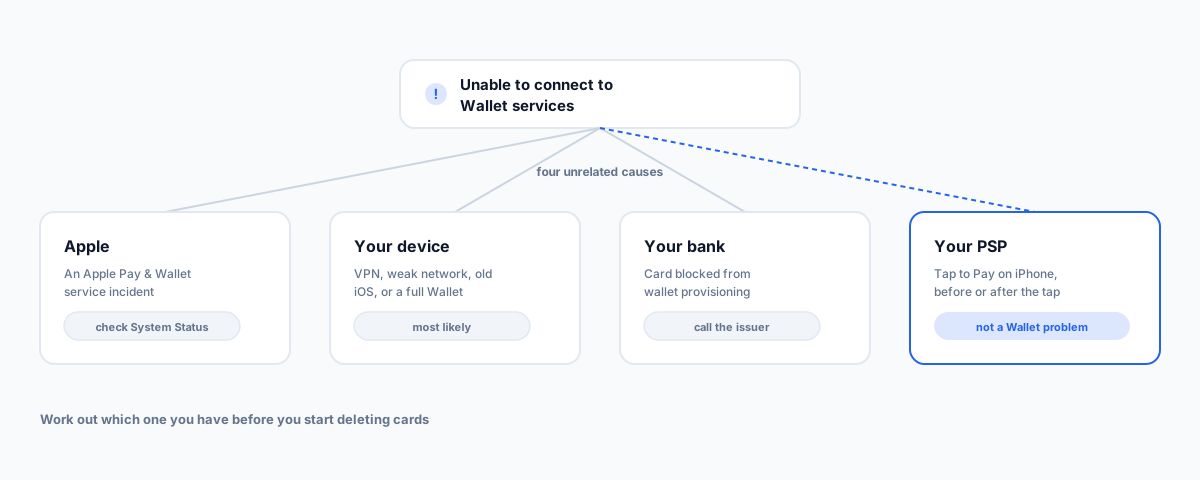
One vague error message covers at least four unrelated failures — your device, your Apple Account, your bank, or Apple itself — and a fifth that isn't a Wallet problem at all if you're the merchant taking the payment. How to tell which one you have before you start deleting cards.
If your iPhone has told you it can't connect to Wallet services, you've been handed a symptom, not a cause. The same message — and its close cousins, "Could not connect to Apple Pay" and "Apple Pay services are unavailable", which Apple has used in slightly different wording across iOS versions — gets shown for at least four unrelated failures. Your device, your Apple Account, your bank, or Apple's own servers. There's a fifth case too, which looks nearly identical and isn't a Wallet problem at all.
Most troubleshooting guides respond to this by listing a dozen fixes in no particular order and hoping one lands. That works eventually, but it means you might sign out of your Apple Account and delete your cards to solve something that was an Apple outage all along. Sixty seconds of diagnosis first is worth more than the whole list.
First: Is It You or Apple?
Start here, because it's the one cause you cannot fix and the fastest to rule out. Apple publishes a live System Status page listing Apple Pay & Wallet alongside its other services. If there's an active incident, stop — nothing you change on the phone will help, and the changes you make while troubleshooting can create real problems once service returns.
There's a second free signal that costs nothing to check. If two phones fail at the same moment — yours and a staff member's, or yours and your partner's — it is almost certainly not the phone. Individual device faults don't synchronise. Same goes for the opposite: if one phone on the counter works and another doesn't, you can stop looking at Apple and start looking at that specific device or card.
The Device-Side Causes
If Apple's services are fine, work through these roughly in this order — cheapest and most reversible first:
- A VPN or content blocker. Wallet needs to reach Apple's servers to verify and provision cards, and a business VPN or filtering profile is a common culprit — especially on a phone that was working fine at home and started failing on the office network. Turn the VPN off and try again before anything else.
- The network itself. Wallet is not fully offline for provisioning and verification. Weak Wi-Fi that's technically connected but not passing traffic is a classic cause. Switch to mobile data — or off it — to isolate it.
- Your Apple Account. Signing out and back in resolves a surprising share of these. So does checking your region: if the region on your Apple Account doesn't match the country your card was issued in, Wallet can fail in ways the error message never explains. Even re-selecting the correct region can shake it loose.
- An out-of-date iOS. Wallet is tightly coupled to the OS, and provisioning problems get fixed in point releases more often than people expect.
- Too many cards. The least obvious one. There's a finite amount of secure element space on the device, and a Wallet that's full of cards, passes, transit cards, and old loyalty cards can simply have no room for another. Apple's own guidance for a related setup failure is to remove one or more cards from Wallet and try again. If you've been adding cards for years without removing any, this is worth trying before anything more drastic.
- A restart. Last on this list rather than first, because it's the one people do reflexively without learning anything. It genuinely does clear transient state — just do it after you've ruled out an outage, so you know what actually fixed it.
The Bank-Side Causes
If the error mentions contacting your card issuer, believe it. That message means Apple got far enough to talk to your bank and your bank declined the provisioning — and no amount of device troubleshooting will change that. Australian issuers apply their own restrictions, and a card can be perfectly fine for in-person and online use while being blocked from digital wallet provisioning, usually after a fraud flag, a recent reissue, or an account-level hold.
This is also the honest explanation for the folk remedy of removing the card and adding it back. It isn't magic and it isn't clearing a cache — it forces the card to be re-tokenised from scratch, which fixes a stale or failed token but does nothing at all for the other causes. It's a reasonable step; it's just not a general-purpose fix, and it costs you the setup work, so it belongs after the cheaper checks rather than first.
The Case That's Actually Different: Tap to Pay on iPhone
Here's the distinction almost nothing on the internet draws. If you're a merchant using Tap to Pay on iPhone to accept contactless payments — no terminal, just the phone — and you hit a connection error, you are not troubleshooting Apple Wallet. You're troubleshooting a payments stack, and the diagnostic path is completely different.
Apple is explicit about where the line sits. Its Tap to Pay on iPhone FAQ says that to troubleshoot issues occurring before the tap screen appears or after a successful tap, you contact your payment app developer or payment service provider — not Apple. The tap screen itself is Apple's; everything either side of it belongs to whoever provides your payment app.
Two specifics from that same FAQ worth knowing:
- "Unable to Set Up Tap to Pay on iPhone — Remove one or more cards from Wallet and try again" is a space problem, not a connection problem, despite reading like one. Delete some cards and retry.
- Missing merchant IDs are an account-linking problem. Your merchant IDs need to be visible under the Apple Account you actually used to set up Tap to Pay — sign in to Apple Business with that same account to view and add them.
So if you're the one taking the money, your first call is your payment provider, not Apple Support and not a phone reset.
If You Take Payments, This Is a Trading Outage
Worth naming plainly: when a wallet failure happens at the counter during trade, it costs you exactly what a carrier outage costs you. Customers can't pay, and the clock is running while you troubleshoot. We've made the case for a second payment path after three carrier outages in a month, and it applies identically here — the cause is different, the effect on the till is the same. If your only way to take a card is one iPhone running one payment app, that's a single point of failure regardless of how reliable each piece is.
The Triage Order
Skimmable version, for when this happens mid-service:
- Are you the merchant or the customer? If you're taking the payment through Tap to Pay, skip to your payment provider. Everything below is for a phone that can't pay or can't add a card.
- Check Apple's System Status. Thirty seconds, rules out the unfixable.
- Does another phone work? Two phones failing together means it isn't the phone.
- Turn off any VPN, and switch between Wi-Fi and mobile data.
- Restart the phone.
- Check the Apple Account — signed in, correct region.
- Update iOS if there's one waiting.
- Thin out Wallet if it's full of old cards and passes.
- Remove and re-add the affected card — last, because it's the most work to undo.
- Call the issuer if the error ever mentions contacting them, and don't spend time on steps 4 to 9 first.
Getting Help
Most of the time this resolves in the first three steps, and the value is in not having done the last three unnecessarily. Where it's worth getting help is the merchant case — if contactless payments on your own devices are failing intermittently, that's a payments configuration problem that tends to recur until someone traces it properly. Our Small Business IT Support service handles that end of it, and if the underlying setup is the issue rather than the phone, our Square POS setup work covers getting the payment side configured so it stops happening.