
28 July 2026
"Do You Actually Need a Business VPN? Secure Remote Access for a Hybrid Small Team"
Hybrid work made remote access a default requirement, but a traditional VPN isn't automatically the right answer anymore. What a VPN actually does versus Zero Trust Network Access, where a simple VPN is still fine for a small team, and the one control that matters regardless of which you choose.
A few years ago, "set staff up with a VPN" was the whole answer to remote access. It isn't anymore — not because VPNs stopped working, but because the security model underneath them has aged badly for how hybrid teams actually operate, and a newer approach, Zero Trust Network Access, has become the default recommendation for a lot of businesses that don't actually need it. Here's what each one actually does, and how to tell which one fits a small team.
What a Traditional VPN Actually Does
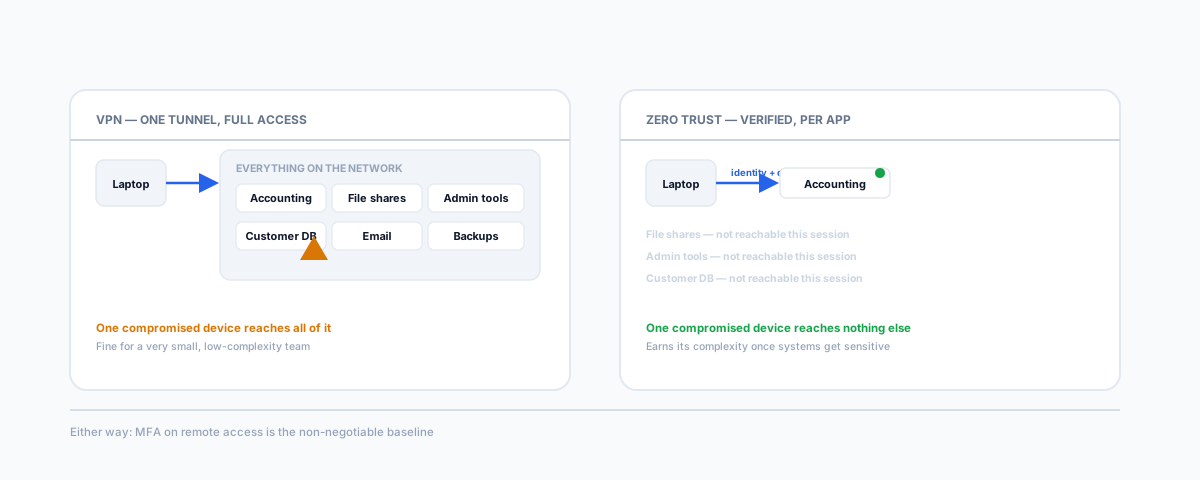
A VPN creates an encrypted tunnel from a device to your business network, and once that tunnel is up, the device is effectively inside — it can generally reach whatever's on the network the same way it would sitting in the office. That's the whole point of a VPN and also its core weakness: access is granted per-connection, not per-resource. If one laptop on that VPN gets compromised — a phished credential, malware, a stolen device with a saved session — whatever that device could reach, an attacker can now reach too. Industry security researchers have been flagging exactly this lateral-movement risk as VPN usage has scaled with remote work, which is the main driver behind the shift toward something more granular.
What Zero Trust Network Access Does Differently
Zero Trust Network Access flips the model: instead of granting broad network access once you're authenticated, it grants access to specific applications, one request at a time, verifying identity and device health on each request rather than trusting a session for as long as it's open. A staff member using a ZTNA setup to reach your accounting software doesn't get put "on the network" the way a VPN does — they get a verified path to that one application, and nothing else is implicitly reachable if their device is compromised. Industry analysts have projected the majority of new remote access deployments would move to this model rather than traditional VPNs, and for businesses running plenty of sensitive systems, it's a real reduction in blast radius if a device does get compromised.
Where a Simple VPN Is Still the Right Call
None of this means a small business needs to rip out its VPN and buy Zero Trust tooling. If you're a very small team — a handful of people, no complex mix of sensitive systems, no compliance requirement demanding granular access control — a straightforward VPN is still a perfectly reasonable way to let staff reach shared drives or internal tools from home. The lateral-movement risk that makes VPNs a liability at scale is a much smaller concern when there are only a few devices and a few systems in play to begin with. Adding Zero Trust complexity to a two-person office isn't security maturity, it's just more to configure and more to get wrong.
Where Zero Trust Earns Its Complexity
The calculation changes once a team grows past a handful of people, or once the systems being accessed remotely include anything genuinely sensitive — financial systems, customer data, admin access to core infrastructure. At that point, per-application access control and device health checks are doing real work, not just adding friction. If your business already runs on Microsoft 365, this doesn't necessarily mean buying a separate product — Microsoft Entra ID's Conditional Access features let you apply Zero Trust-style controls (requiring a managed, healthy device and MFA before an app is reachable) using infrastructure you likely already have, which is worth checking before assuming a dedicated Zero Trust vendor is required. It's worth reviewing alongside how the rest of your identity and device setup is configured — our guide to domain controller best practices covers the identity side this connects to.
The One Control That Matters Either Way
Whichever model you land on, one recommendation doesn't change: the Australian Cyber Security Centre is consistent that multi-factor authentication on remote access to business systems is a baseline control, not an optional extra, and it's one of the fastest ways to close off the most common way remote access actually gets compromised — a reused or phished password. A VPN with MFA in front of it beats a Zero Trust setup without it, every time. If you haven't reviewed where MFA is and isn't enforced across your business, our guide to the Essential Eight checklist is the place to start.
Getting Help
The right remote access setup is a genuine "it depends" — team size, what systems staff actually need to reach, and whether you're already sitting on infrastructure (like Microsoft 365) that can do more than it's currently configured to. Our Small Business IT Support service can assess what your hybrid team actually needs and set it up properly, rather than defaulting to whichever option sounds more current.