
12 July 2026
Domain Controller Best Practices (2026)
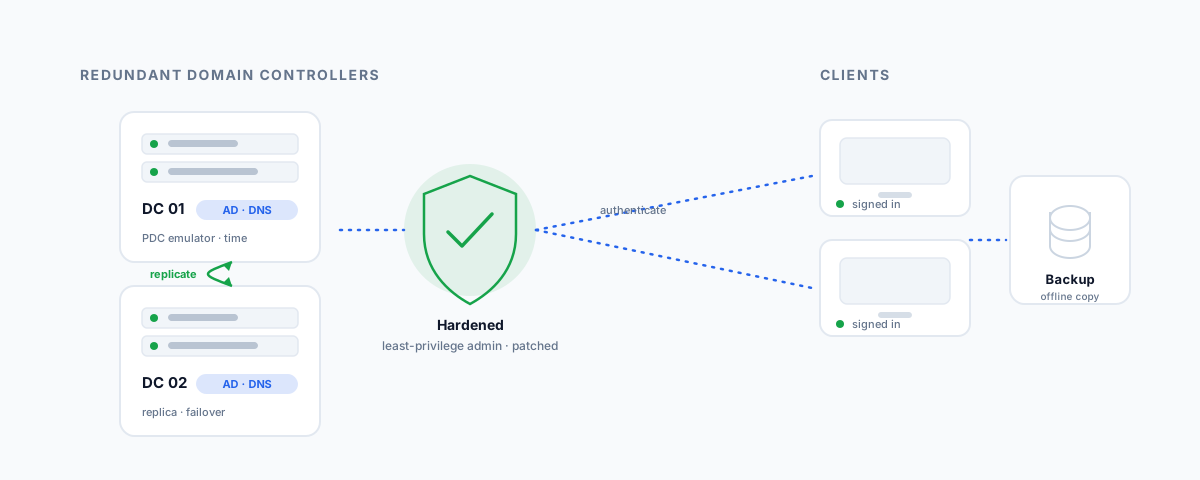
Practical best practices for running Active Directory domain controllers — redundancy, keeping them dedicated, locking down admin access, patching, DNS and time, backup and recovery, and monitoring — plus an honest look at when cloud identity means you no longer need one.
A domain controller is the most important server most businesses never think about. It is the heart of Active Directory — the server that decides who can log in, what they are allowed to do, and how every other machine on the network trusts them. When it works, nobody notices. When it fails, nobody can log in, and when it is compromised, an attacker effectively owns your entire network at once. That combination — critical and heavily targeted — is why domain controllers deserve more deliberate care than the average server. Here are the practices that matter most, pitched at businesses running Active Directory rather than a data-centre team.
First, Do You Even Need One?
It is worth asking the question honestly before hardening something you may not need. For a long time every business with more than a few PCs ran on-premises domain controllers. That is no longer automatic. If your business lives in Microsoft 365 and your identity is in Entra ID (formerly Azure AD), with cloud-managed devices, you may not need a traditional on-prem domain controller at all — cloud identity handles the logins and policy. We cover that side in our guide to Microsoft 365 administration for small business.
Domain controllers still earn their place when you have on-premises servers, file shares that authenticate against Active Directory, line-of-business applications that depend on it, or specific compliance reasons to keep identity local. If that is you — or you run a hybrid of both — the rest of this applies. If it is not, the best domain controller practice might be not running one.
Always Run at Least Two
The first rule is redundancy: never run a single domain controller. If the only one you have dies — a failed disk, a bad patch, a ransomware hit — every user is locked out and the business stops until you rebuild it, which with a single DC can mean a painful restore from backup. Two or more domain controllers replicate with each other continuously, so if one goes down the others keep authenticating users as though nothing happened. This is the single highest-value thing you can do, and for a small business it usually just means a second modest server or virtual machine. Where you run them matters too — spread them across different physical hosts (and, ideally, sites) so one hardware failure or one power outage cannot take them all out together.
Keep Them Dedicated
A domain controller should be a domain controller and little else. It is tempting on a tight budget to make one server do everything — domain controller, file server, print server, the accounting app — but that is a mistake on both reliability and security grounds. Every extra role adds software that needs patching and reasons to reboot, and every extra service is another way in for an attacker who reaches the most sensitive server you own.
| Belongs on a domain controller | Keep off a domain controller |
|---|---|
| Active Directory Domain Services | File and print shares |
| DNS (usually) | Line-of-business and web apps |
| DHCP (acceptable if needed) | Web browsing and email on the server |
| Time synchronisation | Third-party agents you do not strictly need |
The principle is to keep the attack surface and the reboot count as small as possible. A lean, single-purpose domain controller is easier to secure, easier to patch, and far less likely to be knocked over by something unrelated.
Lock Down Admin Access
If a domain controller is the crown jewels, admin access is the key to the vault, and it is where most Active Directory compromises actually happen. A few disciplines make the difference:
- Minimise Domain Admins. The Domain Admins group should be almost empty — a handful of accounts, no service accounts, no "just in case" members. Every extra one is a target.
- Separate admin accounts from daily accounts. Administrators should have an ordinary account for email and browsing and a distinct privileged account used only for administration, never for day-to-day work.
- Never browse the web or read email on a domain controller. That is how privileged sessions get caught by malware. DCs are for administration, nothing else.
- Restrict who can log on where. Use a tiered approach so that high-privilege accounts only ever sign in to the most secure systems, not to ordinary workstations where their credentials can be harvested.
- Manage local admin passwords with LAPS. Windows LAPS gives each machine a unique, rotating local administrator password, so one stolen password does not unlock everything.
- Require multi-factor authentication for administrative access wherever your environment supports it.
None of this is exotic; it is mostly about discipline. The businesses that get breached through Active Directory almost always had too many admins, shared credentials, or someone checking email on a domain controller.
Patch Promptly and Deliberately
Domain controllers are a favourite target for attackers, and serious Active Directory vulnerabilities appear regularly — Zerologon a few years ago let an unauthenticated attacker take over a domain controller in seconds. The lesson is that patching DCs is not optional maintenance you defer to a quiet month; it is security-critical. Apply security updates promptly, but do it deliberately — test where you can, and because you run more than one domain controller, you can patch and reboot them one at a time without an outage. Keep the operating system itself on a supported version; an out-of-support DC is a standing liability no configuration can fix.
Get DNS and Time Right
Two supporting services quietly make Active Directory work, and both are common sources of mysterious problems when misconfigured. Domain controllers almost always run DNS, and AD depends on it completely — clients find domain controllers through DNS, so it has to be correct and resilient. A standard pattern is to run DNS on each domain controller and have them point primarily at each other rather than only at themselves, so a single DC's problems do not break name resolution.
Time is the other one. Kerberos, the authentication protocol underneath Active Directory, rejects requests when clocks drift too far apart, so accurate time is not a nicety — it is what keeps logins working. The domain controller holding the PDC emulator role should be configured as the authoritative time source, syncing from a reliable external source, with everything else in the domain taking its time from the hierarchy. Get this wrong and you get intermittent authentication failures that are maddening to diagnose.
Back Up for Disaster and Ransomware
Even with redundancy, you need real backups, because redundancy protects against a server failing — not against a bad change or an attacker replicating across all your DCs at once. Take regular system-state backups of your domain controllers, keep at least one copy offline or immutable so ransomware cannot reach it, and — this is the part people skip — actually test restoring, because an Active Directory recovery is not a simple file copy. It helps to understand the difference between a non-authoritative restore (bring a DC back and let it catch up from the others) and an authoritative restore (deliberately mark restored objects as the version to replicate out), so you are not learning it during an incident. Our guide to the best automated cloud backup for small business covers the wider backup picture these fit into.
Monitor Replication and Security
Finally, a domain controller you do not watch is one that fails or gets breached quietly. Two things are worth keeping an eye on. The first is replication health — if your domain controllers stop replicating with each other, they drift apart and you get inconsistent logins and policy until it is fixed, so check it routinely rather than discovering it the hard way. The second is security auditing — enable logging of sign-ins and changes to privileged groups, and pay attention to unexpected additions to Domain Admins or logons at odd hours, which are among the earliest signs of a compromise. You cannot respond to what you never see.
Getting Help
Domain controllers reward getting a handful of fundamentals right — run more than one, keep them lean, lock down admin access, patch them, back them up properly, and watch them — and punish neglect, usually at the worst possible moment. If you would like your Active Directory reviewed against these practices, or set up correctly from the start — including the decision of whether on-prem domain controllers still make sense for you versus moving identity to the cloud — our Small Business IT Support service can assess, harden, and maintain it, so the server everything depends on is one you no longer have to worry about.