
17 July 2026
The Card Surcharge Ban Is Coming: Updating Your POS, Pricing, and Checkout Before 1 October 2026
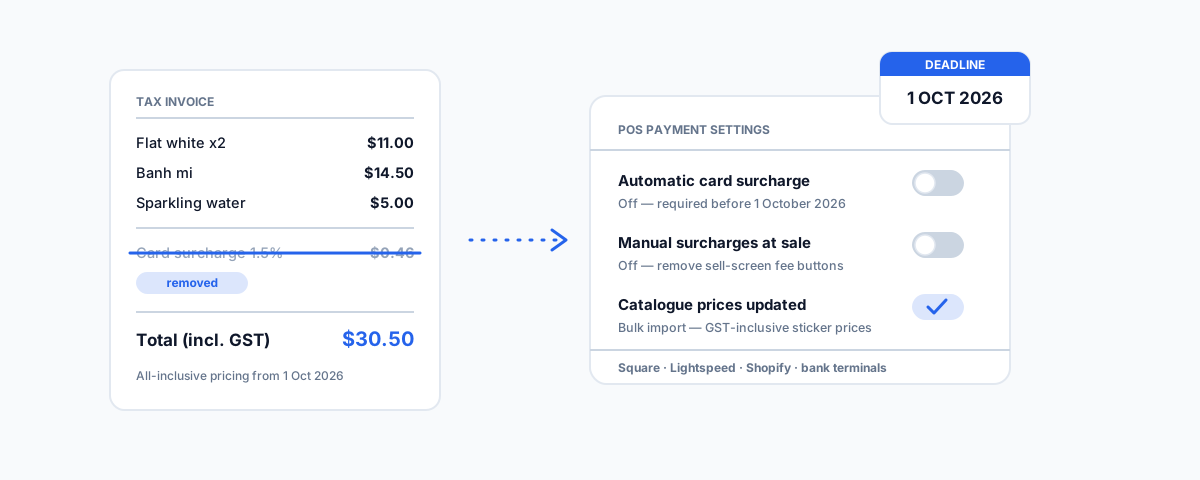
What the RBA surcharge ban means in practice — where the surcharge settings live in Square, Lightspeed, and Shopify, what happens to your merchant fees under the new interchange caps, and how to reprice before 1 October 2026.
On 1 October 2026, the surcharge line disappears from Australian receipts. The Reserve Bank confirmed in March that surcharging on eftpos, Visa, and Mastercard — debit, prepaid, and credit alike — will be banned from that date, and the price on the shelf, the menu, or the checkout page must be the price the customer pays. The policy has been covered to death by banks and accounting firms. What most of that coverage skips is the practical part: the surcharge on your terminal is a setting, somebody turned it on, and it will not turn itself off. If your business surcharges today, you have a small technology project and a pricing decision to get through before October — and doing it in September, in a rush, is how mistakes get made. Here is what is changing, where the settings actually live, and how to reprice without guessing.
What Is Actually Changing
Two things happen at once on 1 October 2026. The first is the ban itself: adding a surcharge to an eftpos, Visa, or Mastercard payment becomes prohibited, and the ACCC is the enforcer. "The price plus 1.5% if you pay by card" stops being a legal way to present a price; every displayed price must include the cost of accepting the payment. The second change is easier to miss but matters just as much: the RBA is cutting the caps on interchange fees — the wholesale fees that flow to card issuers on every transaction — with credit interchange dropping from 0.8% to 0.3%. The RBA estimates the reforms will save consumers and businesses up to $1.8 billion a year. In other words, you lose the ability to pass the fee on explicitly, but the fee itself should get materially smaller — especially for small businesses, which have historically paid the worst rates.
What Happens to Your Merchant Fees
The fees do not disappear on 1 October; your payment provider will still charge you for every transaction. What changes is the wholesale cost underneath, and whether your provider passes the saving through to you is a commercial question — one worth asking now, not in October. The single most useful thing you can do this month is find out exactly what you pay today: pull a recent statement, divide total fees by total card turnover, and you have your effective blended rate. Then ask your provider — Square, your bank, Tyro, whoever sits behind the terminal — what your rate will be from 1 October under the new caps. If the answer is "the same", that is a negotiating conversation, and the weeks before October — when every provider knows merchants are re-evaluating — are the best leverage you will ever have.
Turning the Surcharge Off, Platform by Platform
Do not assume your provider will flip the switch for you. Some will; most have said current settings continue as normal until the deadline, which means the change is yours to make. Where the setting lives:
- Square — surcharging is configured in the Square Dashboard, and there are two places to check: automatic card surcharges (a percentage applied to card payments) and manual surcharge settings (ad-hoc surcharges added at the point of sale). Both need to be off before 1 October. Square has confirmed that from that date merchants can no longer surcharge Visa, Mastercard, or eftpos transactions — but until then it is business as usual, which means the setting stays on until you turn it off.
- Lightspeed — both Retail X-Series and R-Series support surcharging through Lightspeed Payments, configured in the payment settings. Lightspeed has published its own guidance on the RBA change; if you surcharge through Lightspeed Payments, the setting needs to be disabled, and if you added a surcharge as a custom line item or button on the sell screen, that needs to go too.
- Shopify and online checkouts — e-commerce surcharging is usually done through a checkout fee app or a "card fee" product added to the cart, rather than a native setting. Audit your checkout: any app that adds a percentage fee for card payment, any hidden "payment fee" product, and any script that adjusts totals by payment method has to be removed. While you are in there, check your shipping settings for a fee that is really a disguised card cost.
- Bank and standalone terminals — Tyro, CommBank, Westpac, NAB, and ANZ terminals all support configurable surcharge percentages, set either on the device or in the merchant portal. These are the least likely to update themselves. If a tech set it up years ago and nobody remembers how, call your bank's merchant support line and have them walk you through it — or confirm in writing that they will disable it remotely before the deadline.
One warning: do not simply delete the surcharge and move on. That is a revenue cut equal to your blended fee rate, silently applied to every card sale. The setting change and the repricing decision belong together.
Repricing Without Guesswork
There are only two honest options: absorb the fee or build it into your prices. Which one is right depends on numbers you already have. Take your effective blended rate from the exercise above — for most small businesses somewhere between 0.5% and 1.5% — and apply it to your card turnover. That is the annual dollar figure at stake. If it is small relative to your margins, absorbing it and leaving prices alone is the cleanest customer experience and saves you reprinting anything. If it is not, a small across-the-board price rise — often less than the old surcharge, because the new interchange caps lower your costs — recovers it. Remember the displayed price must be GST-inclusive and all-inclusive: menus, shelf labels, price lists, your website, and your booking pages all need to show the final number. If you run on a POS, this is a bulk price update, not a manual one — Square, Lightspeed, and Shopify all support catalogue-wide price edits via import/export, which turns an afternoon of retyping into a spreadsheet exercise.
The Edges Everyone Forgets
The terminal is the obvious place; these are the ones that surface in November as complaints:
- Invoices and payment terms — if your invoice template says "a 1.5% surcharge applies to card payments", that clause has to go, and if your invoicing platform (Xero, MYOB, QuickBooks) adds a card fee on its payment links, check the setting there too.
- Booking and ordering systems — restaurant booking deposits, online ordering platforms, and appointment systems often carry their own card fee settings, configured separately from your main POS.
- Payment links and quotes — saved quote templates, recurring payment links, and subscription billing set up years ago can have surcharges baked in that nobody has looked at since.
- Signage and T&Cs — the "card payments incur a surcharge" sticker at the counter, the note on the menu footer, and the payments clause in your website terms all become wrong on 1 October. Cheap to fix, embarrassing to miss.
A Simple Timeline
Spread over the next ten weeks, this is a small job. In July, audit: find every place a surcharge is configured or mentioned, and work out your effective fee rate from a statement. In August, decide: absorb or reprice, ask your provider what your post-October rate will be, and negotiate if the answer disappoints. In September, execute: update prices in the POS catalogue, disable the surcharge settings, reprint menus and labels, and fix invoices, booking systems, and signage. Then put a reminder in the first week of October to do one test transaction on every payment channel — terminal, online checkout, payment link — and check the receipt.
Getting Help
If your POS was set up by someone long gone and you are not confident where the surcharge settings, catalogue pricing, and receipt configuration live, this is exactly the kind of job worth having done properly once. We set up and reconfigure Square POS for venues and retailers — pricing, catalogues, and payments included — through our Square POS setup service, and our guides to setting up Square POS for a restaurant and IT support for hospitality venues cover the surrounding systems. The deadline is fixed; the only choice is whether the change happens calmly in August or frantically on 30 September.