
12 July 2026
Centralized User Management Tools for macOS (2026)
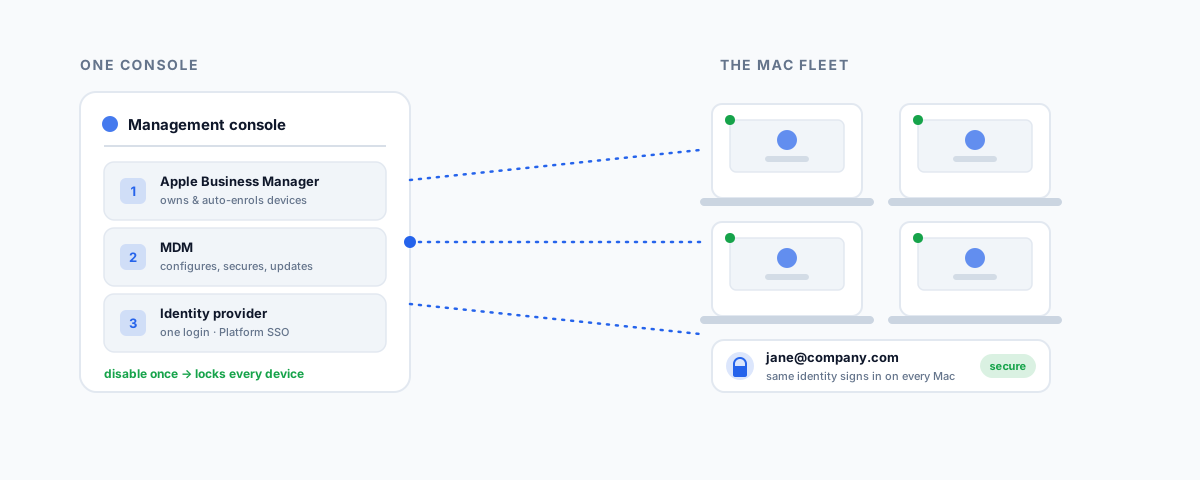
How centralized user management works on macOS — Apple Business Manager, MDM platforms like Jamf, Iru, Mosyle and Intune, and tying the Mac login to a cloud identity provider with Platform SSO — and how to choose the right stack for your fleet.
A Mac is designed as a personal computer, and it shows in how user accounts work: each machine has its own local accounts, its own passwords, its own settings, managed on the device itself. That is fine for one Mac. At five, ten, or fifty, it becomes a genuine problem. Onboarding a new starter means touching their machine by hand; offboarding means hoping someone remembers to remove access; a forgotten password is a desk visit; and there is no single place to see who has access to what. Centralized user management solves this by pulling accounts, logins, and device control into one place you manage remotely. Here are the tools that do it, and how they fit together.
What "Centralized User Management" Means on macOS
On macOS it really involves two layers, and the confusion usually comes from mixing them up. The first is device management — enrolling each Mac into a system that can configure it, push settings and security policies, install apps, and enforce updates, all remotely. That is the job of an MDM (mobile device management) platform. The second is identity — making the account a person logs in with a central, cloud-based account rather than a local one created on each machine, so a single identity governs their access everywhere and can be disabled in one action.
Underneath both sits Apple's own layer, Apple Business Manager, which is what makes the whole thing work at scale. A complete setup is all three: Apple Business Manager to own the devices, an MDM to manage them, and an identity provider to manage the users. Get the three working together and adding or removing a person becomes a single change instead of a tour of the office.
The Foundation: Apple Business Manager
Apple Business Manager (ABM) is the free Apple service that underpins business Mac management, and it is the first thing to set up. Its most valuable feature is Automated Device Enrolment: any Mac your business buys through Apple or an authorised reseller appears automatically in your ABM portal, and when the user unboxes it, it connects to Apple, checks in, and enrols itself into your MDM — downloading your configuration, security policies, and apps with no IT hands on the machine. That is what "zero-touch" deployment means, and it turns a new Mac from an afternoon of setup into a few minutes the user does themselves.
ABM also issues Managed Apple IDs — organisation-owned Apple accounts you control, which can be federated to your existing corporate identity so people sign in with the credentials they already have. ABM does not manage devices on its own; it is the foundation the MDM and identity layers plug into.
MDM Platforms: The Core of Management
The MDM is where day-to-day management lives, and there is a healthy field of Apple-focused options. The right one depends mostly on fleet size, your existing systems, and how much in-house expertise you have.
| MDM platform | Best for | Price signal |
|---|---|---|
| Jamf Pro | Large fleets and complex needs, with a dedicated Mac admin | Premium, per device |
| Iru (formerly Kandji) | Teams wanting MDM, security, and identity in one polished platform | Mid, around US$4/device/month |
| Mosyle | Small fleets and tight budgets | Cheapest; free tier up to ~30 devices |
| Microsoft Intune | Businesses already standardised on Microsoft 365 | Bundled with M365 licensing |
| Addigy | IT providers managing multiple client fleets | Mid-range, multi-tenant |
| Apple Business Essentials | Very small businesses wanting Apple-native simplicity | Low, run by Apple |
| JumpCloud | Cross-platform shops wanting identity and device management together | Per-user tiers |
A few notes on reading that. Jamf Pro is the long-standing enterprise standard — the most capable, and priced and staffed accordingly. Iru, which was Kandji until it rebranded in late 2025, is popular with fast-growing companies for bundling management, endpoint security, and identity in one modern product. Mosyle is the value leader, genuinely capable and with a free tier that suits very small fleets. Microsoft Intune rarely wins on Mac features alone, but if you already pay for Microsoft 365 it consolidates cost and puts Macs and Windows in one console. And JumpCloud is worth a look when identity is your real problem and you run a mix of platforms, since it combines the directory and the MDM.
Connecting the Mac Login to Your Directory
This is the part that turns device management into genuine user management, and it is where macOS has changed most. Historically, businesses bound Macs to on-premises Active Directory; that approach is now discouraged and fading, replaced by tying the Mac directly to a cloud identity provider. Apple's own framework for this is Platform SSO, which connects the macOS login screen to your identity provider so a person signs in to their Mac with their organisation account — and, on recent macOS, can even do so at first setup, with the local account created just-in-time from that identity.
Platform SSO natively works with Microsoft Entra ID and Okta, the two directories most businesses run. Making it smooth in practice is usually a job for a dedicated tool: Jamf Connect replaces the macOS login window and keeps the local password in sync with the cloud one; Iru's Passport extends single sign-on to the login window; and Mosyle builds identity integration in directly, supporting Okta, Entra ID, and Google without a separate product. The effect is the same either way — one cloud identity controls the Mac, so disabling someone in your directory locks them out of their machine, not just your email. That single link is what makes offboarding actually safe, a theme we cover more broadly in our IT onboarding and offboarding checklist for small business.
How the Pieces Fit Together
Put simply: Apple Business Manager enrols the device, the MDM configures and secures it, and the identity provider governs who logs in. A new starter is bought a Mac that auto-enrols through ABM, the MDM applies your standard build the moment it is switched on, and Platform SSO has them log in with their existing company account — no manual account creation anywhere. When they leave, you disable one identity and the machine, its access, and its data lock behind them. That is centralized user management working as intended: the individual Mac stops being a thing you manage and becomes one node in a system you manage.
How to Choose
Match the stack to your reality:
- Already on Microsoft 365 — Intune plus Entra ID is the natural fit, consolidating Macs and Windows and cost into what you already pay for.
- All-Apple and want it simple — Mosyle or Iru give you a clean, Apple-first platform fast; Mosyle for the tightest budgets, Iru for the richer all-in-one.
- Large or complex fleet with a Mac admin — Jamf Pro, for the depth and control nothing else matches.
- Cross-platform, identity-led — JumpCloud to run identity and devices for Mac, Windows, and Linux together.
- A handful of Macs, no IT team — Apple Business Essentials to get a secure, managed baseline without an enterprise platform.
Whatever you pick, pair it with a cloud identity provider (Entra ID, Okta, or Google) and use Platform SSO to make the login central. The most common mistake is buying an MDM to push settings but never connecting identity, which leaves you managing devices while still creating and deleting local accounts by hand — half the job, and the harder half left undone.
Getting Help
Centralized Mac management is very achievable, but the value is in getting the three layers — Apple Business Manager, your MDM, and your identity provider — set up so they work as one, with zero-touch enrolment and a login tied to your directory. That setup is fiddly the first time and easy to leave half-finished. If you would like it scoped and configured for your fleet — enrolment, a standard secure build, and identity-based login so onboarding and offboarding are a single action — our Small Business IT Support service can set it up and run it. And if your identity lives in Microsoft 365, our guide to Microsoft 365 administration for small business covers the directory side these tools plug into.