
11 July 2026
Data Retention Policy Best Practices for Business (2026)
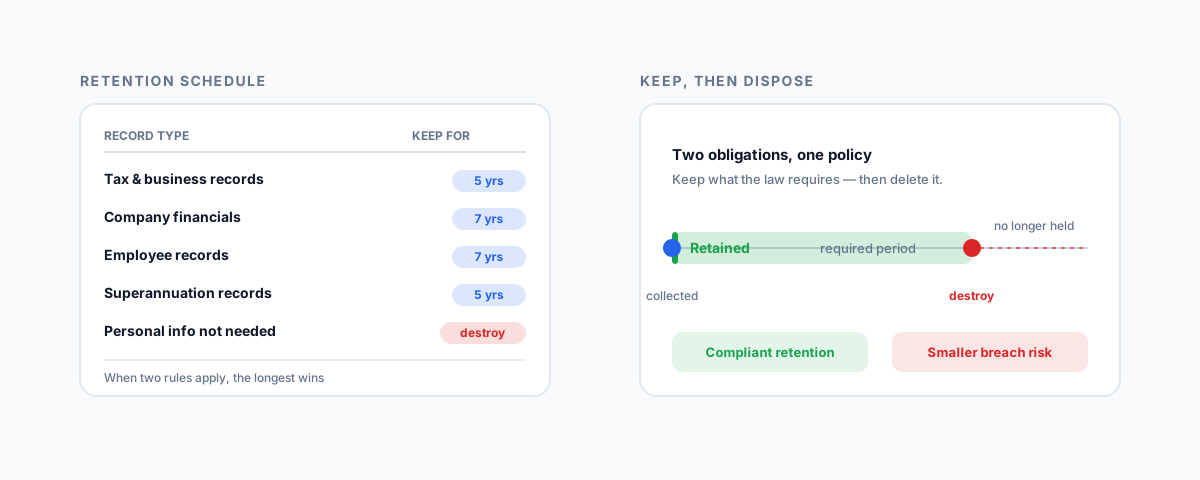
A practical, Australian-first guide to data retention policy best practices — the two obligations of keeping records the ATO, Fair Work and ASIC require and destroying personal information you no longer need under the Privacy Act, plus how to build, automate, and enforce a retention schedule.
Most businesses have a data retention policy without realising it: keep everything, forever, just in case. It feels like the safe option. It is not. Holding data you no longer need is a cost, a compliance breach, and a security liability all at once — every old customer record and ex-employee's file is something a breach can expose and something the law may require you to have already destroyed. A real data retention policy pulls in two directions at once: keep what you are legally obliged to keep, and get rid of what you are not. Getting the balance right is the whole job. Here is how to think about it, with the Australian rules that set the boundaries.
What a Data Retention Policy Actually Is
A data retention policy is a written schedule that answers four questions for every kind of data your business holds: what it is, how long you keep it, where it lives, and how it is disposed of when the time is up. That is it. It is not a backup plan, and it is not a vague intention to "clean up one day." It is a documented decision, applied consistently, that turns "keep everything just in case" into deliberate choices you can defend to an auditor, a regulator, or a customer asking what you still hold about them.
The reason to write it down is that data accumulates silently. Invoices, emails, spreadsheets of customer details, old job files, ex-staff records — none of it announces when it has outlived its usefulness. Without a policy, the default is infinite accumulation, and the pile quietly becomes both your biggest compliance exposure and the most valuable thing for an attacker to steal. A policy is what replaces drift with intent.
Know Your Legal Minimums
The "keep" side of the policy is set largely by law, and in Australia several different regulators impose their own minimum retention periods. You do not get to keep records for less time than these, whatever your own preference. The common ones for a typical business:
| Record type | Keep for | Set by |
|---|---|---|
| Tax and business records (invoices, receipts, GST, BAS) | 5 years | ATO |
| Company financial records | 7 years | ASIC (Corporations Act 2001) |
| Employee time and wages records | 7 years from when the record is made | Fair Work Act |
| Superannuation records | 5 years | ATO / super law |
| Depreciating and capital gains asset records | While you hold the asset, then 5 years after you dispose of it | ATO |
| Personal information no longer needed | Destroy or de-identify it | Privacy Act (APP 11) |
A few points on reading that table. The ATO's five years generally runs from when you prepared or obtained the record, or completed the transaction, whichever is later — and companies fall under ASIC's longer seven-year rule for financial records, so a company defaults to seven, not five. Employee records under the Fair Work Act must be kept for seven years from when each record is made, not from when the person leaves. These are minimums, and the safest rule when two apply to the same document is that the longest one wins. Treat this as orientation rather than advice: the specifics turn on your structure and circumstances, so confirm the periods that apply to you with your accountant or a lawyer.
The Other Half: Delete What You Do Not Need
Here is the part most businesses miss entirely. Retention is not only an obligation to keep — under the Privacy Act it is also an obligation to destroy. Australian Privacy Principle 11 requires that when you no longer need personal information for any purpose you are permitted to use it for, you take reasonable steps to destroy it or de-identify it — unless a law requires you to retain it. In other words, once the ATO's five years is up and you have no other lawful reason to hold a customer's personal details, keeping them is not the cautious choice; it is the non-compliant one.
There is a hard-headed security reason to embrace this, quite apart from the law. Every record you hold is part of your breach blast radius. Under the Notifiable Data Breaches scheme, if personal information you hold is exposed, you may have to notify the affected people and the regulator — and the more you have hoarded, the larger and more damaging that notification becomes. Data you have properly destroyed cannot be stolen, leaked, or subpoenaed. Minimising what you hold is one of the cheapest and most effective security controls there is, and a retention policy is how you operationalise it.
Build the Retention Schedule
Turning those principles into something usable comes down to a short, methodical process:
- Categorise your data. Group what you hold into a manageable set of types — financial records, employee records, customer personal information, marketing lists, operational documents. You cannot set a period for data you have not named.
- Assign a retention period to each. Start from the legal minimum, then extend only where you have a genuine business reason. When more than one rule touches a record, apply the longest.
- Decide where each type lives. A period is meaningless if the same data is scattered across an accounting system, three inboxes, and someone's laptop. Know the systems of record.
- Define the disposal method. Deletion for most digital data, secure destruction for sensitive physical records, de-identification where you want to keep aggregate value without the personal detail. Write down which applies to what.
- Give it an owner. Someone has to be responsible for the schedule existing, being followed, and being reviewed as the business and the rules change. A policy with no owner is a document, not a practice.
Retention Is Not Backup
It is worth being clear that a retention policy and a backup regime are different things doing different jobs, because conflating them is a common and expensive mistake. Backups exist so you can recover from disaster or ransomware; retention governs how long the live data legitimately lives. "We have backups" is not a retention policy — and in fact your backups need their own retention rules, because a backup that quietly holds personal data you were obliged to destroy reintroduces the exact liability you deleted. Set a rotation and expiry on backups too, and make sure your disposal decisions reach into them. If you have not yet sorted the backup side, our guide to the best automated cloud backup for small business covers that half of the picture.
Automate and Enforce It
A retention policy that relies on someone remembering to delete things by hand will not survive contact with a busy month. The point is to make retention and disposal happen automatically. Microsoft 365 and Google Workspace both offer retention labels and policies that keep data for a set period and then delete it without anyone intervening; accounting and line-of-business systems increasingly have their own retention settings. Pair that automation with access controls — the fewer people who can copy data out to a personal drive, the more your central policy actually reflects reality. An enforced policy shrinks your risk on a schedule; an unenforced one is a document you show an auditor while the real data sprawls untouched.
Getting Help
A data retention policy is one of those pieces of business hygiene that is genuinely simple in principle and easy to keep putting off — until a breach, an audit, or a subject-access request makes it urgent. The work is mostly deciding the categories and periods once, then wiring up the automation so the keeping and the deleting both happen on their own. If you would like help mapping what you hold, setting defensible retention periods against the Australian rules, and configuring Microsoft 365 or Google Workspace to enforce them, our Small Business IT Support service can set it up so your data retention runs quietly in the background — keeping what you must, disposing of what you should, and leaving you with far less to worry about. And because retention lives right alongside how you manage staff data, our IT onboarding and offboarding checklist for small business is a useful companion for the employee-records side.