
22 July 2026
Microsoft 365 Copilot vs. Google Workspace Gemini: What Each One Actually Costs Your Business Now
Microsoft's base 365 plans rose on 1 July 2026 and Copilot remains a separate paid add-on, while Google has folded full Gemini access into standard Workspace pricing at no extra cost. The actual per-seat numbers for both platforms, and how to decide which fits your business.
Microsoft and Google made opposite bets on how to charge for AI in the same twelve months. As of 1 July 2026, Microsoft 365's base business plans went up in price, and Copilot — the AI assistant woven through Word, Excel, Outlook, and Teams — remains a separate, additional subscription on top. Google went the other way: Gemini, once its own paid add-on, is now folded into the standard Google Workspace Business price at no extra charge for most plans. If you're deciding between the two suites, or wondering whether the AI features you keep hearing about are already something you're paying for, here are the actual current numbers.
What Microsoft 365 Actually Costs Now
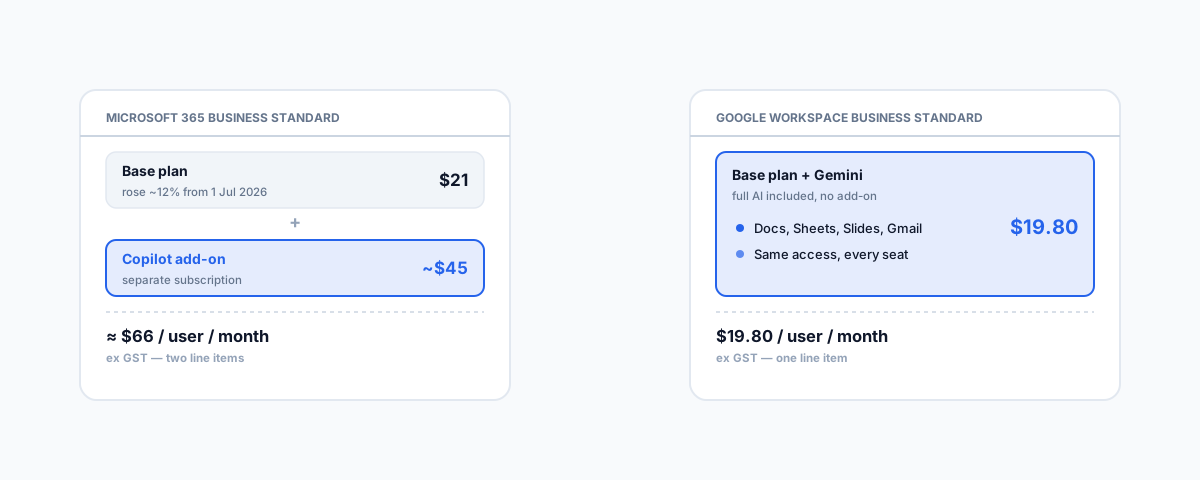
From 1 July 2026, Microsoft's own Australian pricing page lists Business Standard at AU$21.00 per user per month and Business Premium at AU$32.90 per user per month, both ex GST — Business Standard rose roughly 12% on that date, while Premium held steady. Copilot itself is not a plan, it's an add-on: it requires a qualifying base subscription (Business Standard, Business Premium, or an E3/E5 enterprise plan) and then adds its own charge on top, priced globally at USD $30 per user per month, which converts to roughly AUD $45 per seat under Microsoft's regional pricing. Put together, a Business Standard user with full Copilot access is paying somewhere around $66 per user per month ex GST — the base plan and the AI layer as two separate line items. Microsoft's promotional Copilot pricing closed on 30 June 2026, though a limited-time discount is running from 1 July to 30 September 2026 for new subscribers, so the exact number moves depending on when you sign up.
What Google Workspace Actually Costs Now
Google's own Workspace pricing page shows Business Starter at AUD $9.90 per user per month, Business Standard at AUD $19.80, and Business Plus at AUD $30.90 — all ex GST, on an annual commitment. The difference from Microsoft's approach is structural: Gemini used to be sold as its own add-on, and Google has since folded full Gemini access directly into the Business Standard and Business Plus prices above, with no separate charge. Business Starter still gets Gemini, but a lighter version — Gemini in Gmail, plus a capped number of daily prompts in the Gemini app — rather than the full assistant experience across Docs, Sheets, and Slides that Standard and Plus include outright.
The Headline Number
- Microsoft 365 Business Standard + Copilot — roughly $21 + $45 ≈ $66 per user/month ex GST, as two separate charges.
- Google Workspace Business Standard + Gemini — $19.80 per user/month ex GST, Gemini already included.
Compare the two suites at a genuinely equivalent tier and the gap is stark: roughly three times the cost for Microsoft's combination against Google's, because Google's AI is already inside the number rather than stacked on top of it. That is not a small difference once you multiply it across a team, and it is worth knowing before you assume "we'll just turn on Copilot later" is a minor budget line. These are the published rates as we're writing this, both companies revise pricing and promotions often, and GST plus any current discount window will move the exact figure — confirm the live number on each vendor's own pricing page before you commit a budget to either.
Why the Price Alone Isn't the Whole Decision
Cost is the easiest thing to compare and the least complete answer. Copilot's depth inside the actual Office applications — drafting and rewriting directly in Word, building formulas and summarising ranges in Excel, drafting meeting recaps from Teams transcripts — is genuinely more mature in places than Gemini's equivalent features in Docs and Sheets, reflecting how long Microsoft has been shipping it into the core apps. Gemini's strength is closer to breadth at no marginal cost: every Business Standard or Plus seat gets the same full access, so there's no separate decision about which staff "get" the AI add-on and which don't, which matters if you'd otherwise be picking and choosing who gets Copilot to control cost. If your business already runs deep on one platform — heavy Excel and Teams use, or a Google Workspace shop with Docs and Sheets as the daily tools — that existing investment usually matters more than the AI layer on its own, and switching platforms purely to save on AI pricing is rarely worth the migration cost.
How to Actually Decide
Start from what you already run, not from the AI feature list. If you're on Microsoft 365 already, work out which roles would genuinely use Copilot daily — drafting, summarising, analysis-heavy work — rather than licensing it business-wide by default, since the add-on cost scales linearly with every seat you turn it on for. If you're on Google Workspace, the calculation is simpler because Gemini is already inside the Business Standard or Plus price you're likely paying regardless — there's no separate "should we buy the AI" decision to make. And if you're evaluating a platform switch for other reasons entirely — our guide to Microsoft 365 administration for small business covers the wider admin side of that decision — the AI pricing gap is a real number to factor in, not the deciding one on its own.
Getting Help
Working out which seats actually need Copilot, or auditing whether your current Google Workspace plan is already giving you the Gemini access you think you're paying extra for, is a quick review rather than a big project. Alongside this, the same platforms are mid-rollout on passkeys becoming the default authentication method — worth reviewing together since both changes touch the same tenant. Our Small Business IT Support service covers licensing decisions like this as part of ongoing tenant administration, so you're paying for the seats and features you actually use.