
21 July 2026
Passkeys Are Now the Default in Microsoft 365 and Google Workspace — What That Means for Your Business
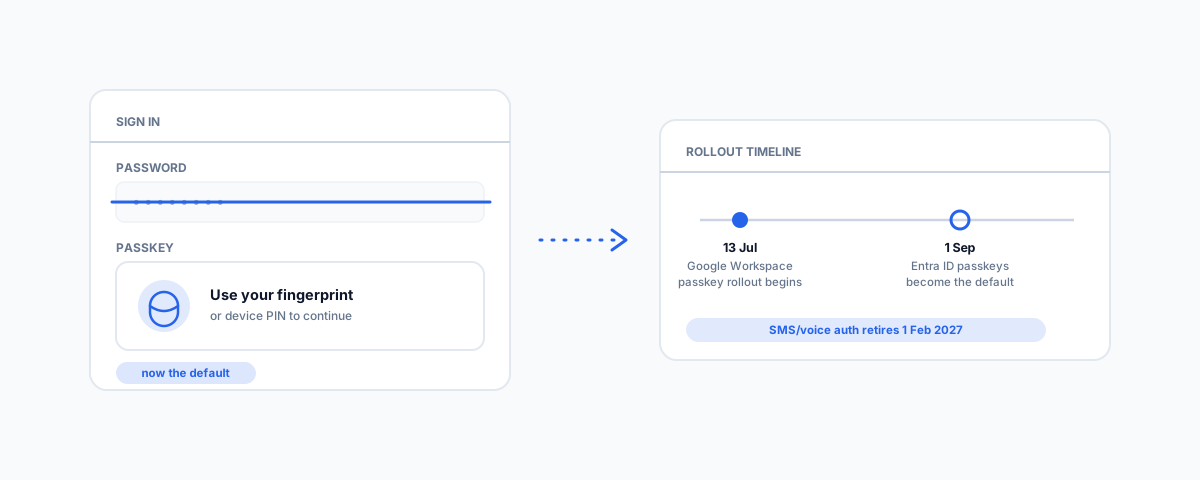
Google started rolling out passkeys across Workspace in July 2026, and Microsoft Entra ID switches to passkeys-by-default in September. What actually changes for a small business, what still doesn't support passkeys, and how to roll this out over 30 days without breaking anyone's Monday morning login.
Within weeks of each other, the two platforms behind most small business logins quietly flipped their default away from the password. Most business owners haven't noticed yet, because nothing broke on the day it happened — but the direction is set, and by early next year the password will be the exception on these platforms, not the rule. Here is what is actually changing, what it means day to day, and how to roll it out calmly instead of scrambling when a staff member's login suddenly looks unfamiliar.
What's Actually Changing, and When
- Google Workspace — a gradual passkey rollout started on 13 July 2026, with visibility taking up to 15 days to reach every release track. Admins can turn on "skip passwords" under Security → Authentication → Passwordless in the Admin console, letting users sign in with a passkey alone rather than a password plus a second factor.
- Microsoft Entra ID — starting 1 September 2026, Entra ID — the identity service behind Microsoft 365 — begins switching users to passkeys as the default authentication experience. Anyone currently on SMS or voice-based multi-factor authentication gets automatically enabled for passkeys, and the next time they authenticate, they are prompted to register one.
- SMS/voice retirement — Microsoft is retiring its own SMS and voice authentication delivery entirely on 1 February 2027. The exit from text-message codes has a date, not just a direction.
What a Passkey Actually Is (Briefly)
A passkey is a cryptographic credential tied to one specific site or service, stored either on a device (a security key, or Microsoft Authenticator) or synced across a user's devices through their platform (iCloud Keychain, Google Password Manager). Signing in means unlocking that stored credential — a fingerprint, a face scan, or a device PIN — rather than typing anything. That distinction is the entire security benefit: a passkey cannot be phished, because there is no string of characters for a fake login page to steal. Compare that to Google's own explanation of why this matters at the scale of an entire platform's account base, not just one login.
What Breaks, and What Doesn't
Nothing is deleted on the day this reaches your tenant. Existing passwords keep working during the transition — what changes is which method gets offered and encouraged first, and eventually, which one is the default. The real friction sits elsewhere: roughly half of the business tools a typical company relies on do not support passkeys yet, so a password manager is not going anywhere in the near term — it is simply managing a shrinking, not vanishing, share of your logins. Two situations need a deliberate plan rather than the default flow: shared or kiosk-style logins (a reception PC, a shop-floor terminal) where no single person's device or fingerprint is the natural authenticator, and service accounts or integrations that authenticate programmatically rather than through a human sign-in screen. Map those out before the rollout reaches you, because the default flow assumes one person, one device.
A 30-Day Rollout, Not a Panic
Treat this the way any sensible identity change gets treated: staged, not switched on for everyone at once. Start by auditing who in your tenant is currently set up for SMS or voice MFA — that is exactly the group Microsoft's automatic enrolment will touch first. Pilot with a handful of comfortable, tech-forward staff before anyone else, and use that pilot to write down the one document every rollout skips: what someone does when their phone is lost, replaced, or dead flat, since that is the single most common support call a passkey rollout generates. Once the recovery path is documented and tested, extending it to everyone else is straightforward. This sits alongside the same identity hygiene we cover in Microsoft 365 administration for small business and domain controller best practices — passkeys tighten the front door, but they are one part of a tenant that also needs clean access reviews and account lifecycle management around them.
Getting Help
A passkey rollout is a good moment to review identity and access as a whole, not just react to a vendor's default changing underneath you. If you would like your tenant's authentication methods audited, a staged passkey rollout planned, and the recovery path actually documented before staff hit it in anger, our Small Business IT Support service handles this end to end. Get ahead of the default before it reaches you, and it becomes a quiet improvement instead of a Monday morning support queue.