
12 July 2026
How to Use Shopify Metafields to Improve Long-Tail Search Visibility (2026)
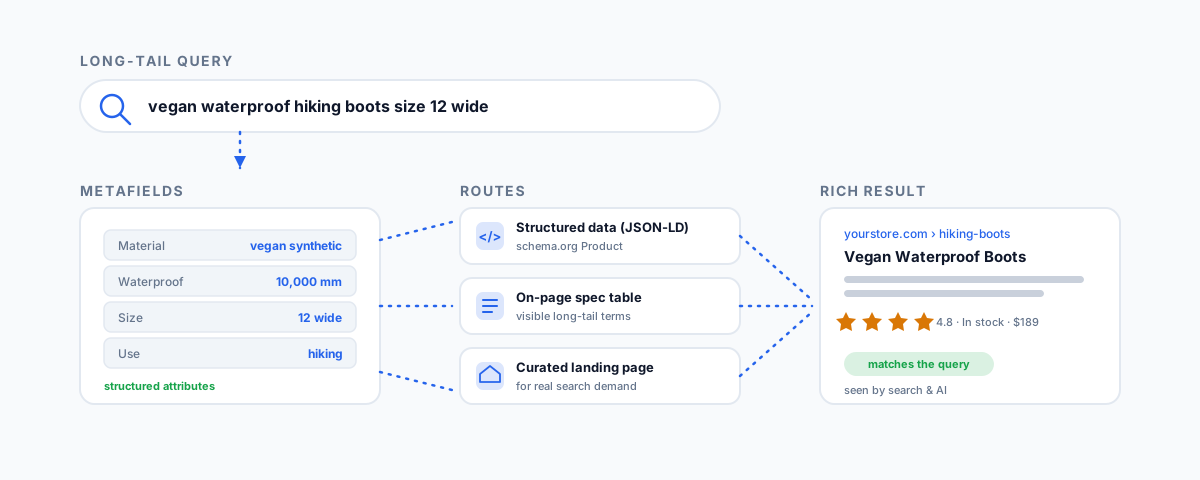
How to turn Shopify metafields into long-tail search visibility — feeding product attributes into structured data, surfacing them as on-page content, building curated and metaobject landing pages for real attribute demand, and managing faceted filters without SEO harm.
Long-tail searches are the specific, multi-word queries that convert: "waterproof hiking boots size 12 wide," "linen curtains 250cm blackout," "food-safe epoxy resin for countertops." Each one has low competition and high intent — the person knows exactly what they want. You win these by having the specific attributes those queries contain present on your pages as structured, machine-readable data, which is precisely what Shopify metafields hold. The catch is that having the data in metafields is not the same as using it for search; the value only appears when you connect those fields to the parts of your store search engines actually read. Here is how to do that, and — just as important — how not to shoot yourself in the foot doing it.
Why Metafields Fit Long-Tail Search
A long-tail query is, almost always, a combination of attributes: a product type plus a size, a material, a colour, a use case. Those attributes are exactly what metafields store — material, dimensions, capacity, compatibility, certifications. When that information lives only in a paragraph of description, it is hard for search engines to parse and easy for them to miss. When it lives in structured metafields you deliberately surface, it becomes something you can feed into the specific places that drive long-tail visibility. The metafields are the raw material; the routes below are how you turn them into rankings.
The Routes at a Glance
| Route | How metafields help | Payoff |
|---|---|---|
| Structured data (JSON-LD) | Feed attributes into product schema | Rich-results eligibility and AI-search visibility |
| Visible spec content | Display metafields on the product page | The page genuinely contains the long-tail terms |
| Curated & metaobject pages | Build indexable pages for real attribute demand | Clean long-tail landing pages that rank |
| Faceted filters (managed) | Metafield filters via Search & Discovery | On-site discovery, without SEO cannibalisation |
| Dynamic meta tags | Inject metafield values into titles and descriptions | Long-tail-relevant snippets at scale |
Route 1: Feed Metafields into Structured Data
The highest-value, lowest-risk route is putting your metafield values into your product pages' structured data — the JSON-LD that describes the product to search engines in schema.org's Product format. Google supports specific product properties like material, colour, and pattern, and populating them from metafields tells Google exactly what the product is in a way plain description text cannot. This adds rich-results eligibility, and it increasingly matters for AI search — ChatGPT Search, Perplexity, and Google's AI Overviews all lean on structured content, so a product whose attributes are in schema is far more likely to be surfaced and cited. Practically, this is a two-step job: define the metafields in the Shopify admin, then output them into the JSON-LD in your theme's Liquid so the schema stays accurate and consistent across the whole catalogue.
Route 2: Surface Them as On-Page Content
Structured data helps machines understand the page, but the visible page still needs to contain the terms people search. Displaying your metafields as a clear specification table or attribute list does that — it puts "800-fill down," "10,000mm waterproof," "size 12 wide" as actual on-page content, which is what makes the page relevant to a query using those exact words. This is the same visible spec table that helps shoppers and reduces support questions, doing double duty for search. The point is that a metafield sitting in the admin, unshown, does nothing for SEO; it has to appear on the page — as schema and as visible content — to earn its keep.
Route 3: Build Curated and Metaobject Pages for Real Demand
This is the route most people get wrong, so it is worth care. The instinct is that filtering by attributes automatically creates long-tail landing pages — it does not, and relying on filter URLs to rank usually backfires (more on that below). The reliable way to capture a long-tail attribute combination is a real, clean, indexable page built for it: a curated collection, or a metaobject-powered landing page, targeting a combination you know people search for. If "vegan waterproof hiking boots" has genuine search demand, a dedicated collection or landing page — with its own title, copy, and a metafield-filtered product set — will outrank a messy filter URL every time. Use your Search Console data to find which attribute combinations actually get impressions, and build proper pages for those rather than hoping filters will do it.
Route 4: Use Faceted Filters — Carefully
Metafields power storefront filters through Shopify's Search & Discovery app, letting shoppers narrow by size, material, or any attribute you have structured. This is genuinely good for on-site discovery and conversion. But it comes with an SEO trap: each filter combination generates its own URL (Shopify's filter.p and filter.v parameters), and most themes let search engines crawl and index all of them by default. A collection with a few filters can spawn thousands of near-duplicate URLs that fragment your crawl budget and cannibalise the rankings of the collection pages you actually optimised.
The fix is deliberate management, not avoidance:
- Canonicalise most filter URLs back to their base collection, so their ranking signals consolidate rather than compete.
- Block low-value parameter patterns in robots.txt at scale, especially for large catalogues where the combinations run into the thousands.
- Keep only the filtered pages that earn it — the specific combinations that show real impressions in Search Console are worth letting index (or better, promoting to a curated page per Route 3); the rest are noise.
Handled this way, filters give you the on-site experience without the SEO damage. Handled carelessly, they quietly bury the pages you want to rank.
Route 5: Inject Metafields into Titles and Meta Descriptions
The last route is templating your SEO fields from metafields. Rather than hand-writing a meta title and description for every product, you can build templates that pull attribute values in — so a title automatically becomes specific and long-tail-relevant ("Alpine Down Jacket — 800-Fill, 10,000mm Waterproof, XS–XXL") across the whole catalogue. Done at scale through your theme or an SEO app, this makes every product's snippet match the specific way people search, without manual editing product by product.
How to Approach It
In order: make sure the attributes are actually in metafields in the first place — if they are still trapped in description text, our guide to the best Shopify apps to extract product specifications from text covers getting them structured. Then feed them into structured data and show them on the page. Then look at Search Console for the attribute combinations with real demand and build curated or metaobject pages for those. Finally, add filters for discovery, with the canonicals and robots rules to keep them from cannibalising. This sequence builds long-tail visibility deliberately instead of hoping for it, and it sits within the broader catalogue work we cover in product data enrichment and — if you are moving to Shopify — migrating without losing SEO.
Getting Help
Turning metafields into long-tail visibility is genuinely high-leverage, but it lives across theme code, structured data, information architecture, and technical SEO — which is why it is often half-done, with data in metafields that never reaches the page or filters quietly cannibalising the catalogue. If you would like your metafields wired into structured data, surfaced on the page, and turned into curated long-tail pages with the faceted navigation managed properly, our Shopify Integrations service builds exactly that. Get the specific attributes buyers search for out of your admin and into the places search engines read, and the long-tail traffic follows.