
17 July 2026
Switching to Jobber Without Losing Your History: Migrating Clients, Quotes, and Jobs
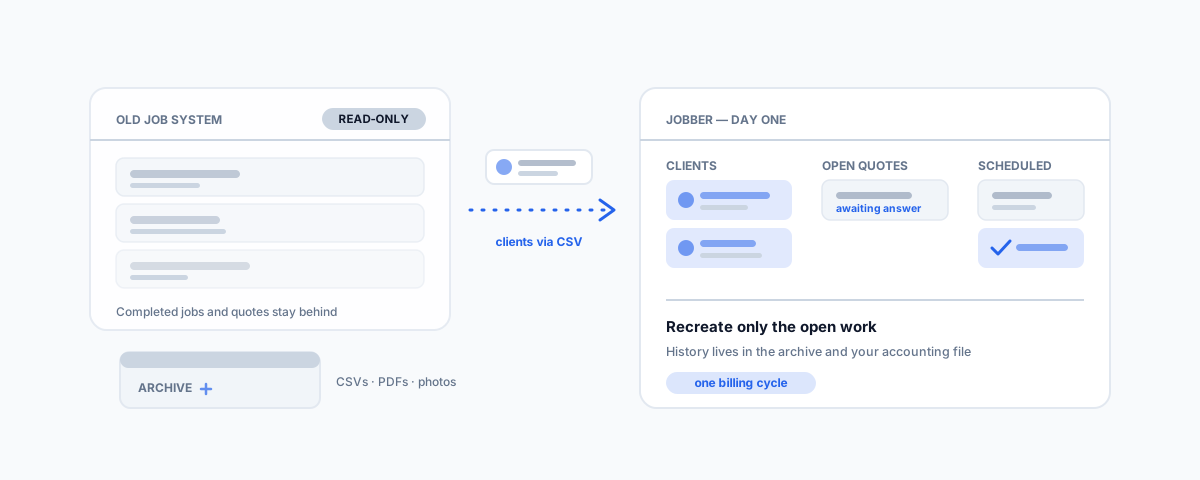
What actually moves when you switch to Jobber — client CSV imports, the quote and job history that does not come with you, and a migration plan that keeps your old records readable without paying for two systems forever.
Switching job management software looks easy in the sales demo: sign up, import your clients, off you go. Then someone asks the question that stalls half of these projects — "what about our history?" Years of completed jobs, sent quotes, and invoices live in the old system, and the uncomfortable truth about moving to Jobber is that most of it is not coming with you. Jobber's import tools cover your client list, not your past. That is not a reason to stay put; it is a reason to plan the switch properly, so the history stays readable, the open work moves cleanly, and you are not paying for two systems out of indecision. Here is how to run that migration.
What Jobber Will and Will Not Import
Be clear-eyed about this before you commit, because it shapes the whole plan:
- Clients — yes. Jobber imports your client list from a CSV: names, contact details, addresses, and notes. This is the well-trodden path, and cleaning the list before import (duplicates, dead numbers, outdated addresses) is worth an hour of anyone's time — you are moving house, so do not pack the junk drawer.
- Products and services — yes. Your price list of services, line items, and rates can be set up quickly, either by import or by hand if the list is short.
- Quotes and jobs — no. Jobber does not import your existing or completed quotes and jobs from another system. There is no magic connector that rebuilds five years of work orders. Anything in flight has to be recreated by hand; anything finished stays behind.
- Invoice history — no, and that is fine. Your invoices already live in your accounting file. If you run Xero, MYOB, or QuickBooks, every invoice you have ever issued is there regardless of which job system created it — which is precisely why the accounting integration matters more than the job history.
Before You Switch: Export Everything
The old system's job is to become a readable archive, and exports are cheap while your subscription is active and expensive-to-impossible after it lapses. Before you cancel anything:
- Export every CSV the old system offers — clients, jobs, quotes, invoices, payments. ServiceM8 and Tradify both provide data exports; take all of them, even the ones you think you will not need.
- Save quotes and job cards as PDFs for anything you might need to reference in a dispute, a warranty claim, or a repeat job — the CSV tells you a job happened; the PDF shows what you actually quoted.
- Get the photos out. Job photos are the most commonly stranded asset in these migrations — before-and-after shots attached to old jobs rarely export cleanly, so pull them while you can.
- Put the lot somewhere durable — a clearly named folder in your cloud storage, not a USB stick in the ute. This archive is your answer to every "what did we do at that property in 2023?" question from now on.
A Migration Plan That Works
With the archive secured, the switch itself is a sequence, not an event. Import the cleaned client list first, and set up your products and services so quoting works from day one. Then recreate only what is genuinely open: quotes still awaiting an answer, jobs scheduled but not started, and recurring visits. Resist the temptation to rebuild recent history "for context" — every hour spent re-keying finished jobs is an hour bought back nothing. Set a cut-off date and be strict about it: everything invoiced before the cut-off is answered by the archive and your accounting file; everything after it lives in Jobber. Finally, connect the accounting integration early, not last — invoice numbering, tax settings, and payment reconciliation are much easier to get right before the first live invoice goes out than after fifty of them have synced wrongly.
The First Month Running Parallel
Keep the old system alive, read-only by policy, for one billing cycle. Nobody creates work in it; it exists to answer questions while muscle memory rebuilds. In that month you will discover the things no checklist predicts — the client whose site notes never made the CSV, the recurring job that was quietly on a custom schedule, the quote everyone forgot was outstanding. Fix each one in Jobber as it surfaces. At the end of the cycle, confirm the archive folder covers everything you still care about, then cancel the old subscription. A migration that keeps both systems half-alive for six months is not caution; it is a second software bill and a team that never fully commits to the new tool. And once the dust settles, the follow-ups and reminders you always meant to set up are worth doing properly — we cover that in automating Jobber.
Getting Help
If you are still choosing between platforms rather than committed to Jobber, our guide to the best software for tradies in Australia compares the field. And if the migration itself is the blocker — a messy client list that needs de-duplicating, exports that will not line up, an accounting integration you do not want to get wrong — that is a contained, one-off job we handle through our small business IT support service. The pattern that works is simple: archive everything, move the list, recreate only the open work, and give history a home that does not charge a monthly fee.