
10 July 2026
The Best Software for Tradies in Australia (2026)
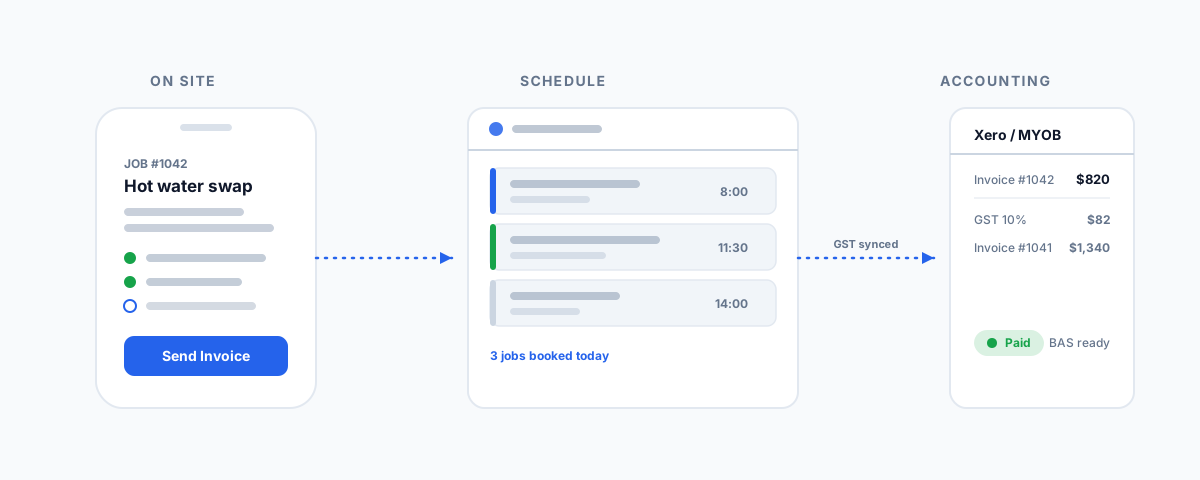
An Australian-first look at the best job-management software for tradies — ServiceM8, Tradify, Fergus, Ascora, AroFlo, and simPRO — laddered by business size, plus how each syncs to Xero or MYOB for GST and invoicing.
A tradie's business does not run at a desk. The quote gets written from the ute, the job gets moved when a supplier is late, the timesheet gets logged on site, and the invoice — if it goes out at all — gets done on the laptop at nine at night. That gap between doing the work and getting paid for it is where most small trades businesses quietly bleed hours and money. Good software closes it: quote on the spot, schedule without a whiteboard, capture the job as it happens, and invoice before you have left the driveway. Here is how the main platforms Australian tradies actually use line up, and how to pick the right one for the size you are now.
What Tradie Software Actually Does
Before the names, it helps to be clear about the job these tools do, because "tradie software" covers a fair bit. The core of it is job management: quoting and estimating, scheduling and dispatch, a mobile job card the field crew fills in, timesheets, materials and inventory, and invoicing. Underneath that sits your accounting — Xero or MYOB — which none of these tools replace. They connect to it. The whole value is turning one flow of information — quote to job to invoice to paid — into something that moves through your business without being re-typed three times.
That framing matters when you choose. A sole trader chasing faster invoicing needs something very different from a ten-van business trying to schedule crews and track stock across jobs. Buying the wrong size is the most common and most expensive mistake, so it is worth reading the market as a ladder rather than a shootout.
The Platforms at a Glance
| Software | Best for | Key differentiator | Focus area |
|---|---|---|---|
| ServiceM8 | Sole traders & small teams | Pay-as-you-go per job, Apple-first | Fast quoting and invoicing on the go |
| Tradify | Sole traders to small crews | Simple, quick to learn, cross-platform | Straightforward quote-to-invoice |
| Fergus | Small trades juggling many jobs | Visual workflow status board | Keeping many jobs moving at once |
| Ascora | Growing trades businesses | Strong scheduling and inventory | All-in-one for a growing crew |
| AroFlo | Mid-to-large, complex work | Deep project, compliance & inventory | Multi-team field operations |
| simPRO | Large field-service operations | Enterprise projects & asset management | Complex, high-volume businesses |
Reading the Landscape
Grouped by where you sit, the picture gets a lot simpler:
- Sole traders and small teams (ServiceM8 and Tradify). This is where most tradies start, and rightly so. ServiceM8 is built around fast quoting and invoicing from a phone, with pay-as-you-go pricing per job that suits variable workloads — the catch is it is Apple-first, so it favours iPhone and Mac users. Tradify is the cross-platform equivalent: simple, quick to learn, and focused on getting a clean quote-to-invoice flow working without a lot of setup. Both are the right first tool for a one-to-five-person operation.
- Small trades juggling many jobs (Fergus). As soon as you are juggling more jobs than you can hold in your head, the problem shifts from invoicing to visibility. Fergus is known for its visual workflow — a status board that shows every job and what it is waiting on — which suits plumbers and electricians running a steady book of work with a couple of staff.
- Growing businesses (Ascora). For a business that has outgrown the starter tools but is not an enterprise, Ascora is an Australian all-in-one that leans into scheduling and inventory, aiming to be the single system a growing crew runs on without the complexity of the big platforms.
- Mid-to-large and complex (AroFlo and simPRO). At the top, these are built for scale and complexity — multiple teams, complex projects, asset and inventory management, and compliance. AroFlo is a powerful Australian field-service platform for businesses with involved jobs; simPRO is the enterprise end, built for high-volume operations with real project and asset management needs. Both reward the investment of setting them up properly, and punish businesses that adopt them too early.
The Accounting Layer
Whichever you choose, remember what these tools are not: they are not your books. In Australia that almost always means Xero or MYOB underneath, and the quality of the sync is a genuine buying criterion — not an afterthought. A tradie business lives on GST-correct invoices, clean BAS, and getting paid, so you want job software that pushes invoices and payments into your accounting cleanly, with GST handled and no double entry. Most of the platforms here sync to Xero, MYOB, and QuickBooks; check that the specific accounting package you run is a first-class integration before you commit, because a half-supported sync will cost you more time than the job tool saves. We walk through one of these connections in detail in our guide to the Tradify and Xero integration.
How to Choose
The honest way to pick is to match the rung to your reality, not your ambition:
- Solo, want faster invoicing — ServiceM8 (if you are on Apple) or Tradify (anything else). Start here; do not over-buy.
- A couple of staff, losing track of jobs — Fergus, for the visual workflow that shows what every job is waiting on.
- Growing crew, need scheduling and stock — Ascora, as an Australian all-in-one that scales with you.
- Multiple teams and complex projects — AroFlo, and budget time for setup.
- Large, high-volume field-service operation — simPRO, with the resources to implement it properly.
The biggest mistake is buying up the ladder — a sole trader on an enterprise platform drowns in features they will never use, while a ten-van business still running on a starter app is holding its scheduling together with spreadsheets and luck. Buy for the rung you are on, with one eye on the next. And weight the mobile app heavily: the field crew will use it every day, and the tool they will actually fill in beats the one with the longer feature list every time.
Getting Help
Choosing the software is the easy part; the value shows up when it is set up properly and connected to everything else you run — your accounting, your email, your scheduling — so information moves through the business instead of being re-typed. That wiring is exactly what tends to get skipped, and it is where the daily admin quietly comes back. If you are running a field-service business and want the whole stack pulled into one connected, low-admin view, our post on uniting SimPRO, Xero, Outlook and Deputy into one AI-assisted dashboard shows what that looks like at the larger end. And if you would like it scoped and built against your actual systems, our Workflow Automation service designs and connects exactly this kind of setup — so the software you pick actually saves the hours it promises.