
17 July 2026
Automating Jobber: Follow-Ups, Zapier, and Getting Data Out of It
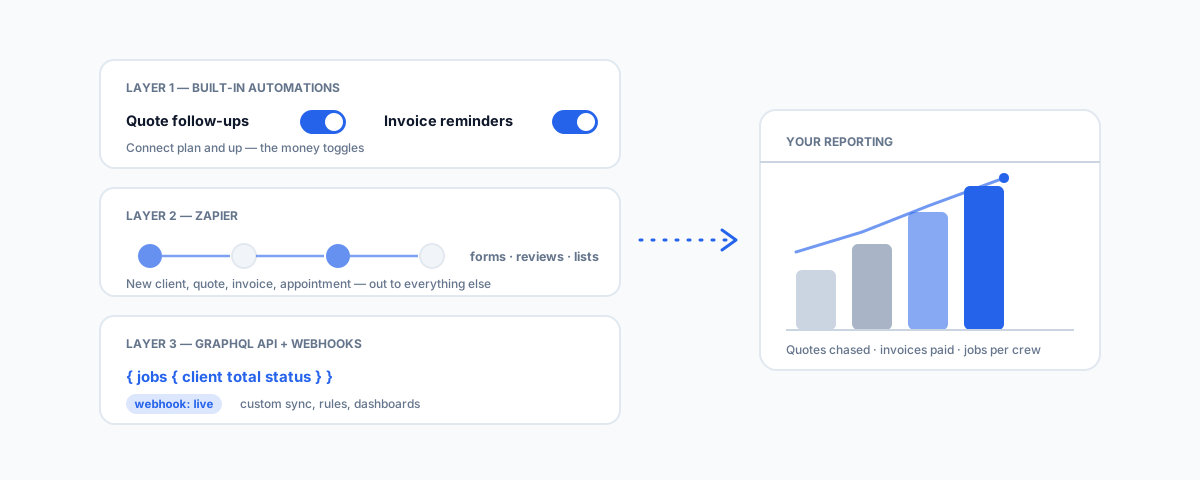
The three layers of Jobber automation — built-in quote and invoice follow-ups, Zapier for connecting the rest of your stack, and the GraphQL API with webhooks for everything the first two layers cannot do.
The admin in a field service business is death by a thousand small tasks: chasing the quote from last Tuesday, reminding the client whose invoice is a week overdue, copying a new enquiry into the system, asking a happy customer for a review. Jobber can automate a surprising amount of this — but the capability is spread across three distinct layers, and knowing which layer a problem belongs to saves you from both under-using what you already pay for and over-engineering what a checkbox would have solved. Here are the three layers, what each one is for, and what to build first.
Layer One: The Built-In Automations
The highest-value automations are the ones Jobber ships with, because they touch money directly. The essentials:
- Quote follow-ups — when a client has not responded to a quote, Jobber automatically sends a reminder on a schedule you set. Unchased quotes are the biggest silent leak in most service businesses, and this single toggle is the closest thing to free revenue in the entire product.
- Invoice follow-ups — overdue invoices get reminded automatically, on a schedule based on days since the invoice was sent, without anyone having to be the bad guy in person.
- Requests to draft quotes — incoming client requests can flow into draft quotes rather than a to-do pile, which shortens the enquiry-to-quote gap that loses jobs to faster competitors.
The catch is plan gating: these automations live on Jobber's Connect plan and up, not the entry tier. If you are on the cheapest plan and drowning in follow-up admin, the honest maths is that the plan upgrade usually costs less than the quotes you are failing to chase.
Layer Two: Zapier for Everything Around Jobber
The built-ins automate Jobber talking to your clients; Zapier automates Jobber talking to your other software. The integration (available on Connect and Grow plans) exposes triggers like new client, new quote, new invoice, and new appointment, which fire in real time and can drive actions in thousands of other apps. The zaps that earn their keep in practice are unglamorous:
- Website enquiry form → new Jobber client and request, so leads stop living in an inbox.
- Job closed → review request, sending the Google review ask while the customer is still pleased.
- New invoice → a line in a spreadsheet or a Slack/Teams message, giving the owner a daily pulse without opening reports.
- New client → your email marketing list, keeping the newsletter audience current without exports.
Zapier's limits are real — it works in discrete steps, has per-task pricing that creeps as volume grows, and cannot express complex logic cleanly. When a zap sprouts five filter steps and a formatter, that is the signal you have hit the ceiling of layer two.
Layer Three: The GraphQL API and Webhooks
Underneath everything, Jobber has a proper developer platform: a GraphQL API that can read and modify most of the data in your account, and webhooks that push events to your own endpoint the moment they happen. This is the layer for the problems the first two cannot touch — syncing Jobber with an industry system nobody has ever written a connector for, enforcing business rules ("no job scheduled without a signed quote"), or building the exact operational dashboard your Monday meeting needs. It requires developer time rather than checkbox time, so it has to be justified by a workflow that runs often enough to matter. But because the API is GraphQL, custom work tends to be compact — you ask for exactly the fields you need — and webhooks mean integrations react in seconds rather than polling on a schedule.
Getting Your Data Out
Jobber's built-in reports answer Jobber-shaped questions. The questions owners actually ask — revenue per crew per suburb per quarter, quote conversion by lead source, which recurring clients are drifting — usually need Jobber's data sitting next to accounting and marketing data. The pattern is the same one we describe for getting CRM data into BigQuery: pull the data out on a schedule (via the API or a connector), land it in a warehouse or even a well-structured spreadsheet, and build reporting there. The side benefit is portability — if you ever change platforms, your operational history is already outside the walled garden, which is exactly the problem switchers hit coming the other way (see our Jobber migration guide).
What to Automate First
Sequence matters, because the early wins fund the appetite for the later ones. In order: turn on quote follow-ups (revenue), then invoice follow-ups (cash flow), then wire your website enquiry form in (lead capture), then the review request (marketing), and only then look at reporting pipelines and API work. If a step is blocked by plan tier, price the upgrade against the leak it fixes rather than against the subscription line alone.
Getting Help
The built-ins you can switch on yourself this afternoon. The middle and bottom layers — a Zapier setup that will not turn into spaghetti, or an API integration that needs building and then quietly maintaining — are the kind of work we do through our workflow automation service. If you run a cleaning or lawn care round, our guide to Jobber for recurring home services in Australia covers where these automations bite hardest. Start with the toggle that chases your quotes; everything else can be added while it pays for the effort.