
3 July 2026
"One AI-Assisted Dashboard for Field-Service Businesses: Uniting SimPRO, Xero, Outlook and Deputy"
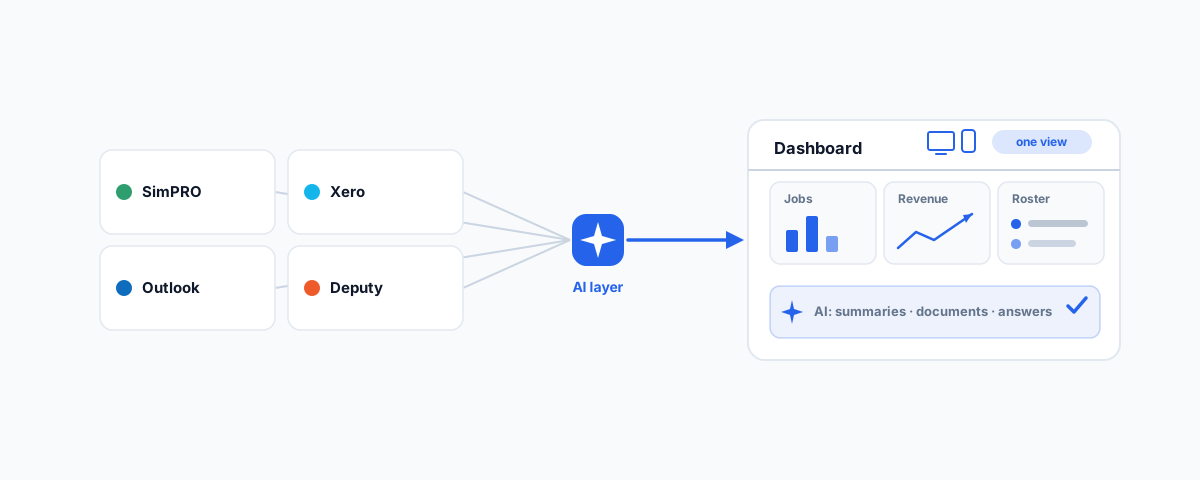
How a field-service business can pull SimPRO, Xero, Outlook, and Deputy into one AI-assisted dashboard — a single view of jobs, money, people, and comms, with AI for admin, documents, summaries, and internal support.
A field-service business runs on four different screens. Jobs live in SimPRO, the money lives in Xero, the roster and timesheets live in Deputy, and half the day's decisions happen in Outlook. Each of those tools is good at its job. The problem is that they are separate, so your staff and managers spend their day hopping between logins, re-typing the same information from one system into another, and never quite getting a single, clear picture of how the business is actually going. The admin quietly eats hours that should be going into the work. This is a look at how to fix that — by pulling those systems into one AI-assisted dashboard.
The Siloed-Tools Problem
It is worth being precise about the problem, because these tools are not entirely disconnected. SimPRO already syncs with Xero, SimPRO pushes timesheets into Deputy and Xero, and Deputy feeds payroll into Xero. Those pairwise integrations are genuinely useful and worth having. But they solve accounting and payroll plumbing — they do not give you one place to stand and see everything, and they do not touch the mountain of manual admin that still gets done by hand.
So the questions that matter most to a business owner still require four logins and a mental calculation: How is that job tracking against quote? Are we actually profitable this month? Who is rostered tomorrow, and does that match the jobs booked in? What did we promise that customer in an email last week? The data to answer all of it exists — it is just scattered across systems that were never designed to be looked at together. That scattering is the real cost, and it grows with every extra tool and every extra staff member.
What a Unified View Gives You
The first half of the fix is a single dashboard that pulls the important signals from each system into one role-appropriate view. Job status and progress come from SimPRO. Financial health — invoicing, cash position, profitability — comes from Xero. Who is working, rostered hours, and labour cost come from Deputy. Key customer and job communications come from Outlook. Instead of four tabs, a manager opens one screen and sees the state of the business; a field staff member opens the same system and sees just what is relevant to them.
The value is not the novelty of a dashboard — it is that decisions stop waiting on someone logging into three systems to piece the answer together. When "how are we doing?" has a single, current answer on one screen, you run the business proactively instead of reconstructing it after the fact.
Where AI Earns Its Place
The second half is what turns a dashboard into a genuine time-saver: an AI layer sitting over your connected data. Because the information from SimPRO, Xero, Deputy, and Outlook is now in one place, AI can work across all of it in ways that were never possible when it lived in silos. That covers exactly the admin that drains a field-service business:
Document generation — drafting quotes, job reports, customer letters, and summaries from real job data instead of retyping them. Summaries — a plain-English recap of a job's history, a customer's account, or the whole day's activity, without reading through four systems. Job-information lookup — asking "what's the status and history of the Henderson job?" in normal language and getting an answer pulled from the actual records. And internal support — an assistant that answers staff questions from your own business data and procedures, so the office is not fielding the same "how do I..." questions all day.
One principle matters more than any feature here: the AI has to be grounded in your real data and access-controlled. It should answer from the actual records, not invent plausible-sounding details, and it should only show each person what they are allowed to see. AI that makes things up, or that leaks payroll figures to the wrong staff member, is worse than no AI at all. Done properly, it becomes a genuinely useful colleague; done carelessly, it becomes a liability.
How It Comes Together
You do not need to replace any of your existing tools to do this — the whole point is to sit on top of them. Each platform exposes an API: SimPRO has one, Deputy has a REST API covering employees, timesheets, rosters and more, Xero has a well-established API, and Outlook data is reachable through Microsoft Graph. A small integration layer connects to each, pulls the relevant data into one place, the dashboard presents it, and the AI works over it. It is the same approach behind any good systems integration — one we apply across projects, and touch on in our rundown of popular Power Automate flows for business.
A few realities are worth planning for rather than discovering later. APIs have limits — rate caps and pagination (Deputy, for instance, caps how many records you can pull at once) — so the integration has to be built to respect them. Authentication and permissions need to be set up carefully so the system reads only what it should. And the AI layer needs guardrails so its answers stay accurate and appropriately scoped. None of these are blockers; they are simply the difference between a demo and something a business can rely on daily.
Easy on Phone and Desktop
A system like this only pays off if people actually use it, and in a field-service business that means it has to work as well on a phone on a job site as it does on a desktop in the office. A field technician should be able to pull up their jobs and log information from their phone; a manager should get the full picture on a larger screen. Building it mobile-first, with a clean interface that does not require training to navigate, is what drives adoption — and adoption is the entire point. The most powerful dashboard in the world is worthless if staff find it easier to go back to their four tabs.
Start Small
The temptation with a project like this is to try to build everything at once, which is also the fastest way to stall. The better path is to start with the single thing that would save the most time — often one unified view, or one AI task like generating job reports — prove it works and delivers, and then expand from there. Each piece you add sits on the same foundation, so the value compounds without the risk of a big-bang rebuild that never quite lands.
Getting Help
Pulling SimPRO, Xero, Outlook, and Deputy into one AI-assisted dashboard is very achievable, but it lives at the intersection of integration, AI, and good product design — and the details (API limits, permissions, keeping AI accurate, mobile usability) are what decide whether it becomes something your team relies on or something that gets abandoned. If you would like it scoped, built against your actual systems, and rolled out so staff and management genuinely use it, our Workflow Automation service designs and builds exactly this kind of connected, AI-assisted operations layer. Bring your business into one view once, and the daily admin stops being where your time goes.