
15 July 2026
Automated Tenant Onboarding: Software to Set Up Microsoft 365 Tenants Properly (2026)
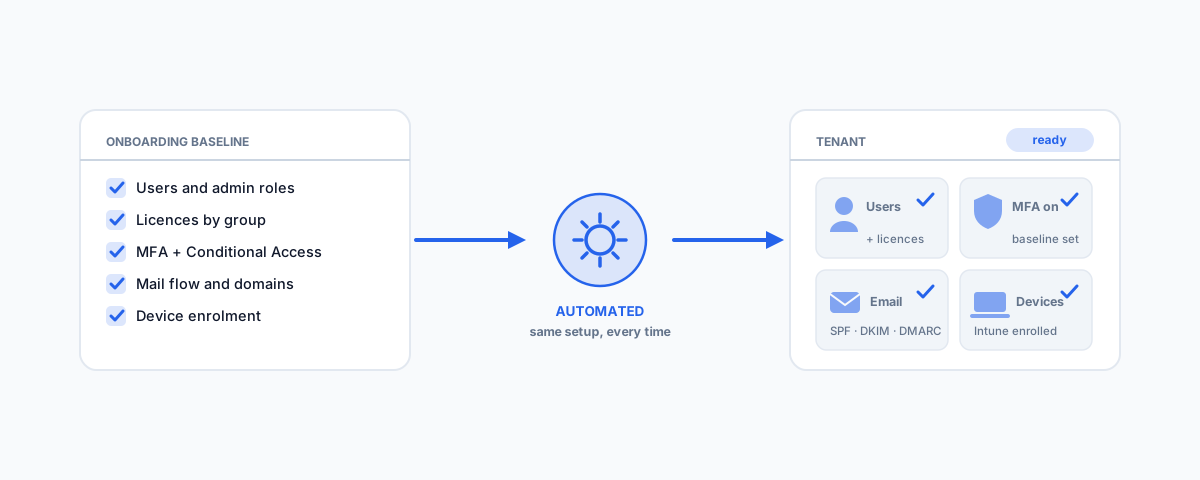
What automated tenant onboarding software actually does for Microsoft 365 — from built-in tools like Entra lifecycle workflows, group-based licensing, and Autopilot to multi-tenant platforms like Lighthouse and CIPP — and how to choose the right level of automation for your situation.
Setting up a Microsoft 365 tenant properly — for a new business, a new entity, or a tenant you have just inherited from a previous IT provider — is not one job but dozens of small ones: users and licences, MFA, mail flow and domains, device enrolment, Teams and SharePoint structure, admin accounts, and the security settings that are all off by default. Done by hand from someone's memory, every tenant comes out slightly different, and something always gets missed — usually the thing you find out about during an incident, like MFA that was never enforced or an old admin account nobody removed. Automated tenant onboarding software exists to fix exactly this: it turns the setup checklist into a repeatable process that runs the same way every time. The catch is that "tenant onboarding" covers two quite different situations, and the right software depends entirely on which one you are in.
Two Situations, Two Kinds of Automation
The first situation is a business running its own single tenant. You set the tenant up once (or clean it up once), and after that "onboarding" mostly means people — every new starter needs an account, a licence, group memberships, a mailbox, a device, and access to the right Teams and files, and every leaver needs all of that cleanly reversed. Here the automation that matters is built into Microsoft 365 itself, and the goal is that a new hire is productive on day one without anyone clicking through five admin centres. The second situation is managing tenants at scale — IT providers onboarding client tenants, franchise groups, or businesses running several entities each with their own tenant. Here the problem is consistency: applying the same security baseline, the same policies, and the same standards to every tenant, and knowing when one drifts. That calls for dedicated multi-tenant software. Most of the frustration with tenant onboarding tools comes from buying for the wrong situation, so it is worth being honest about which one you are in before looking at any product.
What a Proper Tenant Onboarding Covers
Whatever automates it, the substance of a good tenant onboarding is the same. A tenant is set up properly when each of these is deliberate rather than default:
- Identity and users — accounts created from a standard template, sensible naming, no shared logins, and admin roles separated from daily-driver accounts.
- Licensing — the right licence tier assigned automatically by role or group, not hand-picked per user and quietly over-bought.
- Security baseline — MFA enforced for everyone, Conditional Access (or at minimum security defaults) on, legacy authentication blocked, and break-glass admin access documented.
- Email and domains — custom domains verified, SPF, DKIM and DMARC records in place, and shared mailboxes used for shared functions instead of personal accounts.
- Devices — enrolment into Intune so new machines arrive with the right apps and policies, rather than being set up by hand at someone's desk.
- Collaboration structure — Teams and SharePoint laid out on purpose, with ownership and guest-access rules decided up front rather than sprawling later.
- Documentation — a record of how the tenant is configured and why, so the next person (or provider) is not reverse-engineering it.
If a tool automates account creation but leaves the security baseline manual, it has automated the easy third of the job. Our guide to Microsoft 365 administration for small business covers what the finished state should look like in detail.
Automating a Single Tenant with Built-in Tools
If you run one tenant, the good news is that most of the onboarding automation worth having is already included in business-tier Microsoft 365 — it is just not switched on for you. Entra ID lifecycle workflows are the centrepiece: joiner, mover, and leaver workflows that trigger on a start date, create and enable the account, add group memberships, send the welcome email, and — just as importantly — run the leaver sequence automatically when someone departs. Dynamic groups with group-based licensing mean a user placed in the "Sales" group automatically receives the right licence, the right Teams, and the right shared mailboxes, instead of an admin assigning each by hand. Windows Autopilot with Intune extends the same idea to hardware: a laptop shipped straight from the supplier enrols itself, installs the standard apps, and applies your policies on first sign-in, with nobody imaging machines. And for the messy human end of the process — the manager who needs to tell IT a new hire is starting — a simple Power Automate flow that takes a form submission and opens the ticket, creates the account, or notifies the right people closes the gap; we have covered patterns like this in our guide to popular Power Automate flows for business. The point of all of it is that onboarding stops depending on someone remembering the steps. What the automation should implement is the standard joiner-and-leaver process — our IT onboarding and offboarding checklist is the checklist those workflows should encode.
Software for Onboarding Tenants at Scale
Once you are responsible for several tenants, hand-configuring each one — even carefully — guarantees drift, and this is where dedicated tenant onboarding software earns its keep. Microsoft 365 Lighthouse is Microsoft's own answer for partners managing customer tenants: baseline configurations you define once and deploy to each onboarded tenant, plus a single view of security posture across all of them. CIPP (the CyberDrain Improved Partner Portal) is the open-source favourite in the same space — it applies named standards (MFA enforcement, mailbox settings, Conditional Access templates, and hundreds more) across every tenant you manage and re-checks them continuously, which turns tenant onboarding from a checklist into a one-click "apply our standard". Around these sit more specialised options: Augmentt for SaaS-focused multi-tenant management, Nerdio where the estate is Azure-heavy, and scripted baselines via PowerShell, Microsoft Graph, or Microsoft365DSC for teams comfortable maintaining configuration as code. Two honest caveats: these tools assume partner-style access relationships and someone technical enough to define the baseline in the first place, and a single small business with one tenant does not need any of them — the built-in tooling above covers that case better and cheaper.
The Australian Angle
For Australian businesses there are a few local reasons to care about doing this in software rather than by hand. A repeatable baseline is the natural place to encode Essential Eight alignment — MFA, application control, restricted admin privileges, and patching posture stop being aspirations and become settings every tenant simply gets. Data residency is set at tenant creation, so an automated onboarding that provisions tenants correctly in the Australian region avoids a problem that is painful to fix later. And increasingly the practical forcing function is cyber insurance: the questionnaire asks whether MFA is enforced for all users and whether departing staff lose access promptly, and a documented, automated onboarding process is what lets you answer yes truthfully — and prove it after an incident.
How to Choose
A short way through the options:
- One tenant, occasional hires — no new software. Turn on the built-ins: lifecycle workflows, group-based licensing, security defaults or Conditional Access, and a written checklist.
- One tenant, regular hiring or devices to manage — add Intune with Autopilot and a Power Automate intake flow, so both people and hardware onboard themselves.
- A handful of related tenants (multiple entities, a franchise) — define one baseline and apply it with Lighthouse or scripted configuration; resist configuring each tenant lovingly by hand.
- Managing client tenants as a provider — Lighthouse or CIPP as the onboarding and standards engine, with drift detection on, so every new client lands on the same known-good configuration.
Whichever tier fits, the software is the easy part — the real asset is the baseline itself: the documented decision about what "set up properly" means for you.
Getting Help
Automated tenant onboarding is one of those investments that looks optional right up until a messy departure, a failed insurance claim, or a tenant nobody understands makes it urgent. If you would like help defining a sensible Microsoft 365 baseline and putting the automation in place — lifecycle workflows, licensing, device enrolment, and a security posture you can actually evidence — our Small Business IT Support service does exactly this. Set the process up once, properly, and every tenant and every new starter after that simply lands in a system that already works.