
16 July 2026
How to Get CRM Sales Performance Data into BigQuery with Automation
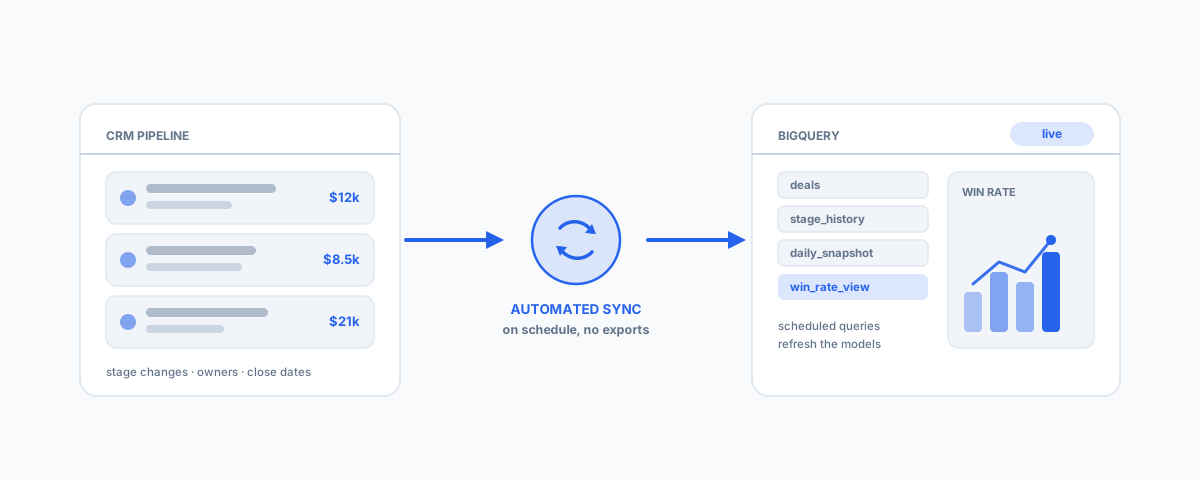
Getting sales performance data out of your CRM and into BigQuery automatically — first-party transfer services, managed connectors, and custom pipelines — plus how to model win rates, velocity, and pipeline history once it lands.
Every CRM ships with dashboards, and they are good at one question: what does the pipeline look like right now. The questions that actually measure sales performance are different — are win rates improving quarter on quarter, which lead sources convert and which just generate activity, how long do deals really take by rep and by segment, and what did the pipeline look like on the first of last month compared to today. Those questions need history, custom logic, and joins to data the CRM has never heard of, and the standard workaround — someone exporting CSVs into a spreadsheet every Monday — reliably dies within a month of the person who built it getting busy. The durable answer is an automated feed from your CRM into Google BigQuery. Here is how that is done, from the no-code routes to the fully custom ones, and what to do with the data once it lands.
Why BigQuery for Sales Data
The case for a warehouse comes down to four things. First, you own the history: a CRM stores the current state of each deal and quietly overwrites the past, so unless you capture changes as they happen, "what was the pipeline worth on 1 March" becomes unanswerable. Second, joins: real performance analysis crosses systems — deals against invoices from your accounting platform, opportunities against the marketing spend that sourced them — and that only works when everything sits in one queryable place. Third, reporting freedom: BigQuery feeds Looker Studio (free), Power BI, or any SQL client, so you are no longer limited to the charts your CRM vendor thought to build. And fourth, cost: at small-business volumes, CRM data is tiny by warehouse standards, and BigQuery's free tier (10 GB of storage and a terabyte of queries a month) means many businesses pay nothing at all for the warehouse itself.
What "Sales Performance Data" Actually Means
Before choosing a pipeline, be precise about what needs to land in BigQuery, because the default sync of most tools captures less than you think:
- Deals or opportunities — amount, stage, owner, source, close date, and the custom fields your process actually uses.
- Stage history, not just current stage — this is the one that catches people out. Win rates, stage-conversion funnels, and sales velocity are all computed from when deals moved between stages. A sync that only mirrors the current state of each deal cannot answer any of them. You need either the CRM's stage-history table (Salesforce's OpportunityHistory, HubSpot's property history), change events captured as they happen, or a daily snapshot of the whole pipeline.
- Activities — calls, emails, meetings per deal and per rep, if effort-versus-outcome analysis matters to you.
- People and structure — owners, teams, and territories, so performance can be grouped the way managers think about it.
- Targets — quotas rarely live in the CRM at all; a small reference table in BigQuery (even maintained from a Google Sheet) turns raw numbers into attainment.
Route One: First-Party Transfer Services
The simplest automation is the kind Google runs for you. The BigQuery Data Transfer Service has a native Salesforce connector: point it at your org, choose the objects, set a schedule, and it lands the tables in BigQuery on a recurring basis with no code and no third-party subscription. Some CRMs also offer scheduled exports to cloud storage that BigQuery can load from on a schedule. The trade-offs are a fixed cadence (typically hours, not minutes), the vendor's schema rather than yours, and coverage that depends on your CRM being one of the supported sources. If it covers your CRM and daily-ish freshness is enough — and for most sales performance reporting it is — start here.
Route Two: Managed Connectors
If your CRM is not covered natively, or you want more objects, more frequency, and less fiddling, the middle route is a managed connector — tools like Fivetran, Airbyte, Coupler.io, or Stitch. They maintain pre-built sources for the major CRMs (Salesforce, HubSpot, Pipedrive, Zoho) and a BigQuery destination, and they handle the boring-but-critical parts: authentication, incremental syncs, schema changes, and retries. Syncs run on a schedule you choose, commonly every five minutes to every hour. The honest caveat is pricing: most charge by rows or volume, which is trivial at the start and can creep as your history grows — so check what a year of your data actually costs, not the entry tier. For a small business that just wants reliable sales data in BigQuery without owning any code, this is usually the sweet spot of effort versus control.
Route Three: A Custom Pipeline
When you need second-level freshness, full control of the schema, or your CRM has no good connector, you build the pipe yourself: the CRM's webhooks or APIs feed a small Cloud Function or Cloud Run service, which validates each change and writes it to BigQuery — via the Storage Write API if you want genuinely real-time ingestion. This is the most flexible route and the one where you own everything: error handling, deduplication, schema management, and monitoring. We have written up exactly this build for one stack in our guide to real-time Zoho-to-BigQuery sync — the architecture and the production traps generalise to any CRM. Choose this route deliberately, not by default; most sales reporting does not need seconds-fresh data, and the ongoing ownership is real.
Modelling the Metrics Once It Lands
Landing raw CRM tables in BigQuery is half the job — the automation that makes the data useful is the second layer, and it lives inside BigQuery itself. Keep the raw synced tables as a staging area, then use scheduled queries (BigQuery's built-in cron) to transform them into clean reporting tables on a schedule. Three patterns do most of the work:
- A daily pipeline snapshot — a scheduled query that appends today's open pipeline to a snapshot table every morning. This is the cheap, robust way to get history even when your sync is current-state only, and it is what makes "pipeline now versus pipeline last quarter" a one-line query.
- Metric views — win rate by rep, source, and quarter; sales velocity (deals × win rate × average size ÷ cycle length); stage-conversion funnels; pipeline coverage against the targets table. Define each once as a view instead of re-deriving it in every dashboard.
- One reporting dataset for dashboards — point Looker Studio at the clean views, never at raw staging tables, so a schema change in the CRM breaks one transformation query instead of every chart.
Done this way, the whole chain is automated end to end: the connector lands raw data, scheduled queries refresh the models, and the dashboards are simply always current — the Monday-morning export job ceases to exist.
Keeping It Reliable
Whatever route you choose, the same three production issues account for most broken CRM pipelines: schema drift (someone adds a custom field and the sync drops or breaks on it), duplicates (retries and webhooks firing twice, so every table needs a stable key and a dedupe step), and quotas and cost (CRM API limits on one side, query and streaming costs on the other). Managed connectors absorb much of this for you; custom pipelines make it your job. Our Zoho-to-BigQuery post covers these production traps in more detail, and the fixes are the same for any CRM. The other reliability rule is organisational: someone must be alerted when a sync fails, because the failure mode of a data pipeline is not an error page — it is a dashboard that is quietly three weeks stale and still being trusted.
How to Choose
A short way through the options:
- Salesforce, and daily freshness is fine — the BigQuery Data Transfer Service; no code, no subscription.
- HubSpot, Pipedrive, Zoho, or you want hourly syncs without engineering — a managed connector like Fivetran, Airbyte, Coupler.io, or Stitch, plus scheduled queries for the modelling.
- Real-time needs, unusual CRM, or full schema control — a custom webhook-to-BigQuery pipeline, owned and monitored like the production system it is.
- Whichever you pick — build the daily snapshot table from day one; it is the single highest-value table in a sales warehouse and the one you cannot backfill later.
If your reporting problem is wider than sales — marketing numbers scattered across ad platforms, or field-service and payroll systems that need to meet in one dashboard — the same warehouse-first thinking applies, and our guides to automated reporting for solo consultants and unifying simPRO, Xero, and Deputy in one dashboard show it at both ends of the scale.
Getting Help
An automated CRM-to-BigQuery feed is one of those projects where the first 80 per cent takes a weekend and the last 20 per cent — stage history, deduplication, snapshots, monitoring — is what decides whether anyone still trusts the numbers in six months. If you would like it scoped and built properly, from choosing the right sync route to the scheduled queries and the Looker Studio dashboards on top, our workflow automation service handles the full pipeline end to end. Set it up once, correctly, and your sales performance reporting stops being a weekly chore and becomes something the business simply has.