
24 July 2026
E-Signatures for Small Business: DocuSign vs. Adobe Sign vs. What's Already in Microsoft 365
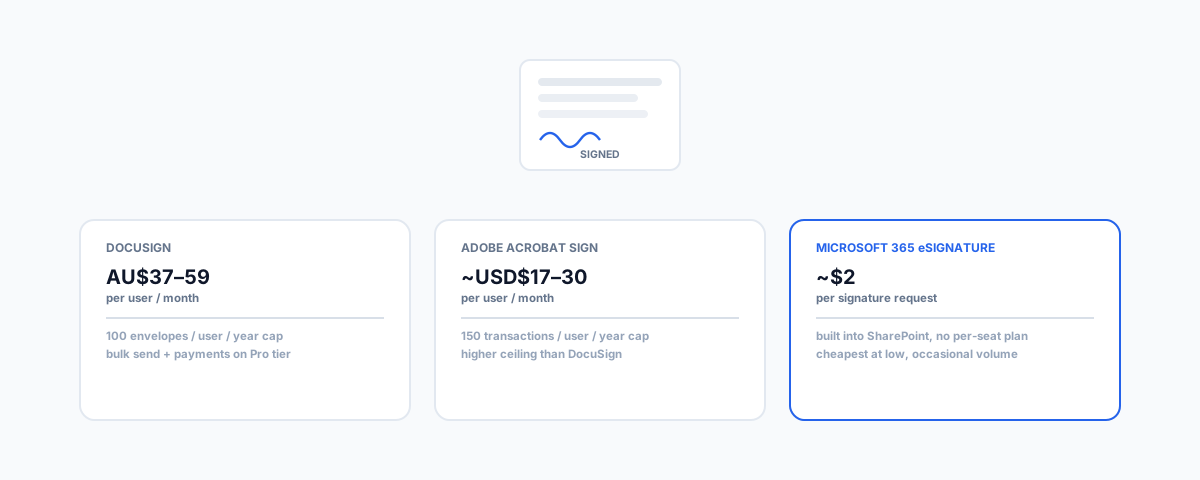
DocuSign Standard runs AU$37/user/month and Adobe Sign around USD$17–24, both capped at 100–150 sends a year — but Microsoft 365 now has a built-in eSignature feature billed per transaction. What each actually costs, and which one fits your actual signing volume.
Getting a contract, quote, or lease signed used to mean printing, signing, scanning, and emailing — or, more realistically, a PDF sitting unsigned in someone's inbox for a week. Every major e-signature tool has solved that problem well. The part worth getting right is which tool, because the pricing models are genuinely different, and if you're already on Microsoft 365, there's a real built-in option most businesses don't know exists.
What DocuSign Actually Costs
DocuSign's own Australian pricing page lists Personal at AU$15/month for 5 envelopes a month, Standard at AU$37/user/month for 100 envelopes per user per year with team collaboration features, and Business Pro at AU$59/user/month — the tier that adds payment collection during signing, bulk send to multiple recipients, web forms, and fuller API access. Both paid team tiers cap out at 100 envelopes per user per year, which is easy to miss until a busy month blows past it. Enterprise pricing is custom.
What Adobe Acrobat Sign Actually Costs
Adobe's team plans run in a similar band — Acrobat Standard for teams around USD$17/user/month, Acrobat Pro for teams around USD$24/user/month, and Acrobat Studio for teams around USD$30/user/month, with all three capped at 150 transactions per user per year (worth checking Adobe's own pricing page directly for current AUD rates, since Adobe's checkout localises pricing by region and it moves independently of the USD list price). Adobe's higher transaction cap compared to DocuSign's 100/year is a genuine point in its favour if you're closer to the ceiling than the floor.
The Built-In Option Most Businesses Don't Know About
This is the part worth knowing before comparing DocuSign and Adobe against each other: Microsoft's own eSignature service is built directly into SharePoint, and it isn't a rounding-error feature. An admin enables it in the Microsoft 365 admin console, and from there anyone with edit and sharing permissions on a PDF or Word document stored in SharePoint can send it out for signature, complete with a digital audit trail logged through Microsoft Purview. Pricing is pay-as-you-go through your Azure subscription, billed per transaction rather than a flat monthly seat — commonly cited around $2 per signature request — which can work out considerably cheaper than a per-seat DocuSign or Adobe plan if your business only sends contracts occasionally rather than constantly. A drawn signature option (stylus, touch, or mouse) rolled out globally between March and May 2026, on by default, alongside the existing typed-signature option.
Two things worth knowing before treating this as a like-for-like replacement. First, it uses "simple" electronic signatures under applicable law rather than the higher-assurance "qualified" or "advanced" signature tiers some regulated transactions require — check whether your specific use case needs that stronger tier before relying on it. Second, external signers who aren't already guests on your Microsoft 365 tenant need Entra B2B guest access configured, which is a real setup step rather than something that works automatically the first time you try it.
The genuinely interesting detail: Microsoft's eSignature platform can also initiate a signature request through Adobe Acrobat Sign or DocuSign as connected providers, with the signed document automatically saved back into SharePoint. It isn't strictly positioned as competing with either — it can be the front door to them, or a free-standing lightweight option on its own.
How to Actually Decide
Start from your real signing volume, not the tool with the most name recognition. A business sending a handful of contracts a month is likely to find Microsoft's pay-per-transaction pricing cheaper than any flat per-seat plan, if you're already on Microsoft 365 with SharePoint in use. A business sending dozens of contracts monthly, needing bulk send, or collecting payment during signing — real estate agencies handling lease agreements are a common example — outgrows the built-in option quickly and is better served by DocuSign Business Pro or an equivalent Adobe tier, where those features are native rather than absent. If you're already comparing password managers or AI assistant pricing the same way — our guides to password managers for small business teams and Microsoft 365 Copilot vs Google Workspace Gemini pricing both cover the same "built-in vs dedicated tool" decision applied to different parts of your stack. For real estate specifically, where contract volume is high and turnaround time matters, our guide to HubSpot for real estate covers the CRM side that an e-signature workflow typically needs to plug into.
Getting Help
Wiring e-signature into how your business actually works — routing a signed contract back into your CRM, triggering the next step in a workflow automatically, or simply making sure the right people get notified when a document is signed — is where the real time savings sit, beyond just picking a tool. Our Workflow Automation service sets up e-signature as part of a connected process rather than a standalone step, so a signed contract actually moves your business forward instead of landing in an inbox to be dealt with manually.