
23 July 2026
Password Managers for Small Business Teams: 1Password vs Bitwarden vs Google/Microsoft Built-In (2026)
Bitwarden Teams starts at USD $4/user/month and 1Password Business at $8.99 — both far cheaper than the cost of a shared spreadsheet of logins. What each actually includes, why "just use what's built in" means something very different on Google Workspace than on Microsoft 365, and how to decide.
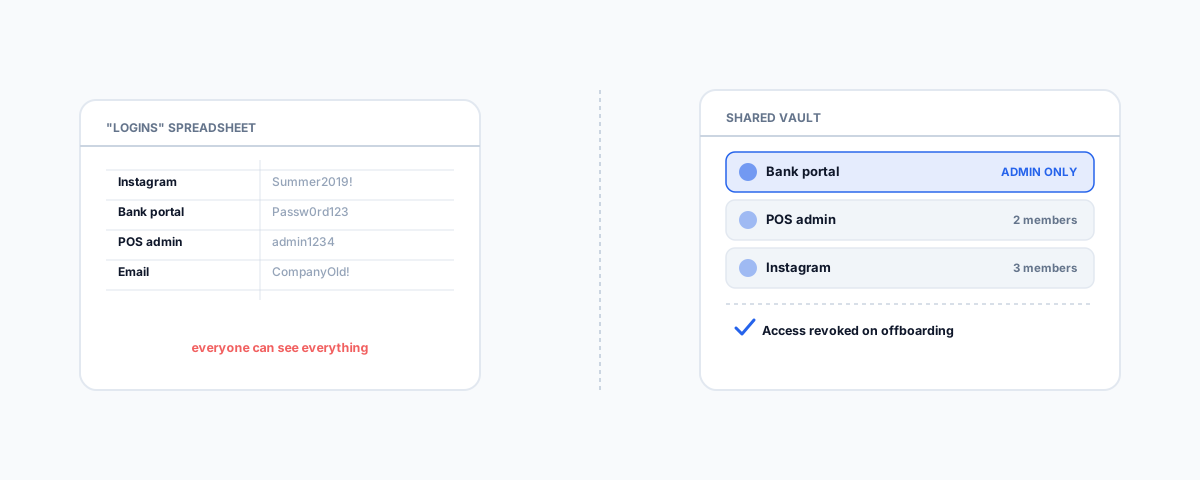
Most small businesses share passwords through a spreadsheet, a note in Slack, or a document titled "logins" that everyone has read access to and nobody remembers to update when someone leaves. It works, in the sense that people can get into the accounts they need — right up until it doesn't, because a departing staff member still has the file, or a shared social media login gets typed into the wrong chat. A proper password manager fixes this for a genuinely small monthly cost, and the real question for most businesses isn't whether to use one, it's whether something you're already paying for already covers it.
What 1Password Actually Costs and Includes
1Password's own Business pricing page lists two small-team tiers. Teams Starter Pack is a flat USD $24.95 a month covering up to 10 people, with shared vaults, role-based permissions, and developer tools included — a genuinely simple entry point if your team is under ten. Business runs USD $8.99 per user per month (billed annually) and adds single sign-on integration with Okta, Entra ID, OneLogin, and Duo, more granular vault permissions, Watchtower security monitoring that flags weak or reused passwords, custom groups and policies, and activity reporting. One detail worth knowing before you commit: adding an 11th person to Teams Starter Pack moves your whole organisation onto per-seat Business pricing, not just the extra seat.
What Bitwarden Actually Costs and Includes
Bitwarden's own pricing page puts its Teams plan at USD $4 per user per month (annual) — materially cheaper than 1Password's equivalent tier — and it still includes shared credentials, an audit-trail event log, directory sync, and SCIM-based automated provisioning. Enterprise, at USD $6 per user per month, adds passwordless SSO, account recovery, a self-hosting option for businesses that want the vault on their own infrastructure, and a free Families plan for every user. Feature-for-feature, Bitwarden's entry tier covers a lot of what 1Password charges more for, which is worth factoring in if budget is the deciding factor rather than brand familiarity.
Why "Just Use What's Built In" Means Two Different Things
This is the part most comparisons skip, and it matters because the honest answer is genuinely different depending on which platform you're already on. Google Password Manager, built into Chrome and Android, has no real business layer at all — no secure credential sharing between staff, no audit trail, no team management console. The Google Workspace admin console lets you enforce a generic password-strength policy, but that's a setting, not a password manager feature. It's a fine personal tool and not a viable way to share a login across a team once more than a couple of people need access to the same account.
Microsoft's equivalent is a genuinely different story. Microsoft Edge for Business added a real admin-grade feature: secure password deployment, where an IT admin encrypts a set of credentials and pushes them to specific user groups on managed devices, tied to each person's Entra ID identity. The password autofills for the user when they land on the right site, but it can't be viewed, copied, or exported from the browser, and an admin can revoke access instantly — Microsoft's own announcement of the feature covers the mechanics. It's one-directional — admin pushes credentials out, rather than staff sharing logins with each other directly — so it doesn't replace a dedicated vault for every use case, but it's a real capability, not a rounding error the way Google's built-in option is. If you're on Microsoft 365 with managed devices already, it's worth checking whether this covers your actual sharing needs before paying for a separate tool.
How to Actually Decide
Start from how your team is actually sharing credentials today, not from a feature list. If it's a handful of shared logins on Microsoft 365 managed devices, Edge's secure password deployment may already be enough, at no extra cost. If you're on Google Workspace, the built-in option isn't a real contender past a two- or three-person team, so the decision is really between Bitwarden and 1Password. Bitwarden's lower per-seat cost and directory sync make sense if budget and integration with an existing identity provider matter most; 1Password's Watchtower monitoring and more polished admin experience are worth the premium if you want less setup friction and don't mind paying for it. Either dedicated option is worth the cost the moment more than a handful of people need shared access to business-critical accounts — the monthly spend is trivial next to the cost of one departing staff member still holding a shared login six months later.
Where This Fits With the Rest of Your Access Controls
A password manager solves credential sharing, not the whole access-control picture. Multi-factor authentication is the other half of the same story, and both Microsoft and Google are actively shifting toward passkeys by default — our guide to passkeys becoming the default in Microsoft 365 and Google Workspace covers that rollout. Password hygiene and MFA are two of the same eight controls we cover in our guide to the ASD Essential Eight for small business, and revoking a departing staff member's vault access belongs in the same process as the rest of their offboarding, covered in our IT onboarding and offboarding checklist.
Getting Help
Choosing between Bitwarden, 1Password, and what's already built into your existing platform is a quick decision once you know what you're actually comparing — the harder part is rolling it out so staff actually use it instead of falling back to old habits. Our Small Business IT Support service sets up and rolls out password management alongside the rest of your access control, so shared logins stop living in a spreadsheet nobody's updated since someone left.