
22 July 2026
Google Business Profile for Local Service Businesses: The Setup Most Tradies and Venues Get Wrong
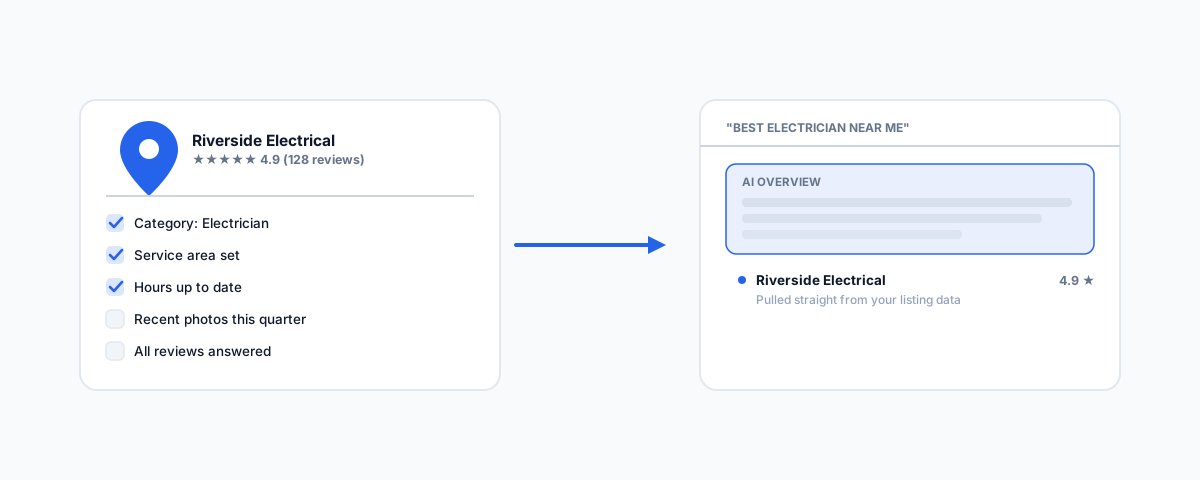
For a tradie, restaurant, or clinic, Google Business Profile is often the first thing a customer sees — before your website. What changed in 2026 (AI Overviews now answer "best electrician near me" straight from your listing), the setup mistakes that quietly cost local visibility, and the checklist to fix it.
For most local service businesses — a plumber, a lawn care operator, a suburban restaurant, a clinic — Google Business Profile is not a marketing nice-to-have, it is often the first thing a prospective customer actually sees. Someone searches "electrician near me" or "best pizza [suburb]," and the map pack and profile answer the question before your website ever loads. That makes the listing worth getting right, and in practice most small businesses set it up once, years ago, and never touch it again — which is exactly the gap 2026's changes have made more expensive.
What Actually Changed in 2026
Local search results now increasingly answer the query directly rather than just linking to it. Google's AI Overviews, previously limited to informational queries, now regularly appear for local intent searches like "best electrician near me" or "family dentist in [suburb]" — pulled largely from the structured data on Business Profile listings: categories, attributes, services, and reviews. Google's own Business Profile help centre documents the features behind this shift: AI-assisted responses to customer messages, scheduled and multi-location Google Posts, and a more detailed Insights view. The practical effect is that profile completeness now carries more weight than it used to — every missing attribute, outdated hour, or unanswered question is a small trust gap that can push a customer toward a competitor with a fuller listing, and it is also a gap in the data Google's own AI summary is drawing from when it answers on your behalf.
The Mistakes That Actually Cost Visibility
These are the recurring problems we see across trades, hospitality, and clinics — not exotic technical issues, just details nobody revisited after the initial setup.
- Wrong business type for how you actually operate. A mobile trade with no public shopfront — a plumber, an electrician, a lawn care business — should be set up as a service-area business with the address hidden, not a storefront listing with a home address exposed and a pin that confuses customers about where to actually go.
- Inconsistent name, address, and phone number. If your listing, website footer, and any directory listing (Yellow Pages, local chamber sites, Facebook) don't match exactly, Google treats that as a trust signal working against you, not a rounding error.
- Generic or wrong primary category. "General contractor" instead of the specific trade, or a single broad category when a handful of accurate secondary categories would surface the listing for more specific searches.
- Photos that are years old, or missing entirely. Recent, real photos of your team, vehicle, premises, or completed work outperform stock imagery and directly affect the trust signals Google now weights more heavily.
- Reviews left unanswered. A response to every review — good or bad — signals an active, attentive business, and a calm, specific reply to a negative review often reassures the next customer more than the review itself worried them.
- The Q&A section left blank or hijacked. Anyone can post a question on your listing, and anyone can answer it — including a competitor. Seed the obvious questions (do you offer emergency callouts, what areas do you service, what's the minimum job size) with your own accurate answers before someone else does.
- Duplicate listings. A second, older listing — often created accidentally by an app or a past employee — splits your reviews and confuses which one Google actually surfaces.
A Practical Setup and Maintenance Checklist
Getting this right once, and then keeping it current, is a short recurring task rather than a project:
- Confirm the business type (storefront vs service area) matches how customers actually reach you.
- Audit name, address, and phone number for exact consistency across every place your business appears online.
- Set the primary category precisely, and add every genuinely relevant secondary category.
- Upload current photos every quarter — team, vehicle or premises, and finished work if that applies to your trade.
- Respond to every new review within a few days, and clear any existing backlog.
- Add or update service area, business hours (including public holidays), and service or product attributes whenever they change.
- Post at least monthly — Google's Posts feature now supports scheduling, so a quarter's worth can be queued in one sitting rather than forgotten.
- Search your own business name plus suburb periodically to catch a duplicate listing before it costs you reviews.
Where This Fits With the Rest of Your Setup
A strong Business Profile does the most good when it points somewhere solid — a website that loads properly and a booking or contact path that actually works. If you run a trade business, our guides to software for tradies in Australia and Jobber for cleaning and lawn care businesses cover the booking and job-management side this often feeds into. For hospitality and venues, our guide to IT support for hospitality venues covers the booking and POS systems a Business Profile listing typically drives traffic toward.
Getting Help
A Business Profile audit is quick to do properly and easy to leave broken for years once it's set up wrong the first time. If you'd rather have your domain, website, and Google presence set up and kept current as one job rather than three separate afterthoughts, our Domain & Web Presence service covers exactly this. Your listing is often the first impression a customer forms of your business — worth making sure it's an accurate one.