
3 August 2026
Property Management Software With QuickBooks Integration: What Actually Syncs
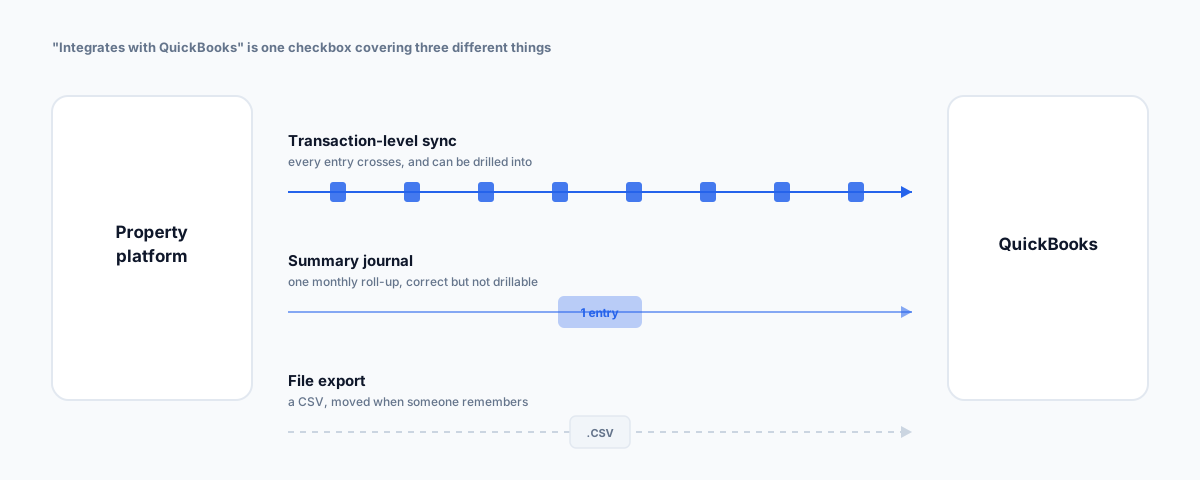
"Integrates with QuickBooks" covers three very different things, from transaction-level sync to a CSV export with a nice logo. What each platform actually pushes across, why the answer changes completely if you hold other people's rent in trust, and what to check before you commit.
"Integrates with QuickBooks" is one of the least informative claims on a software comparison page. It appears as a tick in a feature table, which implies the platforms carrying that tick are doing roughly the same thing. They aren't. Behind that single checkbox sit at least three genuinely different arrangements, and the difference determines whether your accountant thanks you or quietly rebuilds your books by hand every quarter.
There's also a prior question that most listicles on this topic skip entirely, and it matters more than any feature comparison: are you managing your own properties, or holding someone else's rent? If it's the latter and you're in Australia, the shortlist you should be working from is not the one that comes up when you search this.
We've covered how the major platforms compare by portfolio size and the Australian landlord-specific options separately. This post is narrower: what the accounting integration actually does.
What "QuickBooks Integration" Actually Means
Three tiers, described honestly:
- Transaction-level sync. Individual transactions — rent received, expenses paid, owner disbursements — flow into QuickBooks as discrete entries, usually mapped to a chart of accounts you configure once. This is what people picture when they read "integration", and it's the only version where QuickBooks stays a genuine source of truth without manual work.
- Summary journal entries. The platform posts a periodic roll-up — monthly, usually — as one or a handful of journal entries. Your P&L is correct at a summary level, and your general ledger is much tidier, but you can't drill from QuickBooks back to a specific tenant payment. For a lot of businesses this is completely fine. It is not what most people assume they're buying.
- Export and import. A CSV or IIF file you download from one system and upload to the other. Vendors do describe this as an integration. It is a file transfer with a schedule you have to remember.
None of these is inherently wrong. The problem is choosing on the basis of the checkbox and discovering the tier afterwards, usually at the end of a financial year. Ask which one it is before you sign, and ask specifically whether the sync is one-way or two-way — a one-way push means anything corrected in QuickBooks gets overwritten or duplicated on the next run.
The Platforms That Genuinely Do It
The property management platforms with real QuickBooks Online integration are, overwhelmingly, built for the US market — which shows up in the pricing, the terminology, and the assumptions about how rent moves:
- DoorLoop — QuickBooks Online sync alongside its own built-in accounting, portals, maintenance, and bank reconciliation. Positioned at operators scaling up rather than at someone with two properties.
- Buildium — a long-standing option in the residential space, commonly cited as the general-purpose pick for property management accounting.
- TenantCloud — notable for a genuinely usable free tier, with QuickBooks Online sync sitting on a paid plan rather than the free one.
- STRATAFOLIO and Re-Leased — both aimed at commercial rather than residential portfolios, with STRATAFOLIO's CAM reconciliation syncing to QuickBooks.
If you're a self-managing investor or a commercial operator, that list is a reasonable starting point. If you run a rent roll in Australia, keep reading, because it probably isn't.
The Australian Complication: Trust Accounting
This is the part that reorders everything. If you hold rent on behalf of landlords, that money is trust money, and it is governed by state legislation rather than by preference. In NSW, for example, licensees under the Property and Stock Agents Act 2002 must hold clients' funds in a trust account at an authorised deposit-taking institution, and those funds cannot be used for any purpose other than for that client. Only the licensee in charge may authorise a withdrawal. The audit period runs to 30 June, the auditor's report is lodged by 30 September, and the audit follows Australian assurance standards. Every state and territory runs its own version of this — the principles rhyme, the mechanics and lodgement details don't.
QuickBooks is a general ledger. It is not a trust accounting system, and it does not know about statutory trust obligations, per-owner ledgers, or a licensee-in-charge authorisation step. That's not a criticism — it was never built to. But it means that for an agency, "which platform syncs to QuickBooks" is the wrong first question. The first question is which platform does compliant trust accounting for your state, and the accounting integration is chosen from whatever's left.
In practice, the platforms that handle Australian trust accounting properly — PropertyMe, Console Cloud, MRI Property Tree, Re-Leased — are built around Australian and New Zealand legislation, and the accounting integration they most commonly offer is Xero, not QuickBooks. That is a market reality rather than a technical limit, and it's the honest answer to why the QuickBooks-integrated shortlist looks so American.
One more wrinkle worth knowing: in Australia, QuickBooks from Intuit effectively means QuickBooks Online. The desktop lineage here diverged years ago — the product that looks and feels like old QuickBooks Desktop is sold by Reckon under its own brand. So if an Australian vendor says "QuickBooks integration", it's worth confirming which product they actually mean.
When QuickBooks Integration Is Genuinely the Right Answer
None of the above applies if you're not holding anyone else's money:
- Self-managing investors with a handful of properties, where the rent lands in your own account and there's no trust obligation at all. Here the integration question is the real question, and the tier of sync is what to compare on.
- Commercial operators whose books already live in QuickBooks Online, particularly where CAM reconciliation is the hard part rather than trust compliance.
- Businesses where property is a sideline — a company that owns the building it trades from, say. Forcing that into a dedicated property platform is usually worse than keeping it in the accounting system you already run.
If You're Still on QuickBooks Desktop
Worth flagging because the deadline has already passed rather than being on the horizon. Intuit discontinued QuickBooks Desktop 2023 after 31 May 2026 — covering Pro Plus, Premier Plus, Mac Plus and Enterprise 23.0. Past that date there's no live technical support, no online bank feeds, no Desktop Payments or Payroll services, and critically no security updates. Intuit runs this on a rolling cycle, so each subsequent version reaches the same end point about three years after release.
If you're choosing a property platform now and your books are on an unsupported Desktop version, sequence it deliberately: sort the accounting migration first, then pick the property platform against the system you'll actually be running. Choosing a platform for its Desktop integration in 2026 is optimising for something that's already gone. Our guide to QuickBooks alternatives is a reasonable place to start if you're reconsidering the accounting side at the same time.
What To Check Before You Commit
Ask these before signing, not after the first reconciliation:
- Which tier is the sync? Transaction-level, summary journal, or file export. Get a straight answer.
- One-way or two-way? And what happens to a correction you make in QuickBooks after the sync has run.
- Does it handle owner disbursements, or only rent received? Plenty of platforms sync the income side cleanly and leave the payout side manual.
- Does it separate trust from operating funds in a way your auditor will accept, if that applies to you.
- What does month-end actually look like? Ask the vendor to walk you through a reconciliation rather than a feature list.
- What happens at year-end, and has anyone in your state actually lodged an audit off this configuration.
Getting Help
The integration is usually the part that gets decided last and causes the most trouble afterwards, because it's the only piece that has to satisfy both the people managing properties and the person doing the books. Our Workflow Automation service covers exactly this join — getting a property platform and an accounting system talking to each other properly, with the sync tier and the reconciliation process worked out deliberately rather than discovered at the end of a financial year.