
4 August 2026
QuickBooks Online for Trucking Companies: The Australian Setup
US trucking guides are built around IFTA, which doesn't exist here. The Australian problem is fuel tax credits — where the same truck earns two different rates depending on where it drove, and the rate changed three times in 2026 alone. What QuickBooks does, what it won't, and the TPAR rule that isn't the construction one.
Most guides on setting up accounting software for trucking are American, and they're organised around IFTA — the fuel tax agreement covering carriers running across US states. It doesn't exist in Australia, so the entire spine of those guides is irrelevant here.
The Australian equivalent is fuel tax credits, and it's a bigger deal than IFTA in one specific way: it's not just a reporting exercise, it's money coming back to you every BAS. Get the setup wrong and you either leave cash with the ATO or claim too much and amend later. Everything else — cost per truck, contractor reporting, depreciation — matters, but fuel is the one that pays for the effort.
Fuel Tax Credits Are the Main Event
If you run heavy vehicles with a gross vehicle mass over 4.5 tonnes, you can claim fuel tax credits on eligible fuel. So far so simple. The complication is that the same truck earns two different rates depending on where it drove.
- Travelling on public roads, the fuel tax credit rate is reduced by the heavy vehicle road user charge. For gaseous fuels the road user charge has reduced credits to nil.
- Travelling off public roads — on a mine site, in a quarry, on private property — the rate isn't reduced by the road user charge, and you use the higher "all other business uses" rate instead.
That distinction isn't a technicality. For a fleet doing meaningful off-road work, the gap between the two rates is the difference between a correct claim and leaving real money behind. It also means your fuel records need to support a split between on-road and off-road use, which is a data problem before it's an accounting problem.
The Trap: Rates Change Mid-Period
Here's the part that causes amended BASs, and 2026 is an unusually good year to explain it, because the rate has moved three times.
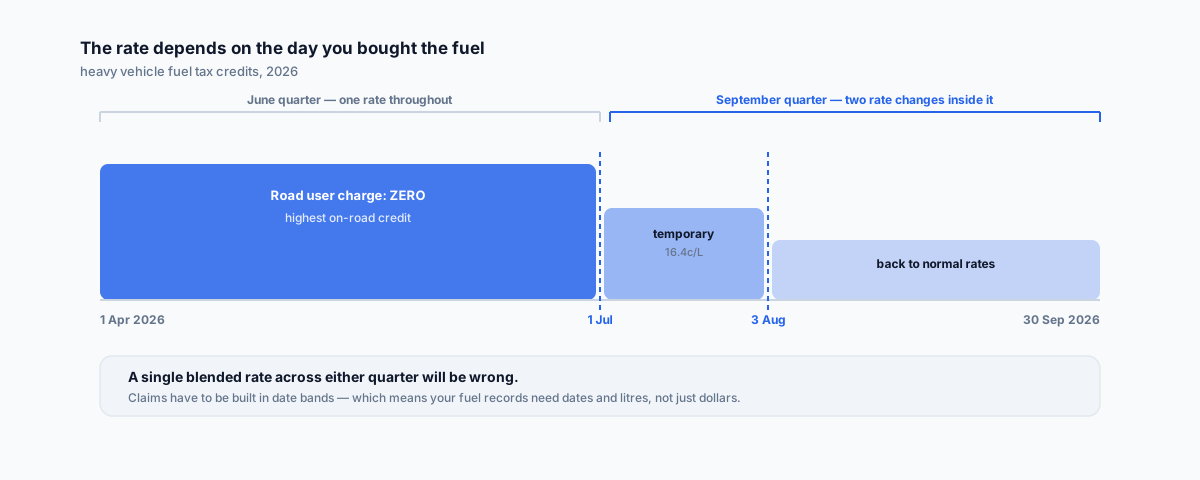
The rule is that you must use the rate that applied on the date you acquired the fuel — not the rate at the end of the quarter, and not an average. Now look at what happened this year, per the ATO's published rate periods:
- From 1 April to 30 June 2026, the heavy vehicle road user charge was set to zero — which pushed on-road fuel tax credits up sharply for that window.
- From 1 July to 2 August 2026, temporary measures applied: a reduction in full excise rates for one month, with the heavy vehicle road user charge set to 16.4 cents per litre for liquid fuels and 21.9 cents per kilogram for gaseous fuel.
- After 2 August 2026, the road user charge and excise rates returned to normal levels.
Read that against a BAS period. Anyone reporting quarterly is currently sitting in a September quarter that contains a rate change on 1 July and another on 3 August. Anyone still finalising the June quarter had a zero road user charge throughout. A single blended rate applied across either period will be wrong.
Those figures are as published by the ATO, but rates vary by fuel type and are indexed regularly, so work from the fuel tax credit rates tables for the exact period and fuel you're claiming rather than from any figure in a blog post. The durable lesson isn't the numbers — it's that the acquisition date determines the rate, so your fuel records need dates on them and your claim needs to be built in date bands.
What QuickBooks Won't Do Here
Worth being blunt so you plan around it: QuickBooks Online does not calculate fuel tax credits for you. There's no feature that reads your fuel bills, works out which litres were on-road and which weren't, applies the correct rate for each acquisition date, and hands you a BAS figure.
What you can reasonably do inside QuickBooks is structure the inputs so the calculation is possible:
- Separate fuel from other vehicle costs in the chart of accounts, so fuel spend is isolated rather than buried in a general running-costs account.
- Record fuel purchases with enough granularity — supplier, date, litres, vehicle — that you can band them by rate period afterwards. Litres matter more than dollars here, and dollars are what accounting software naturally captures.
- Keep the on-road/off-road split somewhere defensible, whether that's telematics data, run sheets, or a fuel card report. QuickBooks isn't going to source this for you.
The calculation itself belongs in the ATO's fuel tax credit calculator or a dedicated add-on. Trying to force it into the accounting file usually produces a number nobody can substantiate later, which is the worst outcome of the available options.
Cost Per Vehicle, Not Cost Per Job
This is the structural difference from most trades businesses. A builder wants profit per job. A carrier wants cost per truck, and ideally cost per kilometre — because the question that matters is which vehicles are earning and which are quietly costing more than they return.
Practically, that means picking one dimension in QuickBooks and using it consistently for vehicles — and then coding every fuel bill, tyre, service, registration and insurance line against the right one. As with job costing, the setup is easy and the discipline is where it falls over. A fleet where half the maintenance invoices aren't attributed to a specific truck produces per-vehicle reporting that's worse than none, because it looks authoritative and isn't.
TPAR for Road Freight — and It's Not the Construction Rule
If you pay contractors to provide road freight services on your behalf, you may need to lodge a Taxable Payments Annual Report. Same report, same 28 August deadline as everyone else, but the eligibility test is different from the one that applies to builders, and conflating them is a real risk if you've read general Australian advice.
Per the ATO's road freight services guidance:
- The threshold is 10% or more of your business income from taxable payments reporting system services — not the 50% test that applies to building and construction.
- Since 1 July 2019, if you provide both road freight and courier services, you must combine the payments received for both when working out whether you're over that threshold.
- Payments to employees aren't reported. Only contractors and subcontractors.
Ten percent is a low bar. A business whose main trade is something else but which does a meaningful slice of freight can be captured without ever thinking of itself as a freight company. Our QuickBooks setup guide for construction covers the mechanics of enabling TPAR in QuickBooks and flagging suppliers — the steps are identical, it's only the question of whether you're caught that differs.
Trucks Don't Fit the Instant Asset Write-Off
A quick expectation-setter. The instant asset write-off threshold sits at $20,000 per asset for eligible small businesses — which comfortably covers a laptop or a set of tools and comes nowhere near a prime mover or a trailer.
So for the assets that actually define a trucking business, you're in depreciation and small business pooling territory rather than immediate deduction. That's not a QuickBooks setup question so much as a reason to have the fixed asset register set up properly from the start and to talk to your accountant before a major purchase rather than after.
Where QuickBooks Stops
QuickBooks Online is an accounting system, and a fleet generates a lot of operational data that has no business living in one: job and load allocation, driver hours and fatigue records, maintenance scheduling, telematics, kilometres by vehicle.
The sensible architecture is that operational systems own that data and feed the accounting file, not the reverse. That's especially true for the on-road/off-road split — telematics can substantiate it in a way that a manual estimate never will, and if you're claiming a materially higher off-road rate, substantiation is exactly what you'd want to have.
While you're setting things up, automating a backup of the QuickBooks file is worth doing once and forgetting about.
Getting Help
The fuel tax credit calculation is where the money is, and it's also the part QuickBooks leaves to you — which means it lives or dies on whether fuel data, vehicle data and the on-road/off-road split actually reach the person preparing the BAS in a usable form. Our Workflow Automation service covers that join: getting fuel card, telematics and accounting data into one place so the claim is built from records rather than reconstructed from memory each quarter.