
30 July 2026
Secure Workspace Setup for Small Business: What 'Secure' Actually Means Beyond the Marketing Label
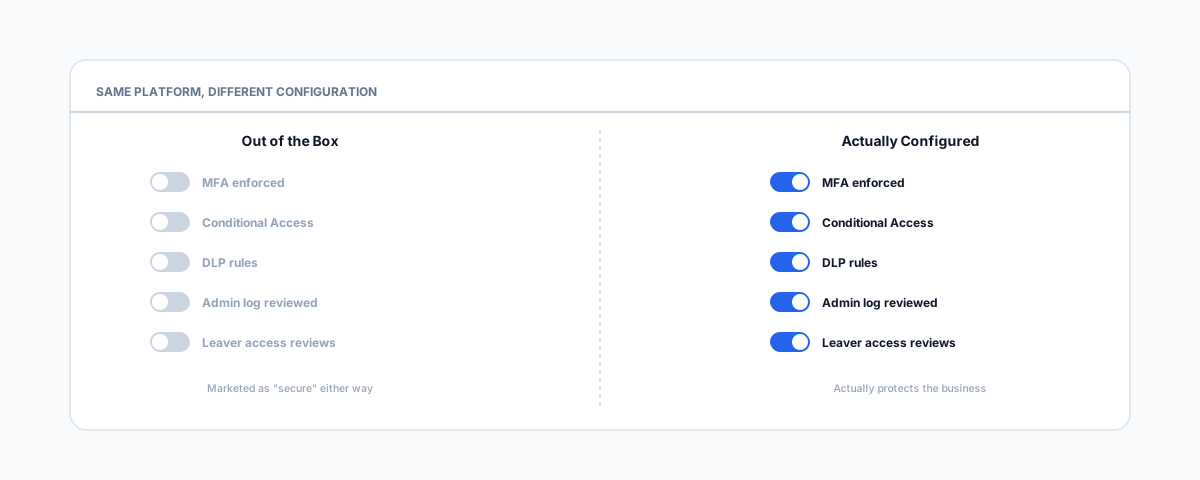
Every platform markets itself as a secure workspace. What actually protects a business is configuration, not the label — the checklist that matters, why most of it ships off by default, and when a misconfigured workspace becomes a legal reporting obligation under Australia's Privacy Act.
Every workspace platform sells itself as secure. Microsoft 365, Google Workspace, Box, Dropbox — the word "secure" sits on every one of their landing pages, and it means almost nothing on its own, because it is true of all of them and none of them at the same time. The encryption, the data centres, the compliance certifications behind the marketing are genuinely real — but they describe what the platform is capable of, not what your particular tenant is actually configured to do. Two businesses on the exact same Microsoft 365 plan can have completely different real-world security, because almost everything that actually stops a breach is a setting somebody has to turn on, not a feature that comes on by default. This is the practical version of what "secure" needs to mean once you get past the label.
What Ships On vs What You Have to Turn On
Most platforms ship in a state that is secure enough to avoid an embarrassing headline about the vendor, but not secure enough to protect your business by default. A few things are genuinely on from day one — data is encrypted in transit and at rest, the vendor's own infrastructure is patched and monitored, and basic account authentication exists. Almost everything past that baseline is opt-in: multi-factor authentication is available but not enforced, admin accounts are not automatically separated from daily-use accounts, and data loss prevention rules do not write themselves. Trace almost any real workspace breach back far enough and it is rarely a flaw in Microsoft's or Google's infrastructure — it is a control that existed in the product the whole time and simply was not switched on.
The Checklist That Actually Matters
Regardless of which platform you are on, these are the settings that separate an actually secure workspace from one that just uses the word:
- MFA enforced for everyone, not just offered — a login option nobody is required to use is not a control. Enforce it account-wide, including for admins.
- Conditional Access (or its equivalent) — rules that block or challenge sign-ins from unexpected locations, devices, or risk signals, rather than accepting any correct password from anywhere.
- Data loss prevention rules — policies that catch sensitive data (financial details, personal information, client records) before it leaves the workspace via email, sharing links, or download, rather than trusting staff to remember not to.
- Admin activity logging, reviewed by someone — most platforms log admin actions by default; almost nobody actually looks at the log until after an incident.
- Access reviews on joiners and leavers — an account that should have been disabled the day someone left is one of the most common ways an old login becomes a live risk.
- Encryption beyond the baseline for genuinely sensitive files — standard encryption at rest protects against the vendor's infrastructure being compromised, not against a compromised staff account; extra-sensitive files may need client-side or end-to-end encryption on top.
None of this is exotic. It is mostly a half-day of configuration work, which is exactly why it is worth checking rather than assuming — "secure workspace" software does not do any of it for you automatically.
When "Secure" Becomes a Legal Obligation, Not Just Good Practice
In Australia, a misconfigured workspace stops being just an operational risk once it actually leaks personal information, because that can trigger the Notifiable Data Breaches (NDB) scheme under the Privacy Act. The OAIC's own guidance sets a specific bar: an eligible data breach requires unauthorised access, disclosure, or loss of personal information, that this is likely to result in serious harm, and that the business was not able to prevent that harm with quick remedial action. When all three are met, both affected individuals and the OAIC have to be notified. Worth knowing before you assume this applies to you either way: businesses with annual turnover of $3 million or less are generally exempt from the Privacy Act altogether, so the NDB scheme may not legally bind a genuinely small operation. But there are real exceptions regardless of turnover — health service providers always are, and as of 1 July 2026, so are businesses newly brought into scope as AML/CTF reporting entities under the Tranche 2 reforms, including lawyers, accountants, real estate agents, and conveyancers. If that's your industry, the exemption you may have relied on no longer applies, turnover aside.
The Platform Doesn't Do This For You
Whichever platform you're on, the tools exist — Conditional Access and MFA enforcement are standard in Microsoft 365 and Google Workspace, DLP is available on the higher-tier plans of both, and admin logging comes built in. What none of them do is switch strict settings on for you by default, because that would generate more support tickets and setup friction than most vendors want out of the box. Our guide to passkeys becoming the default in Microsoft 365 and Google Workspace covers one specific piece of this shift in more depth, and if your business handles health information specifically, our guide to secure workspace platforms for healthcare data goes further into what a Business Associate Agreement actually adds on top of the checklist above. The broader Essential Eight checklist is the wider framework this all sits inside if you want the full picture beyond the workspace itself.
Getting Help
Working through this checklist properly takes a few hours once, and then mostly maintains itself — the hard part is usually just getting started and knowing what "done" actually looks like. If you'd like a hand auditing your current workspace configuration against this list, or setting it up properly from scratch, our Small Business IT Support service can take that off your plate.