
14 July 2026
Protecting Your Small Business Data: Backup, Retention, and Access (2026)
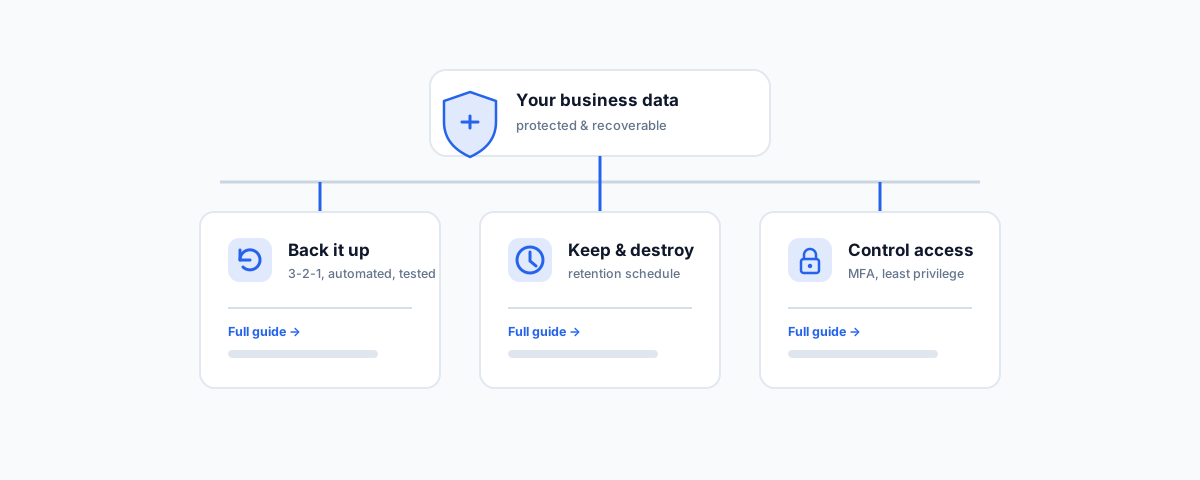
An Australian-first overview of the three foundations that protect small business data — backing it up, keeping and destroying records on the right schedule, and controlling who can access it — with links to the full guide for each.
Most small businesses hold more data than they realise — customer records, invoices, contracts, payroll, email — and most protect it in a patchwork. A backup that may or may not be running, files kept forever because deleting feels risky, and access that never gets tidied up when someone leaves. Each gap is quiet until the day it is not: a ransomware hit, an audit, or a departed employee who still has the logins. Protecting business data well is not one project; it rests on three foundations — backing it up, keeping the right records for the right time, and controlling who can access it. This post ties the three together and points to the full guide for each.
Foundation One: Back It Up
The first question after any data loss — a failed drive, a mistaken deletion, a ransomware attack — is simply whether you have a clean copy to restore. Too often the answer is a backup nobody had checked in months, or a false belief that because everything lives in Microsoft 365 or Google Workspace it is already safe. It is not: those platforms protect against their own outages, not against you or an attacker deleting data, and once retention windows pass, deleted items are gone. A real backup follows the 3-2-1 rule — three copies, on two types of media, one off-site — runs automatically, and is tested by actually restoring from it. For Australian businesses, where the data is stored (data sovereignty) matters too.
For the full detail — what to look for, the best device, server, and Microsoft 365 or Google Workspace backup options, and the rules that matter more than the brand — read our guide to the best automated cloud backup for small business.
Foundation Two: Keep the Right Records for the Right Time
Backing everything up forever is not protection — it is hoarding, and it quietly becomes a liability. Data protection has two opposing obligations that have to be balanced. On one side, the ATO, Fair Work, and ASIC require you to keep certain records for set periods — commonly five to seven years. On the other, the Privacy Act expects you to destroy or de-identify personal information once you no longer need it, because every extra record you hold is one more thing that can be breached. The answer is a written retention schedule that says how long each type of record is kept and what happens when that period ends — and, ideally, automation that enforces it so it does not depend on someone remembering.
For how to build, automate, and enforce a schedule that satisfies both obligations, read our guide to data retention policy best practices for business.
Foundation Three: Control Who Can Access It
A backed-up, well-retained data set is still exposed if the wrong people can reach it. Most small-business breaches are not sophisticated — they are a reused password with no multi-factor authentication, an admin account shared by three people, or a former staff member whose logins were never revoked. Controlling access comes down to a few habits: enforce MFA on every account, give people only the access their role needs, use shared mailboxes and groups rather than personal accounts for shared functions, and remove access promptly and completely when someone leaves. For most small businesses this work happens inside Microsoft 365 or Google Workspace, which makes the admin console the single most important place to get right.
For a practical walkthrough of managing users, licensing, email, a sensible security baseline, and clean joiner-and-leaver handling, read our guide to Microsoft 365 administration for small business.
How the Three Fit Together
The reason to treat these as one system rather than three chores is that each covers a gap the others leave open:
- Backup without retention becomes an ever-growing pile you cannot search and should not still be holding — and a bigger target if it is breached.
- Retention without backup means your carefully scheduled records can still vanish in a single failure or deletion.
- Access control without either protects data that might not survive a mistake, while backup and retention without access control simply keep a tidy, well-preserved copy that the wrong person can walk off with.
Done together, they reinforce one another: you hold the records you are meant to, for as long as you are meant to, with a tested copy you can restore, reachable only by the people who should reach them. That is what "protecting your data" actually means in practice.
Getting Help
Each of these foundations is straightforward on its own; the difficulty is setting all three up so they run without you thinking about them, and keeping them right as staff, devices, and obligations change. If you would like help putting the full picture in place — an automated, tested backup, a retention schedule that satisfies the ATO and the Privacy Act, and an access baseline with MFA and clean offboarding — our Small Business IT Support service can assess where the gaps are and close them. Get the three foundations right once, and protecting your business data stops being a worry you carry and becomes something that simply runs.