
23 October 2026
Subcontractor Management Software for Residential Builders: What It Actually Needs to Track (Licences, Insurance, and Retention)
Most "subcontractor management software" comparisons test scheduling and messaging features. For an Australian residential builder, the real risk is compliance — an unlicensed trade on site, a lapsed insurance certificate, a missed retention payment. What the software actually needs to track, and where the current tools fall short.
A "subcontractor management software" search usually turns up comparisons of scheduling calendars, messaging features, and bid management. None of that is wrong, but for a residential builder in Australia it's answering the wrong question first. The thing that actually puts a build — or a builder's licence — at risk isn't a missed message. It's an unlicensed trade turning up on site, an insurance certificate that lapsed three months ago without anyone noticing, or a retention payment that should have gone into a trust account and didn't.
The Four Things That Actually Go Wrong
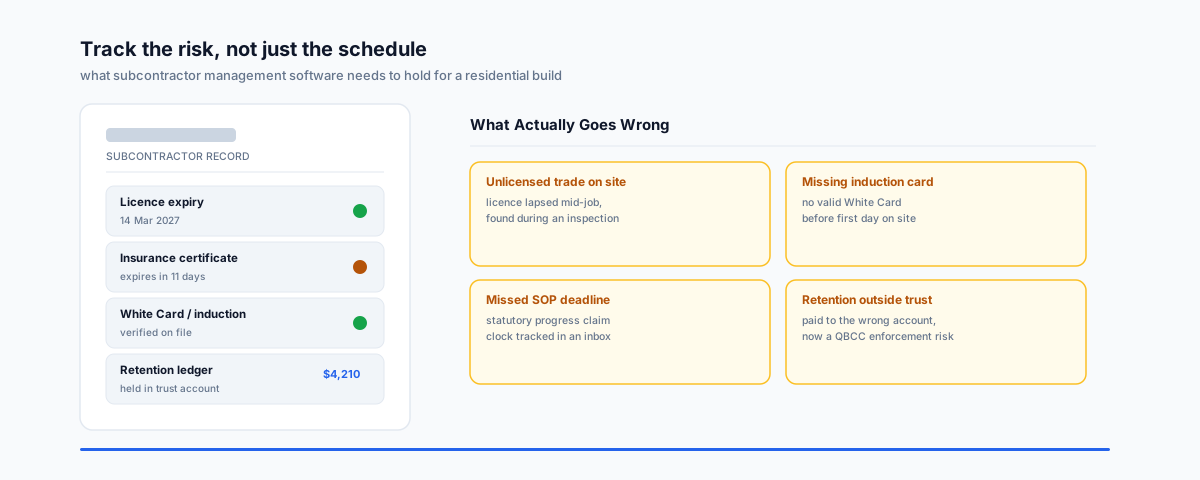
- An unlicensed or unregistered trade on site. Every state has its own licensing regime for building work — QBCC in Queensland, Fair Trading in NSW, the VBA in Victoria — and a subcontractor's licence can lapse mid-job without anyone flagging it until an inspection or a dispute forces the question.
- A subcontractor without a valid induction card. The General Construction Induction Card — known almost everywhere as the White Card — is a national requirement for anyone setting foot on an Australian construction site, issued after completing the standard induction unit through a registered training organisation. Service NSW's own page on applying for one confirms the mechanics: it's state-issued but recognised nationally, which is exactly the kind of detail that's easy to assume is fine and expensive to find out isn't.
- A missed progress claim deadline under state Security of Payment legislation. We've covered this ground in detail in our piece on construction variation and progress claim approvals — the short version is that these deadlines are set in legislation, not negotiated, and an email chain is a bad place to track a statutory clock.
- Retention money handled outside a required trust account. Queensland's Project Trust Account regime is the clearest example of where this bites: QBCC's own regulatory guide sets out the statutory trust framework protecting subcontractor payments, and retention trust accounts extended to every party down the contracting chain holding cash retentions from 1 October 2025. A developer was fined $150,000 in a landmark prosecution for paying head contract money into the wrong account — proof the regulator is actually enforcing this, not just publishing guidance.
What the Software Should Actually Track
Judged against those four risks, here's what a subcontractor management tool needs to hold — not as a nice-to-have, but as the actual job it's doing:
- Licence number and expiry date per subcontractor, with a reminder well before it lapses, not a note someone has to remember to check.
- Current insurance certificates (public liability, workers compensation) with their own expiry tracking, because an expired certificate found after an incident is a much worse conversation than one flagged a month early.
- Induction/White Card status, confirmed before the first day on site, not assumed because the trade "always has one."
- Payment claim dates tied to the actual statutory deadline for your state's Security of Payment Act, not a generic 30-day reminder that doesn't match the law.
- A retention ledger that's separate from general job costing, especially if a trust account regime applies to your contracts.
Where to Look
The honest state of the market: most subcontractor-facing construction software is built around scheduling, estimating, and job costing first, with compliance tracking bolted on to varying degrees. Buildxact is the clearest Australian-native option built specifically for residential builders and renovators, with estimating, scheduling, and accounting integrations as its core strength — worth checking directly with them on how deep its subcontractor compliance tracking actually goes before assuming it covers everything above. Heavier platforms like Buildertrend or Procore carry genuinely broad feature sets but lean toward commercial and larger-scale building, and can be more system than a small residential builder's subcontractor list actually needs. For some builders, the better fit ends up being a lighter, purpose-built compliance tracker that sits alongside the accounting software they already use — our guide to setting up QuickBooks Online for a construction business covers that accounting side, which any subcontractor tracking approach eventually needs to connect to.
Getting Help
The right subcontractor tracking setup is rarely about buying the biggest platform — it's about making sure licences, insurance, inductions, and payment deadlines are tracked somewhere that actually sends a reminder before they become a problem. Our Workflow Automation service can help wire up compliance reminders and payment-deadline tracking around whatever job management or accounting software you're already running.