
12 July 2026
What a Complete Shopify Store Build Includes: The Full Scope (2026)
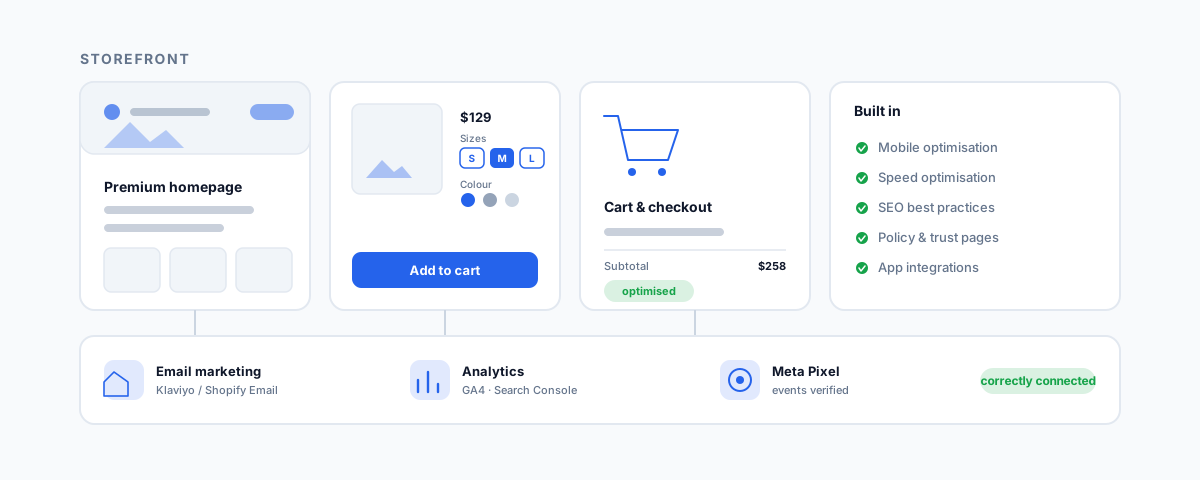
A plain-English walkthrough of everything a complete Shopify store build should cover — from product and collection pages to cart and checkout, mobile and speed, SEO, email marketing, analytics and tracking, and app integrations — and what "done properly" looks like for each.
When you commission a Shopify store, the quote often lands as a tidy bullet list — build the site, product pages, checkout, SEO, some tracking. It reads simply enough that it is easy to assume every provider means the same thing by it. They do not. Each of those lines hides a range from "technically done" to "done properly," and the gap between them is where a store either quietly works or quietly leaks sales. This is a walkthrough of what a complete Shopify build actually covers, line by line, and what good looks like for each — so you can read a scope and know whether you are buying a storefront or a store.
The Full Scope at a Glance
A complete build breaks into four jobs: the store and its pages, the conversion experience, being found, and the marketing and data plumbing behind it. Here is the whole scope grouped that way.
| Area | What it covers |
|---|---|
| Store and pages | Full Shopify build, premium homepage, product pages for sizes and variants, collection pages, About, FAQ, Contact, and the Shipping, Returns & Refund, and Privacy policy pages |
| Conversion | Cart and checkout optimisation, mobile optimisation, speed optimisation |
| Being found | SEO best practices baked in during the build |
| Marketing and data | Email marketing (Klaviyo or Shopify Email), Google Analytics, Meta Pixel and Search Console setup, and basic app integrations |
None of these are optional extras — they are what "a complete store" means. The differences between providers show up in how well each line is executed, so it is worth understanding what each one really involves.
The Store and Its Pages
This is the part everyone pictures, and it is more than a homepage. A premium brand feel on the homepage is real work — layout, typography, imagery, and pace that make a business look established rather than like a template with a logo dropped in. But the pages that decide sales are the product and collection pages.
Product pages for multiple sizes and variants are where the hidden complexity lives. Getting variants right means the size and colour options behave correctly, the right image shows for the right variant, stock tracks per variant so you do not sell what you do not have, and the pricing and add-to-cart logic hold together across every combination. A store with a beautiful homepage and clumsy variant handling frustrates customers exactly at the moment they are trying to buy. Collection pages then have to organise those products so people can actually find what they want — sensible grouping, filtering, and sorting, not just a wall of everything.
Around the shop sit the supporting pages — About, FAQ, and Contact — which do quiet but real work building trust and deflecting support questions. And then the policy pages: Shipping, Returns & Refund, and Privacy. Treat these as more than boilerplate. In Australia, your returns and refunds handling has to line up with Australian Consumer Law, and your privacy page has to reflect what you actually collect and do with customer data. Generic copied templates are a genuine liability here, not a shortcut.
Conversion: Cart, Checkout, Mobile, Speed
A store can be beautiful and still lose the sale in the last few steps, which is why cart and checkout optimisation is called out separately. This is about removing friction where it costs the most — a clear cart, obvious shipping and cost information, and a checkout that does not make people work or hesitate. Small improvements here move revenue more directly than almost anything else on the site.
Two build-wide qualities sit underneath that. Mobile optimisation is not a nice-to-have — most Shopify traffic is on phones, so a store that is merely acceptable on mobile is losing the majority of its visitors' goodwill. And speed optimisation is both a conversion and a search issue: slow stores convert worse and rank worse, and the usual culprits are heavy apps, oversized images, and bloated themes. It is easy to wreck speed by bolting on apps after launch, which is exactly the trap we dig into in why apps slow down your Shopify store. Getting speed right is a discipline maintained through the whole build, not a checkbox at the end.
Getting Found: SEO
SEO best practices during the build means the foundations are laid while it is cheap to lay them: clean URLs, correct page titles and meta descriptions, structured data so products show richly in search, a sensible collection and navigation structure, and proper handling of images and headings. Almost none of this is visible on the surface, which is precisely why it gets skipped by providers focused on how the store looks on launch day. Retrofitting SEO onto a store built without it is far more expensive than building it in from the start — this is one of the clearest markers of a provider who is thinking past launch.
Marketing and Data Wiring
The last group is the plumbing that turns a live store into a business you can grow. Email marketing integration — whether Klaviyo or Shopify Email — connects your store to the channel that reliably drives repeat sales, with the flows and sign-up points wired in so you are collecting and using customer data from day one. If you are weighing the options there, our comparison of Klaviyo vs Mailchimp for Shopify is a useful starting point.
Then there is measurement: Google Analytics, Meta Pixel, and Google Search Console. The scope wording matters here — "setup, or ensuring they're correctly connected." Pasting in a tracking ID is not the same as verifying that events fire, conversions attribute correctly, and the pixel is actually feeding your ad campaigns. Broken or half-connected tracking is worse than none, because you make decisions on numbers that are quietly wrong. A proper build confirms the data flows end to end. Finally, basic app integrations where needed — reviews, subscriptions, or similar — should be added deliberately, choosing proven apps and watching their effect on speed, rather than piling on extensions that conflict and bloat the store.
What "Complete" Leaves Out
It is worth being honest about the edge of this scope. Everything above is a complete storefront — a store that looks good, converts, is found, and is measured. What it does not include is the deeper back-office integration that removes daily admin: syncing orders and payouts into your accounting, keeping one stock pool accurate across multiple sales channels, pulling prices from a supplier feed, or pushing orders into a POS or CRM. For many businesses that plumbing is where the real time savings live, and it sits a layer beyond a standard build. If you are still choosing who to hire, our guide on what to look for in Shopify website development services covers how to tell a storefront builder from someone who can do this deeper work — and our piece on multichannel inventory sync shows one example of it in practice.
Getting Help
A complete Shopify build is not a single deliverable — it is fifteen small jobs done well and wired together, and the difference between a store that launches and one that works is almost entirely in the execution of the lines that never show on the surface. If you would like a store built to this full scope — designed properly, optimised for conversion and speed, set up for search and tracking, and integrated with the systems you actually run — our Shopify Integrations service designs and builds exactly that, and documents it so you are never locked in. Get the whole scope right once, and the store stops being a project and becomes an asset.